Organisation auswählen
Mule Runtime with Older Anypoint Runtime Manager Agent Certificate need to be Restarted Before Sept 15, 2026
Veröffentlichungsdatum: Jul 1, 2026
Beschreibung
A subset of hybrid (on-premise installed) Mule Runtimes with older Anypoint Runtime Manager (ARM) Agent certificate needs to be restarted due to security enhancements.
To avoid the Mule Runtime failing to connect to the ARM platform, please follow this document and restart impacted Mule Runtime.
Lösung
Which Mule Runtime will be impacted?
Customers using the impacted Runtimes have been contacted individually via email, with a list of impacted servers. Please reach out to your MuleSoft(Data Foundation) Account Executive for further details.
A subset of Hybrid standalone (on-premise) Mule Runtime in the US Control Plane with older ARM Agent certificates are impacted.
The following Runtimes are not impacted:
- CloudHub 1.0/2.0
- Runtime Fabric (RTF)
- EU Control Plane (https://eu1.anypoint.mulesoft.com)
- Gov Cloud
- Hyperforce
However, if you wish to verify manually, follow the steps in the below section "How can I identify the impacted Runtime?"
What is the impact detail?
The impacted Runtime will be disconnected from the ARM platform after September 15, 2026
Note: Even if the Runtime is disconnected from the ARM platform, the local Mule Runtime and deployed Mule applications will continue to run without any issues. However, since the Runtime is disconnected, they cannot be managed via the ARM UI or API.
How can I identify the impacted Runtime?
Customers using the impacted Runtimes are contacted individually via email. To get a list of impacted servers, please reach out to your Account Executive for further details or if you wish to verify manually, the technical verification methods are as follows:
Step 1) Check ARM UI
Check the Runtime status on ARM and proceed to the next steps.
For "Running" status Runtime:
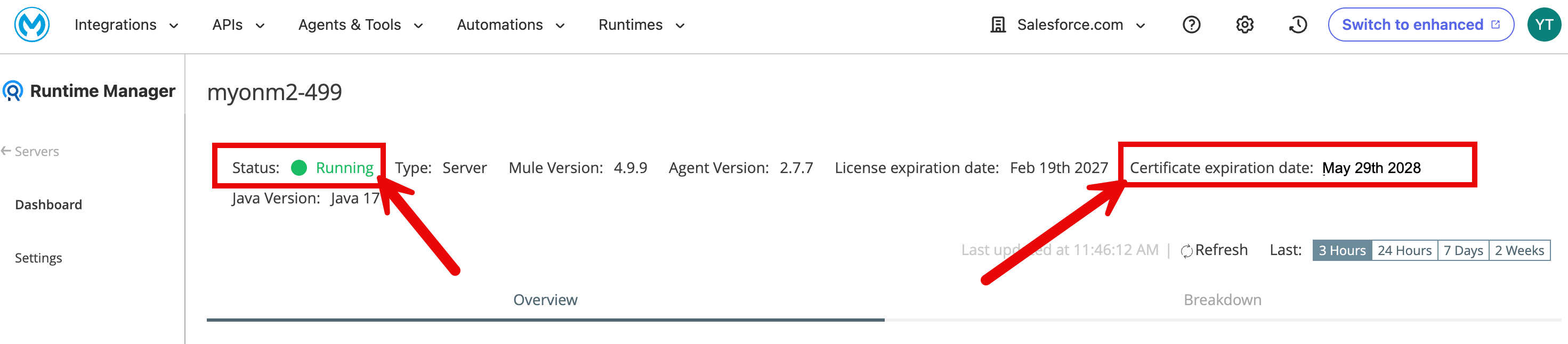
Go to the ARM UI and check "Certificate expiration date:". If it is between May 29 to June 1, 2028, it is impacted. Please follow the steps in the below section "What is the required Action?".
Example of impacted Runtime:
For "Disconnected" status Runtime:
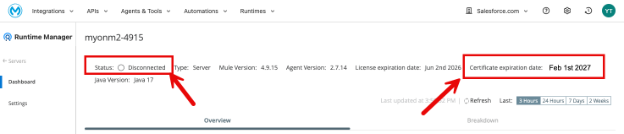
Go to the ARM UI and check "Certificate expiration date:".
If it is on or before February 12, 2027, the Runtime is impacted.
Example of impacted Runtime:
Step 2) Check Agent cert backup file name
Even if you see "Certificate expiration date:" after February 13, 2027 in Step 1, you still need to check Step 2 (*1).
Go to the Runtime installation folder and check the backup file name for your ARM Agent certificate, mule-agent.jks.[YYYY-MM-DD]_[HH-mm-ss].
Example of impacted Runtime:
$ cd $MULE_HOME/conf
$ ls -l mule-agent.jks*
-rw------- 1 ytaokaonm ytaokaonm 2317 May 29 12:59 mule-agent.jks
-rw------- 1 ytaokaonm ytaokaonm 2315 Feb 1 2025 mule-agent.jks.2025-02-01_12-03-22
$
If the YYYY-MM-DD is on or before 2025-02-12 and the current mule-agent.jks is May 29 or 30 2026, the Runtime is impacted.
This means the cert file was originally created on/before 2025-02-12, hence its two-year expiration was on/before February 12, 2027. Although the current mule-agent.jks has been updated by ARM Platform, the new cert has not yet been loaded into memory (*1).
*1 For impacted and "Running" status servers, ARM Platform has already triggered ARM Agent cert update from the platform side, which updated the cert expiry date on ARM UI. Therefore, even if you see "Certificate expiration date:" after February 13th, 2027 in Step 1, you still need to check Step 2.
What is the required Action?
Please restart your impacted Mule Runtime before September 15, 2026, to ensure continued connectivity and security. Please follow the detailed steps below for each Runtime status.
A) Runtimes in "Running" status
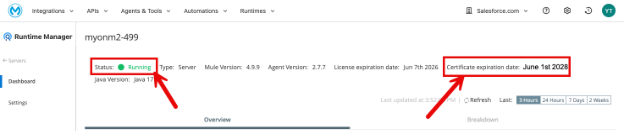
Just restart your Runtime and make sure the status is Running and "Certificate expiration date:" is around June 01, 2028. Customers do not need to trigger ARM Agent certificate update for this case (*2).
Example:
*2 Manual update/renewal of your ARM Agent cert is not required for Runtimes in "Running", for this specific case. The Runtime restart will load the updated cert into Runtime's memory. Therefore, please simply restart your impacted Runtime, no need to click the "Renew Certificate" button in the ARM UI (if you have already clicked it, that is not a problem).
B) Runtimes in "Disconnected" status
1. Manually trigger ARM Cert renewal by following the document Renew a Certificate via the Command Line
2. Then restart the Runtime, make sure the status becomes "Running" and "Certificate expiration date:" is in 2028. See the sample image in A)
FAQ
Q: What happens if I don't take action by the 15th September 2026?
A: The impacted Mule Runtime status becomes "Disconnected". Please follow the steps in section "B) Runtimes in "Disconnected" status".
Q: Will the disconnection take place exactly on Sept 15th, 2026? If so, at what time?
A: An exact date and time is not set. The impacted Runtimes will be Disconnected once the security enhancement is implemented on ARM Platform, which is scheduled for sometime after Sept 15th, 2026. Therefore, we recommend not waiting until 15th Sept and taking action at the earliest. If there are any major changes to the schedule, we will update this KB article.
Q: My server status on the ARM UI was "Running," and its certificate expiry date showed June 01, 2028 (or similar dates). Since the server was affected, I restarted the Runtime, but the expiry date on the UI did not change. Why is that?
A: This is the expected behaviour. For affected servers in a "Running" status, the ARM Platform had already automatically triggered the certificate update on the backend. This is why the UI was already displaying the new expiry date (around June 01, 2028) even before you restarted the Runtime. The purpose of the Runtime restart was to load this renewed certificate into its local memory on your on-prem server. Since the UI had already been updated by the platform beforehand, the displayed date remains the same after the restart.
Q: ARM Agent with expired cert can still connect ARM Platform, is this due to this KB?
A: Yes, it is to maintain the connection between the impacted Runtime/Agent and ARM Platform. ARM Agents with an expired certificate (mule-agent.jks) is allowed to connect ARM Platform until Sept 15th, 2026. There are no security concerns at this time because ARM Platform continues to validate ARM Agent cert except the expiry date, during this period.
Nummer des Knowledge-Artikels
005321818
Konnten Sie Ihr Problem mithilfe dieses Artikels lösen?
Geben Sie uns Feedback, damit wir uns verbessern können.
