조직 선택
ITSM : Azure Data Sync for Employee Records
게시 일자: Jul 7, 2026
상세 설명
This article describes how Employee records are synchronized from Microsoft Azure Active Directory (Azure AD) to Salesforce. It covers the record matching logic, synchronization architecture, field mapping capabilities, scheduling options, and prerequisites for the integration.
The sync uses a unique identifier — the Azure AD Object ID mapped to the Salesforce Federation Identifier — to determine whether an Employee record should be created or updated. The process is handled by Pre Shipped out-of-the-box Apex classes:
The sync uses a unique identifier — the Azure AD Object ID mapped to the Salesforce Federation Identifier — to determine whether an Employee record should be created or updated. The process is handled by Pre Shipped out-of-the-box Apex classes:
- AzureADEmployeeSyncScheduler – Schedules the sync based on a configured CRON expression.
- AzureADEmployeeSyncJob – A Queueable Apex class that processes Azure AD users in batches of 200, retrieving them from the Microsoft Graph API using recursive Queueable execution.
- AzureADEmployeeSyncFieldMapper – Maps Azure AD user attributes to Salesforce Employee fields.
The initial sync performs a full retrieval via
https://graph.microsoft.com/v1.0/users/delta and returns a Delta Token Link. Subsequent syncs use this token to retrieve only newly created, updated, or deleted users — improving performance significantly.Note: This sync creates/updates Employee records only. It does not provision Salesforce User records. User provisioning must be configured separately via Employee User settings from Setup.
솔루션
Prerequisites
- Ensure your implementation uses API version 67.0 or later (required for the Federation Identifier field on the Employee object).
- Add your tenant Id, client Id and client secret in the Azure AD Employee Sync ExternalCredential
Customizing Field Mappings
- To map additional Azure AD properties or populate custom Employee fields, edit the AzureADEmployeeSyncFieldMapper Apex class.
- Add new mappings using the custom fields and incoming properties as needed.
 Do not remove or modify existing out-of-the-box mappings — this may cause sync failures or prevent records from being created/updated correctly.
- All changes must be thoroughly tested before changing the Apex class.
Currently we provide the following field Mappings
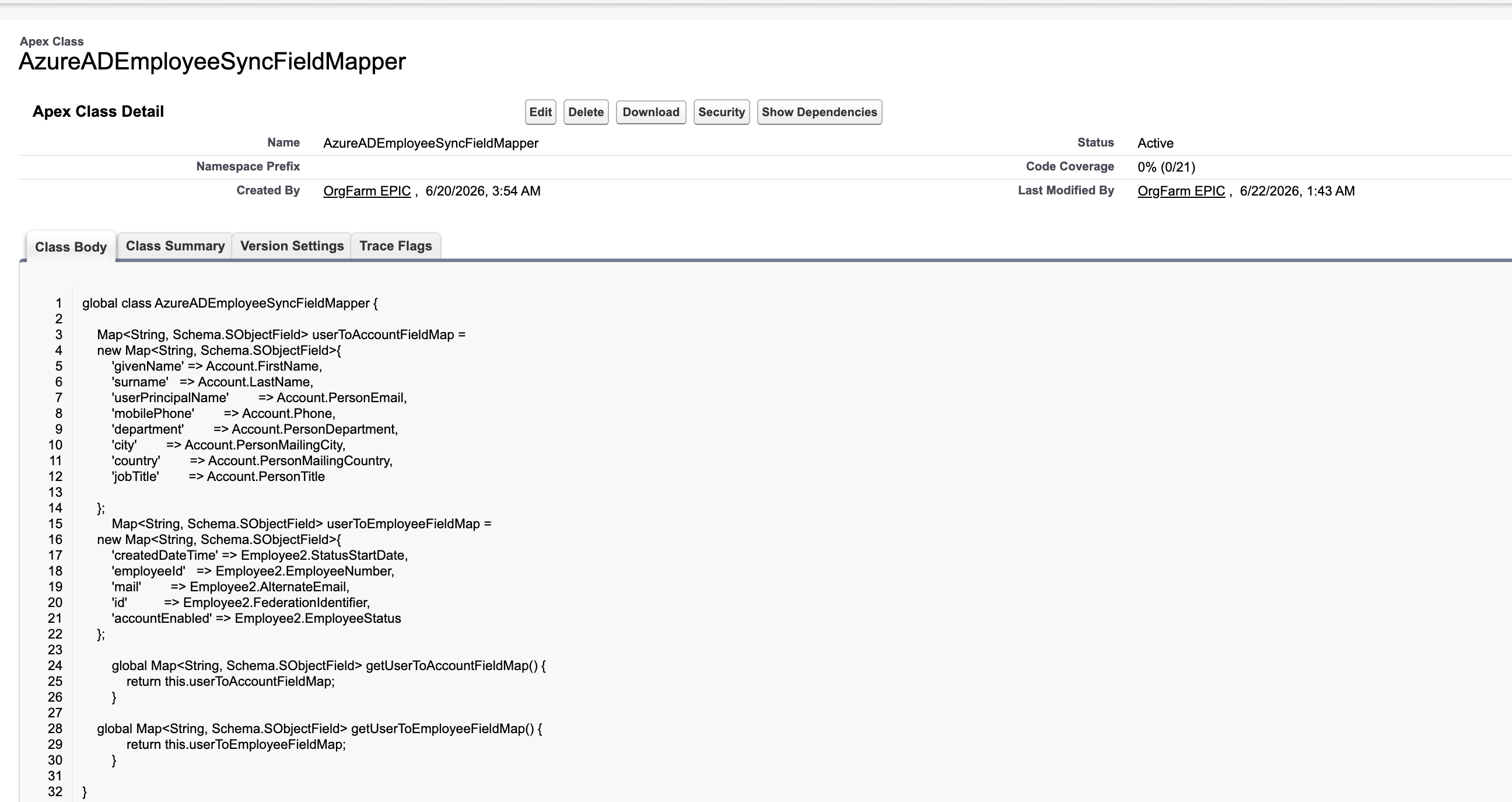
NOTE :-Ensure all required mapped fields are populated with valid data. If a required field does not receive a value during sync, the Employee record will not be synced and the user will be skipped.
Scheduling
Configure the sync frequency by setting a CRON expression when scheduling the
AzureADEmployeeSyncScheduler job, based on your organization's business requirements.Knowledge 기사 번호
005387487
이 기사를 통해 문제를 해결했습니까?
개선을 위한 의견을 보내주세요.
