Выбрать организацию
Classic Dispatch Console Tab Not Visible or Missing from Navigation for Users
Дата публикации: Jun 24, 2026
Описание
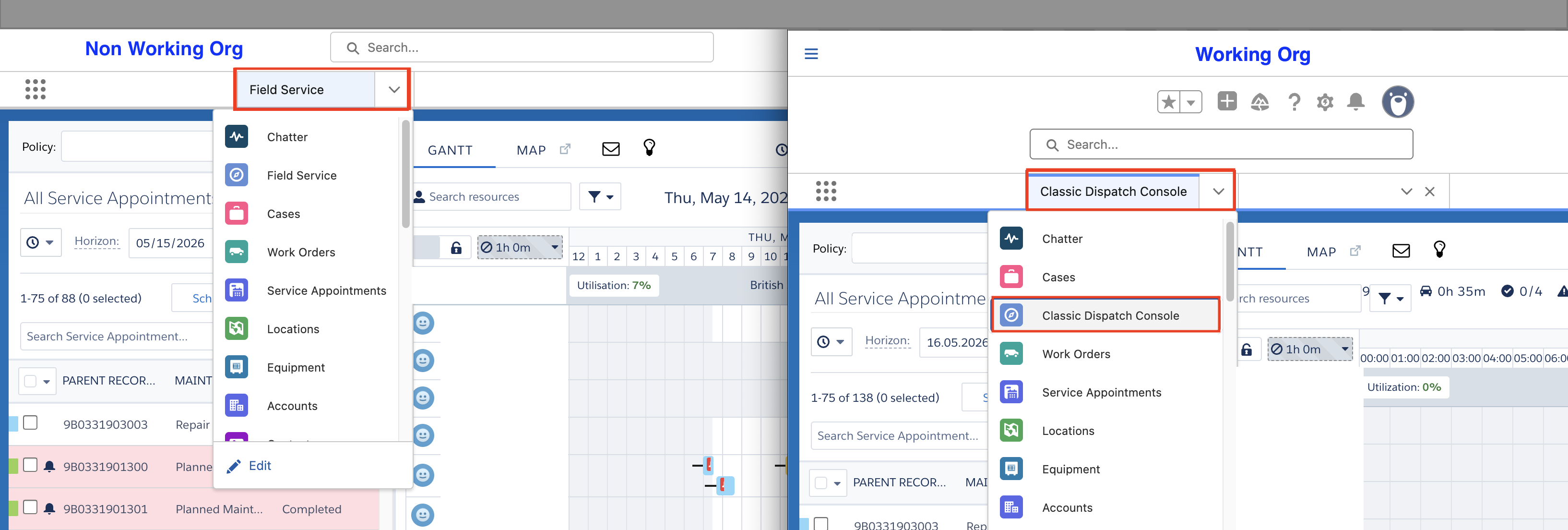
- The "Classic Dispatch Console" tab does not appear in the Add More Items list in the Lightning App navigation editor as shown in the - Non Working Org Screenshot
- Searching for "Classic" in the nav editor's Add More Items search box returns no results.
- The tab still renders with the legacy label "Field Service" rather than "Classic Dispatch Console."
- Admin/English-language users on the same app and org are unaffected and see the updated tab label correctly.
Решение
The FSL package renamed the Dispatch Console tab label from "Field Service" to "Classic Dispatch Console" as part of the Summer '26 release. This label change was applied only for users with Salesforce set to English.
Users operating in a non-English language did not receive the updated label mapping and cannot locate the tab by its new name in the navigation editor.
Change the affected user's Salesforce language to English (Setup → Users → Edit → Language).
After saving, the user should refresh or re-login — the Classic Dispatch Console tab will then be visible and addable via the nav editor.
Дополнительные ресурсы
- Setup → Tabs correctly shows Classic Dispatch Console only (no separate "Field Service" tab exists).
- Profile Tab Settings for the affected profile is set to Classic Dispatch Console – Default On.
- The API name
FSL__FieldServiceis returned correctly in responses for both affected and unaffected users.
Номер статьи базы знаний
005387504
Эта статья решила вашу проблему?
Оставьте свой отзыв, чтобы мы могли стать лучше!
