組織を選択
Salesforce Field Service: Work Order Estimation Fails with "Work Source and Its Associated Work Types Weren't Added Successfully"
公開日: Jun 26, 2026
説明
When you use the Work Order Estimation flow in Salesforce Field Service to generate estimates from existing Work Orders, you may encounter the error "Work Source and its associated Work Types weren't added successfully. Ask your Salesforce admin for help."
This error appears during the "Select Existing Work Order" step when the system attempts to extract data from the selected Work Order. The Work Order Estimation Connect API requires specific field values on Work Order Line Items to build a valid WorkEstimationCoveragesContext object during the extraction phase. When these required fields are missing, the API cannot resolve Price Book Entries for coverage estimation, causing the transaction to roll back.
For example, a Field Service administrator runs the Work Order Estimation flow and selects an existing Work Order that was manually created without a Product assigned to its Line Items. The flow immediately fails with a toast error and returns to the previous step. The same administrator manually enters the Asset and Work Type and completes estimation successfully — confirming that the Price Book configuration is correct but the Work Order Line Item data is incomplete.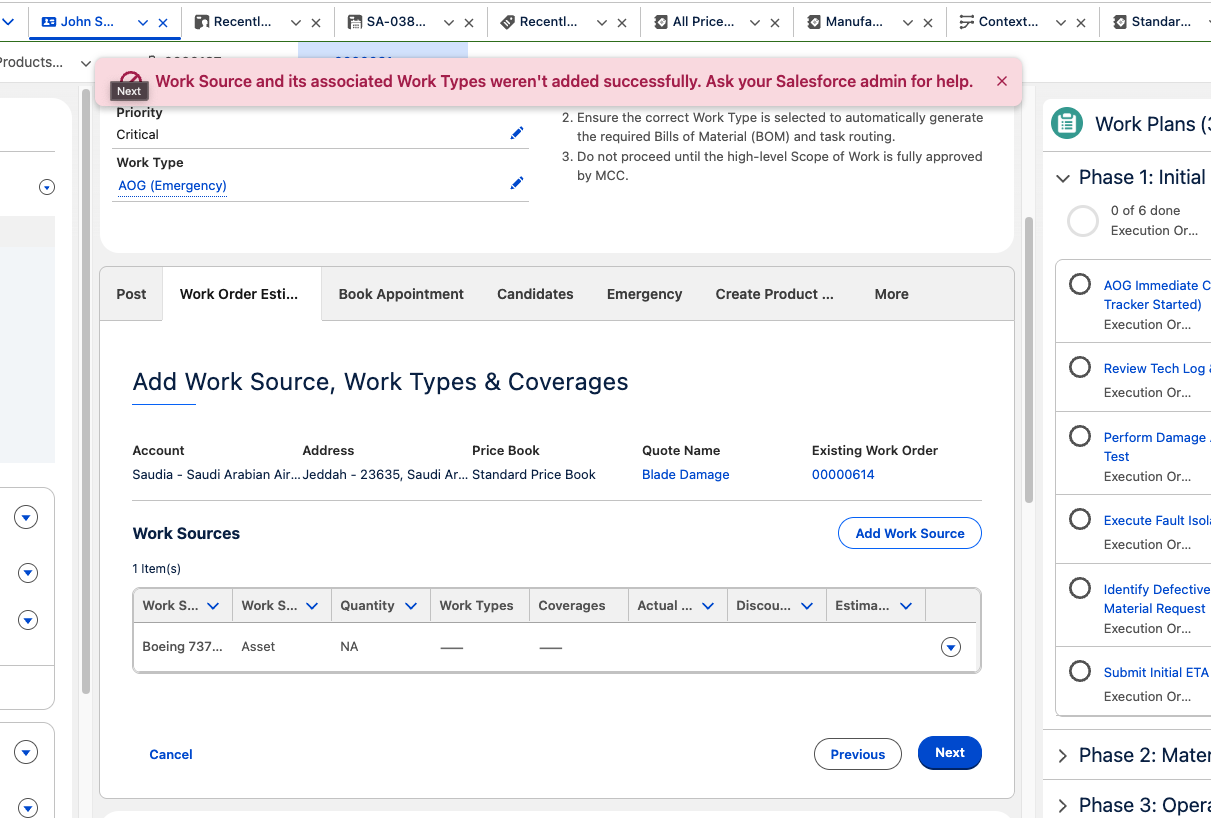
解決策
To resolve the "Work Source and its associated Work Types weren't added successfully" error in Salesforce Field Service Work Order Estimation, populate the required fields on Work Order Line Items before using them as estimation sources.
Steps to Resolve
- Navigate to the Work Order record you want to use for estimation.
- Open the Work Order Line Items related list on that Work Order.
- For each Work Order Line Item, edit the record and complete the following:
- Set the Product field (Product2Id) to a valid Product record associated with this line item.
- Set the Quantity field to a numeric value. The minimum accepted value is 1.
- Save each Work Order Line Item record after making the changes.
- Return to the Work Order Estimation flow and relaunch it.
- Select the updated Work Order in the "Select Existing Work Order" step and click Next.
Note: All Work Order Line Items on the selected Work Order must have both the Product and Quantity fields populated before the estimation flow can proceed. The API validates each Line Item individually during extraction.
Verification Steps
After completing the steps above, verify the fix by confirming the following:
- Launch the Work Order Estimation flow.
- Select the Work Order that now has fully populated Line Items.
- Click Next on the "Select Existing Work Order" screen.
- Confirm that the flow advances to the next step without displaying the toast error message.
If the error persists after populating both fields, verify that the Product values on the Work Order Line Items are linked to active Products with valid Price Book Entries in the associated Price Book.
Known Limitations
- The Work Order Estimation Connect API does not automatically traverse to Products Required child records. It only extracts data from the Work Order Line Item header fields.
- Manual population of the Product and Quantity fields may be required if your business process relies on Products Required related lists for Bill of Materials management.
- The API extraction process cannot infer Product or Quantity values from related Work Type configurations.
ナレッジ記事番号
005387524
この記事で問題は解決されましたか?
ご意見をお待ちしております。
