Vælg en organisation
Map Layers Do Not Render in the Scheduling Console in the Field Service
Udgivelsesdato: Jul 27, 2026
Beskrivelse
Issue
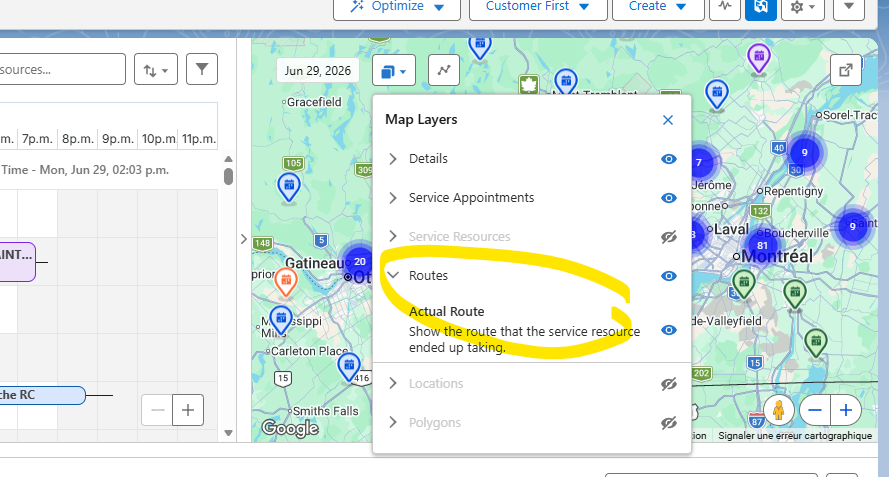
After upgrading the Field Service Lightning (FSL) package, map layers in the Scheduling Console may fail to render. As a result, service resource locations and planned routes are not displayed, causing the map to appear blank or incomplete.
This issue affects users assigned to the Field Service Dispatcher permission set, while other Scheduling Console functionality may continue to work as expected.
Cause
The Scheduling Console requires the Show Planned Route app permission to display map layers. When the permission is not enabled, service resources and planned routes cannot be rendered on the map.
Løsning
Enable the Show Planned Route app permission by completing the following steps:
- In Setup, use Quick Find to search for Permission Sets.
- Click Field Service Dispatcher.
- Click App Permissions.
- Locate Scheduling Console in the app permissions list.
- Check the Show Planned Route checkbox.
- Click Save.

Once the permission is enabled, the Scheduling Console will display service resource locations and planned routes for users assigned to the Field Service Dispatcher permission set.
Vidensartikelnummer
005387534
Løste denne artikel dit problem?
Giv os besked, så vi kan forbedre os!
