Seleccionar una organización
Summarize Scheduling Issues for Field Service Action Displays Incorrect Appointments Data with Agentforce
Fecha de publicación: Jun 26, 2026
Descripción
When using the Agentforce schedule summary feature in the Field Service Dispatch Console, the Agent retrieves data from reports located in the "Field Service Copilot Reports" folder. These reports include:
- Unscheduled appointments due today
- Emergencies
- In-jeopardy appointments
If these report filters are modified — intentionally or inadvertently (e.g., during testing, sandbox refresh validation, or admin customization) — the Agent will return data based on the altered filter criteria. This can result in:
- Past appointments appearing in the summary
- Appointments from non-selected service territories being included
- Incorrect counts of emergencies or in-jeopardy appointments
- Overall inaccurate or misleading schedule summaries
Solución
Root Cause: If the report filters in the "Field Service Copilot Reports" folder have been modified from their out-of-the-box (OOB) configuration.
Restore the correct out-of-the-box filter configuration for each report in the "Field Service Copilot Reports" folder:
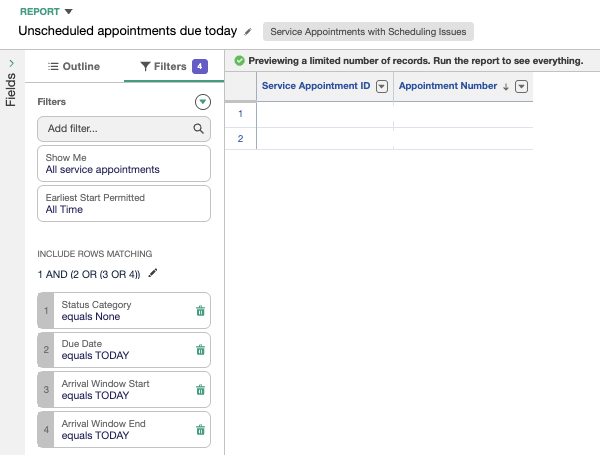
Report 1: Unscheduled Appointments Due Today
Filter: Status Catergory=None AND (Due Date = TODAY OR Arrival Window Start = TODAY OR Arrival Window End = TODAY)
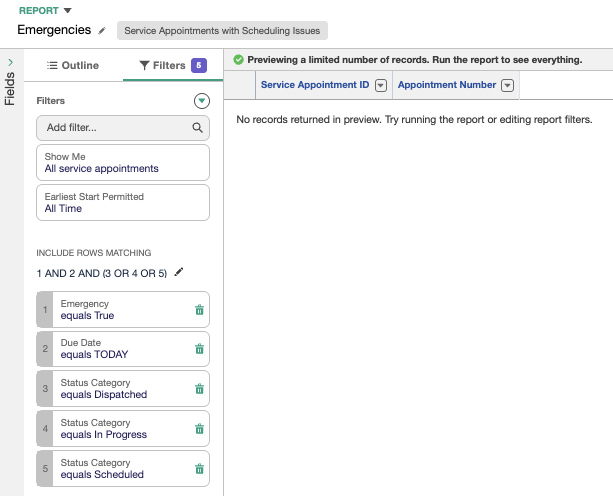
Report 2: Emergencies
Filter: Emergency=True AND Due Date=TODAY AND Status Category=Scheduled OR Dispatched OR In Progress
Report 3: In-Jeopardy Appointments
Filter: InJeopardy=True AND ((Sched Start Time = TODAY OR Sched End Time = TODAY) OR (Sched Start Time < TODAY AND Sched End Time > TODAY)) AND Status Category= Scheduled OR Dispatched OR In Progress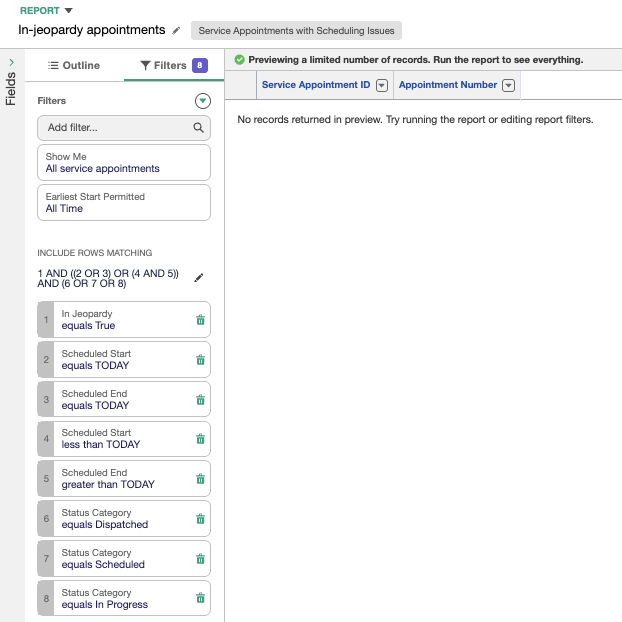
Steps to update the report filters:
- Navigate to App Launcher → Reports → All Folders
- Open the "Field Service Copilot Reports" folder
- Select the report to modify → Click Edit
- Go to the Filters tab
- Remove any incorrect or additional filters
- Apply the correct filters as listed above
- Click Save
- Repeat for all three reports
- Test the Agentforce schedule summary results
Número del artículo de conocimiento
005387545
¿Resolvió este artículo su problema?
¡Háganos saber cómo podemos mejorar!
