Velg en organisasjon
Marketing Cloud Next - Troubleshooting Marketing Flows That Contain the Create Consent Action
Publiseringsdato: Jul 20, 2026
Beskrivelse
If you’re running into issues with a Marketing Cloud Next flow that contains the Create Consent action, take a look at these troubleshooting tips.
Løsning
The flow is active but doesn't create or update consent
If your flow was created before May of 2026 and includes a reference element, such as a text variable or Get Records element, this behavior is part of a bug that has been fixed. To correct this behavior in your existing flow, follow these steps:
- Create a new version of the flow.
- Click the consent action to open it. You don't need to make any changes.
- Activate the new version.
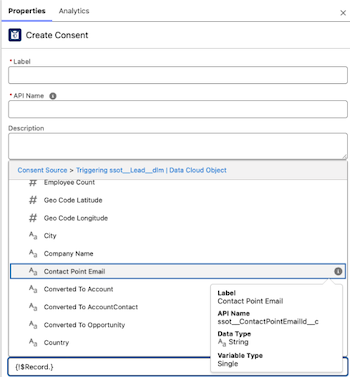
You receive an error "contactPointValue provided value cannot be formatted"
Review the consent action and make sure that the Contact Point field value references a contact point, such as an email address. It can't reference an ID for a contact point, such as Contact Point Email ID.
Knowledge-artikkelnummer
005387795
Hjalp denne artikkelen med å løse problemet ditt?
La oss få vite det slik at vi kan forbedre!
