Выбрать организацию
Salesforce Connected Apps & ECA Security Controls - Partner App FAQs
Дата публикации: Aug 26, 2026
Описание
Salesforce mandates implementing four security controls—OAuth PKCE, Refresh Token Rotation, Refresh Token Idle time-to-live (TTL), and Refresh Token IP Allowlist by May 11, 2026, for Connected Apps or External Client Apps (ECA) included or used in connection with a Partner Application, provided or created by the Partner, and in use by more than two customer production orgs.
This FAQ complements the official ISVForce Guide with guidance on testing, implementation, and compliance.
Решение
Scope, Deadlines, and Enforcement
What specific security controls are being enforced on May 11, 2026?
-
The four security controls are:
|
Security Feature |
Compliance Due Date |
|---|---|
|
OAuth PKCE |
May 11, 2026 |
|
OAuth Refresh Token Rotation |
May 11, 2026 |
|
Refresh Token Idle TTL |
May 11, 2026 |
|
Refresh Token IP Allowlist |
May 11, 2026 |
-
These requirements apply to any Connected App (CA) or External Client App (ECA) that is included or used in connection with a Partner Application, provided or created by the Partner, and is in use by more than two customer production orgs.
-
The specific details are available at: Secure Your Connected Apps and External Client Apps
Why is it critical to perform thorough testing and validation of the four security controls before clicking the "Review Controls" link to lock them, and what are the permanent implications of this action?
-
Thorough testing ensures that your integration, including any necessary code changes for PKCE and Refresh Token Rotation, is fully functional before enforcement. This is critical because clicking the "Review Controls" link permanently locks these security controls for your Connected App or ECA; once locked, they cannot be unlocked or reverted.
-
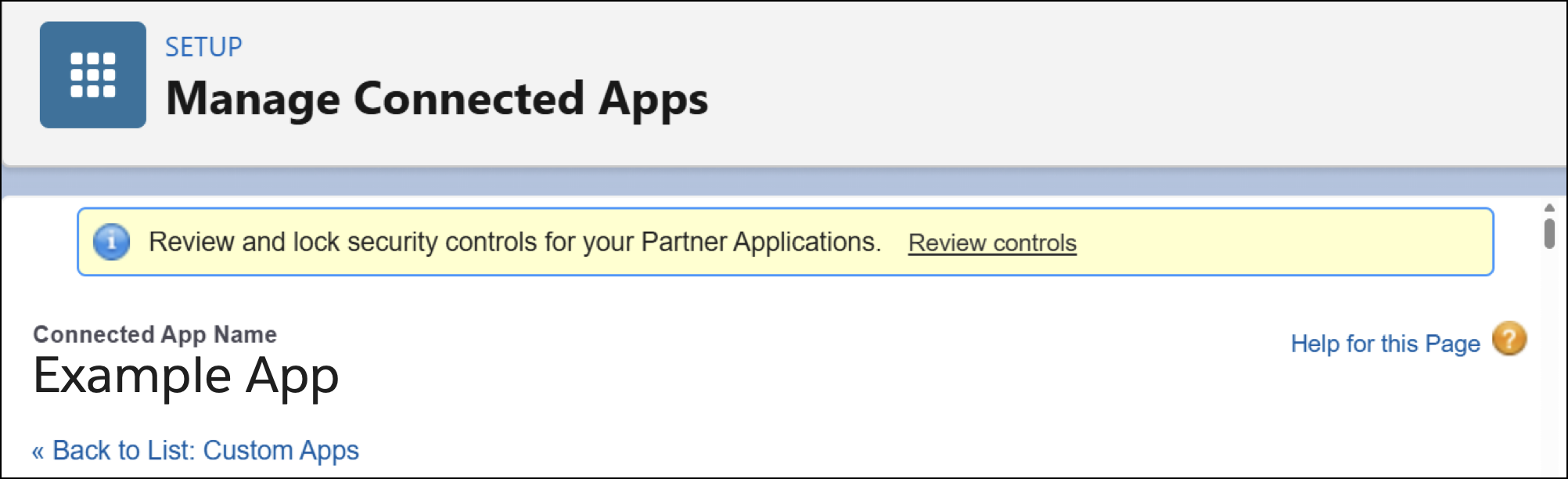
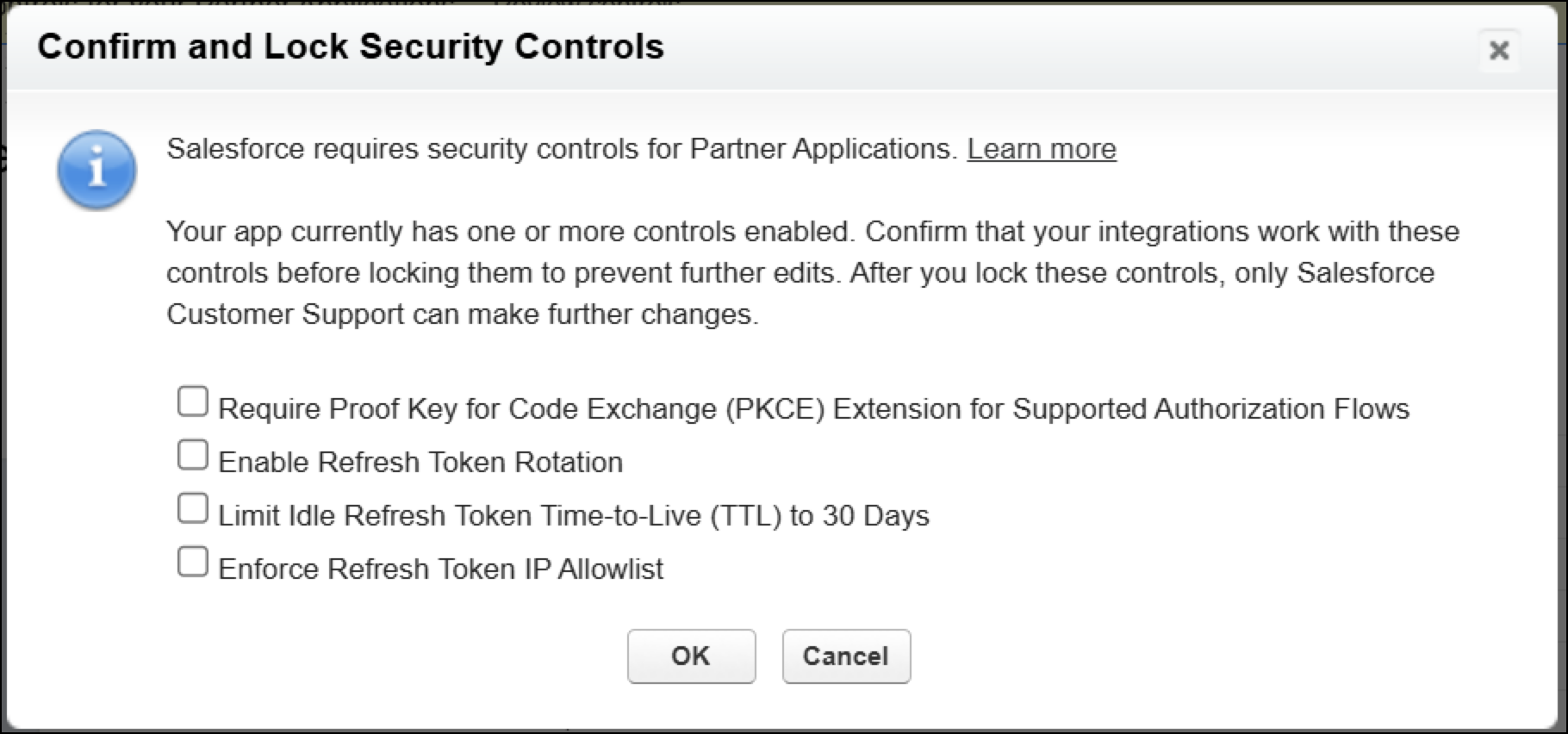
Lock the security controls ONLY after you have tested the code changes and controls thoroughly
For ECAs:
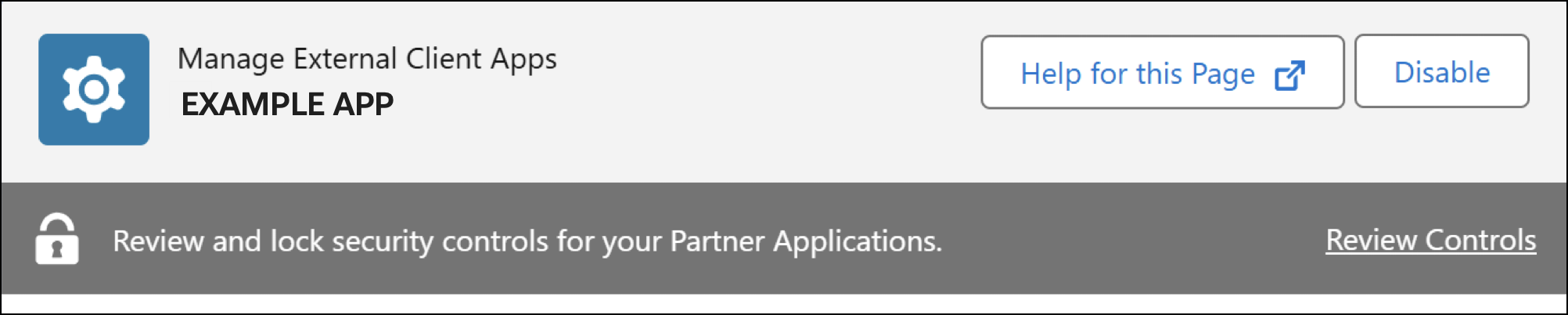
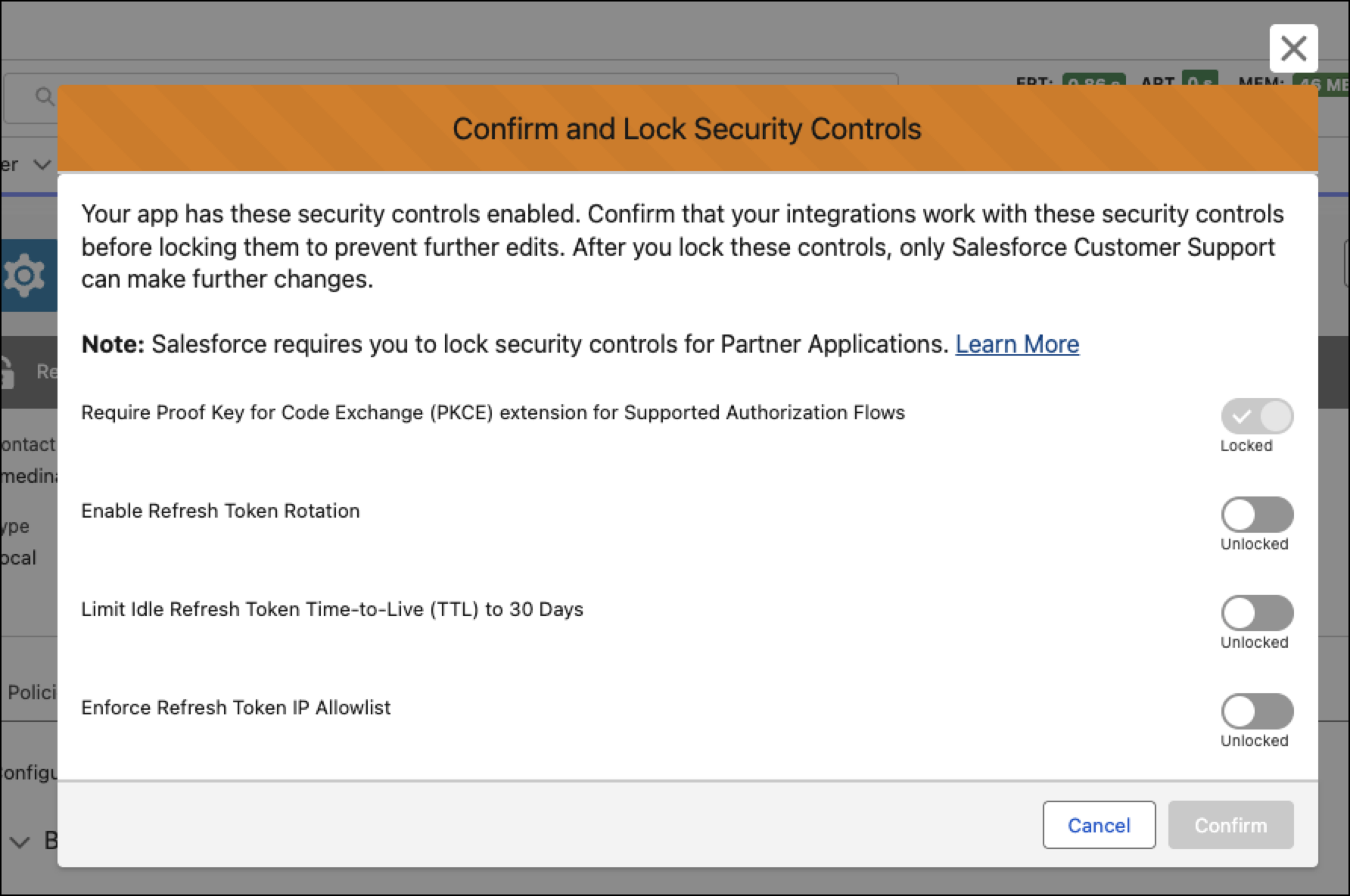
For Connected Apps:
Will refresh token rotation be enforced for Connected Apps (CAs) or External Client Apps (ECAs) that are only connected to a single production org, or only used against sandbox/developer/scratch orgs?
-
The enforcement applies to applications that are in use by more than two customer production orgs.
Is May 11,2026 a hard deadline, and are there any exceptions?
-
As of now, there are no plans for a formal extension program.
-
Please stay in contact with your Partner Account Manager (PAM) for updates.
Is PKCE (Proof Key for Code Exchange) required for the User Agent flow? Are there exceptions for certain flows?
-
PKCE (Proof Key for Code Exchange) is not required for the User Agent flow.
-
Here is a breakdown of PKCE requirements and exemptions for different OAuth flows:
-
User Agent Flow: PKCE is designed for flows that use an authorization code; User agent flow does not rely on code exchange for access tokens to be issued. The User Agent flow is not included in the May 11 PKCE/RTR enforcement scope; however, User Agent Flow is not allowed for AppExchange use cases.
-
Flows that Require PKCE: PKCE is required for the Web Server Flow, Hybrid Web Server Flow, and any flow that uses an authorization code.
-
Flows PKCE Does Not Impact: PKCE has no impact on the following flows, as they do not involve an authorization code exchange: JWT Bearer Flow and Client Credentials Flow
-
Is the User Agent flow being deprecated? What is the timeline, and what happens to apps using it after May 11, 2026?
-
The May 11, 2026 enforcement is focused on four controls: PKCE, RTR, RT IP Allowlist, and RT 30-day Idle TTL.
-
Salesforce does not recommend continued use of inadequate authorization flows like:
-
User Agent flow
-
Username/Password flow
-
Device flow
-
Hybrid User Agent flow
-
-
Username/Password flow is not available for use with an ECA
-
Use of inadequate flows is not allowed for AppExchange use cases.
-
See: https://help.salesforce.com/s/articleView?id=005318040&type=1 for more details.
-
User Agent flow deprecation is not in-scope for May 11, 2026 enforcement.
OAuth Flows, Controls, and Technical Architecture
What should ISVs and Customers check to receive the latest guidance on the new controls?
-
Please review the Secure Your Connected Apps and External Client Apps page on the ISVforce Guide: Build and Distribute AppExchange Solutions for up to date information on the new security controls.
-
For notifications about updates, please join the PartnerBlazer Slack channel.
-
Please stay in contact with your PAM for updates
How should a partner test PKCE and RTR changes on an existing Connected App that is being used in production?
-
Create an ECA in a sandbox or test org to validate changes without touching the production Connected App.
-
PKCE: Developers can make the required code changes first without turning on the control. Salesforce will ignore the code verifier until PKCE is turned on in the app configuration; so your updated code will not interrupt existing connections.
-
RTR: Follow the same approach for RTR — implement the logic to capture and store the new refresh token on each call before enabling the feature.
-
Once code changes are validated and working, activate PKCE & RTR in the app’s configuration.
Is it possible to create new Connected Apps?
-
As of Spring '26, new Connected Apps cannot be created.
-
Partners can still update existing Connected App configurations.
-
For new integrations, partners must use an ECA.
Our Connected App is not currently part of our managed package. Is packaging required to meet the security requirements by May 11, 2026?
-
For May 11, 2026, the focus is on enforcing the four security controls that are documented here: Secure Your Connected Apps and External Client Apps
-
After completion of the enforcement of the security controls, we will send out communication for packaging and security review submission.
-
In most cases, Salesforce will require Connected Apps and ECAs to be packaged for security review submissions.
-
Partners should plan for security review submissions post the enforcement of the security controls. See Connected Apps (CAs) and External Client Apps (ECAs) AppExchange Security Review Submission Guidance for additional guidance.
What happens if a partner does not comply with the required security controls by May 11, 2026?
-
After the deadline, Salesforce will identify non-compliant ISVs and will begin enforcing the security requirements as a technical matter.
-
When Salesforce begins enforcing these requirements as a technical matter, the ability of the partner's integrations to interoperate with the Salesforce services may be suspended until such time as the partner updates the integration.
When RTR is enabled and a client attempts to reuse an expired refresh token, what error code is returned?
-
OAuth 2.0 Authorization Errors help page documents the different errors.
-
Attempting to use an expired or already-rotated refresh token returns an `invalid_grant` error.
-
Developers should handle this error in their client code by triggering the authorization flow again.
We create Connected Apps directly in customer orgs. They are not part of our managed package. Are these in scope for the May 11 deadline?
-
Connected Apps created in customer orgs are out of scope for the May 11 deadline.
-
The Salesforce security team published this Knowledge Article where they explained the use cases where it is mandatory to package the CA/ECA.
-
Having said that, the security controls offer defense-in-depth and all Connected App and ECA implementations should plan to adopt them as soon as possible.
Some of our customers have created their own Connected Apps for their own integrations, completely independent of anything we have built. Are those also in scope for May 11?
-
Connected Apps created by customers for their own use are not in scope for the partner deadline of May 11, 2026.
-
The security controls offer defense-in-depth, and all Connected App and ECA implementations should plan to adopt them as soon as possible.
If we turn on the security controls (PKCE, RTR, RT IP Allowlist & RT Idle 30 day TTL) on a Connected App or ECA, do those changes automatically propagate to all subscriber/customer orgs, should the ISV release a new package version? Should the customer upgrade to the latest version manually or through a push upgrade?
-
None of the 4 security controls require a new package version with the updated Connected App or ECA configuration.
-
If any of the security controls are not working as expected, please create a support case immediately with the relevant details.
What actions should customers/subscribers take after the ISV has turned on the security controls?
-
In most cases, no package upgrade is required for CA/ECA configuration-only security control changes; however, there is one exception to this: If OAuth logic is implemented inside managed package code, then customers must upgrade to the updated package version.
-
Customers should verify integration health after rollout and re-authenticate if needed for updated client behavior.
Is RT IP Allowlist a mandatory security control?
-
RT IP Allowlist is one of the four required controls for in-scope partner apps, with implementation based on how refresh tokens are used.
-
Salesforce guidance indicates this control should be enabled when refresh token requests originate from controlled server IP ranges.
-
Note that the total IPs in the allowlisted IP range cannot be more than 256
-
-
This security control is not applicable for
-
End-user device flows (for example, mobile apps using custom URI schemes).
-
Salesforce-to-Salesforce refresh token flow
-
How does the Refresh Token IP Allowlist work for server-to-server refresh token API call?
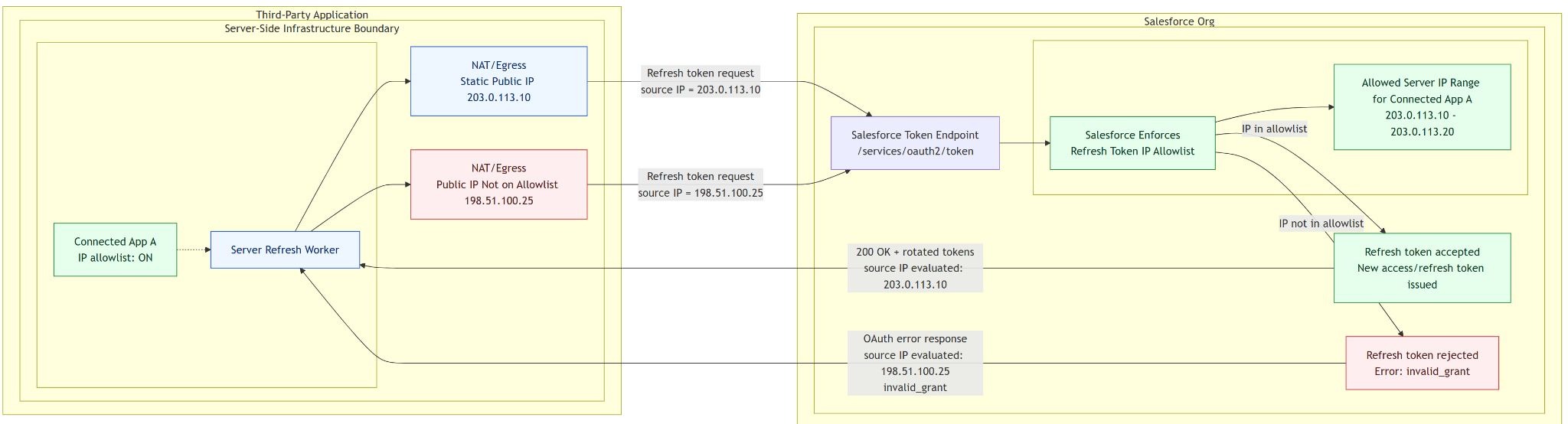
How can I configure the Refresh Token IP Allowlist range?
-
In your Connected App/ECA OAuth settings, turn on Enforce Refresh Token IP Allowlist.
-
Add only the required IP ranges (avoid broad ranges); Salesforce validates refresh-token requests against those ranges.
-
A total of 256 IP addresses are allowed across all configured ranges.
-
The 256 limit for total number IPs that can be allowlisted for refresh token flow is a firm requirement and is unable to be extended.
-
Will all partner applications making API calls to Salesforce require a packaged Connected App or ECA?
-
Please see Connected Apps (CAs) and External Client Apps (ECAs) AppExchange Security Review Submission Guidance for details on packaging CAs/ECAs for AppExchange security review submission.
Where should ISVs create the ECAs to be packaged?
-
ECAs must be created in a DevHub/PBO.
-
For partners, the DevHub is typically the PBO.
-
If you encounter errors packaging an ECA, confirm it was not created in a scratch org before creating a support case.
Will Refresh Token Rotation (RTR) be automatically turned on for non-compliant partner Connected Apps and ECAs on May 11, 2026?
-
Partners must enable RTR themselves, along with the other three security controls where applicable, by May 11, 2026.
-
After verifying all security controls are working as expected, ISVs must lock security controls by clicking on the “Review Controls” link. Please note that once locked, they cannot be unlocked.
-
Please stay in contact with your PAM for updates.
What should we do to ensure to avoid the expiry of the refresh token at the 30-day mark?
-
To avoid re-authorization due to an expired refresh token, developers can invoke the refresh token flow before the 30 day Idle mark.
-
This will ensure that the refresh token will get a new 30 day TTL.
-
NOTE: With Refresh Token Rotation turned on, the refresh token API call will result in both new access token and refresh token being issued.
Implementation, Rollout, and Customer Impact
We cannot control when end users update our mobile app. If RTR is force-enabled before all users are on an updated version, they will be repeatedly logged out. How do we manage this?
-
Salesforce's recommended approach is to proactively communicate your rollout plan to customers before May 11, 2026. This includes:
-
Confirming you are running an upgrade campaign with your customers;
-
Providing a target completion date; and
-
Providing progress updates.
-
-
If needed, please work with your designated PAM or Salesforce Support for guidance.
If we make our Connected App compliant and deploy a new package version, but a handful of customers can't upgrade in time, does that put our org's compliance at risk?
-
ISVs should turn on the 4 security controls as applicable and make the relevant client side changes to ensure the continued interoperation of partner integrations with the Salesforce services.
-
ISVs must run campaigns with the customers to upgrade non-Salesforce apps to ensure the integrations continue to interoperate after the security controls are turned on.
-
At the moment, there is no requirement to release a new package version to include the updated Connected App/ECA configuration - the changes take effect automatically.
When PKCE is enabled on a Connected App, will existing access and refresh tokens be invalidated, forcing customers to re-authenticate?
-
Access tokens and refresh tokens issued prior to turning on the controls remain valid.
-
All new authorization requests MUST use the PKCE related code_challenge and code_verifier to ensure the authorization flows successfully issue new access and refresh tokens.
-
Refresh tokens issued before this control is enabled are also subject to the 30-day TTL once it is turned on.
What is the Idle Refresh Token Time-to-Live (TTL), and when does it invalidate a refresh token?
-
The new security control invalidates a refresh token if it has not been used in a 30-day window.
-
If the refresh token flow is used, the 30-day window resets — this is a sliding window, not a fixed expiry.
-
Refresh tokens issued before turning on this security control are also subject to the 30-day TTL once it is turned on. Any token not used within 30 days of enablement will expire.
-
Client code should handle the `invalid_grant` error returned when and expired refresh token is used.
What happens when the Refresh Token TTL setting is enabled, and what actions are required?
Enabling this setting immediately invalidates all active access tokens. You must have a plan in place to handle this invalidation based on your application's current setup:
- Active Refresh Tokens (used within the last 30 days): If you already have a refresh token flow, the system will automatically fetch a new access token. Users will not experience any interruption.
- Expired Refresh Tokens (unused for 30+ days): The token is no longer valid, and the user will be prompted to re-authenticate.
- Automated Flows (no user interaction / no refresh tokens): Simply re-initiate the authentication flow to generate a new token.
Testing Tip: You can preview this exact experience today by manually revoking an active access token and observing the resulting end-user behavior.
We use the same Connected App for mobile app and webserver flow. What is the recommendation for my use case?
-
Avoid mixing fundamentally different callback URL purposes in one CA/ECA.
-
Use separate apps for cleaner policy enforcement.
-
The mobile app use case has an exemption from RT IP Allowlist control, but the webserver flow must implement the control.
-
Salesforce will enforce RT IP Allowlist control if a webserver flow is identified - regardless of whether the app is used for another flow.
We use the JWT Bearer flow for server-to-server integrations. PKCE does not seem technically applicable. Do we still need to enable it?
-
PKCE is not technically used by JWT Bearer flow because there is no authorization code exchange.
-
For in-scope partner apps, Salesforce requires enabling the mandated CA/ECA security controls by the deadline; design apps so controls are compatible with current and future OAuth use.
-
Avoid mixing fundamentally different callback URL purposes in one CA/ECA; separate app purposes where possible for cleaner policy enforcement.
What is the impact of the four security controls on OAuth scopes?
-
The four security controls (PKCE, RTR, RTR IP Allow List, Idle TTL) have no direct impact on OAuth scopes.
-
Salesforce's long-standing recommendation is to keep scopes minimal — only what the integration actually needs. See Connected Apps (CAs) and External Client Apps (ECAs) AppExchange Security Review Submission Guidance for detailed guidance.
For a mobile app where the OAuth token is granted directly to an end user is the Refresh Token IP Allow List required?
-
Refresh Token IP Allow List is not required when the refresh token is held and used by an end user directly (e.g., a mobile app).
-
IP allow listing is designed for server-to-server integrations where the refresh token is held by back-end infrastructure at a known, static IP address.
-
When the refresh token is managed by end user devices (mobile, browser), the IP is not expected to be a static IP and the control is not applicable.
-
Typically, if the callback URL is a custom URI scheme (for example, sfdc://success), Salesforce will not enforce RT IP Allowlist.
-
Please note that multipurpose apps that have a mix of custom URL scheme and valid https callback URL will not be exempt and ISVs need to separate out the use cases.
Is there a way for partners to get a list of the Connected Apps that fall under the new security requirements?
-
Salesforce will not provide a list of apps that are subject to the May 11, 2026 deadline.
-
Partners can self-identify using the following criteria:
-
You own the Connected App/ECA configuration (it lives in your dev hub, namespace org, or packaging org).
-
The Connected App is in use in more than two customer orgs.
-
If both conditions are met, the app is in scope for the security requirements enforceable on May 11, 2026.
-
Is there a way for partners to see a compliance or non-compliance status for their Connected Apps against the four required security controls?
-
Yes. A "Review Controls" ribbon/banner appears on Connected App and ECA configuration pages in Salesforce Setup.
-
This option is visible only if at least one of the four controls is already turned on.
-
Opening this banner shows the status of all four controls and allows partners to permanently enable all four controls in one action.
-
Very important: Once you confirm and lock the controls via the Review Controls pop-up, the controls cannot be turned off.
-
Ensure the controls are enabled and working as expected before locking them.
-
Salesforce is requesting all in-scope ISVs to self-attest by enabling and locking all four controls via this mechanism.
-
Documentation with screenshots on how to use this feature is published: Secure Your Connected Apps and External Client Apps.
Should I create my ECA in a DevHub or a namespace org?
-
For packaging, create the ECA in your DevHub org.
We have two separate systems that both rely on the same shared refresh token. With RTR enabled, if one system uses the token, the other's copy becomes invalid. How do we architect around this?
-
Salesforce acknowledges this is a legitimate use case, but is unable to offer a prescriptive architectural solution at this time.
-
Salesforce does not endorse or reject a specific architecture pattern for this scenario.
We submitted our security review before security controls were made a mandatory requirement. Will our submission be rejected because RTR is not enabled?
-
ISVs have until May 11, 2026 to enforce the security controls.
-
Please document why the control is not enforced in the security review submission.
We currently have our refresh token TTL set to 60 days (to reduce friction for infrequent mobile app users). Is that compliant? What is the maximum allowed value?
-
For the AgentExchange use cases, Idle RT will expire by 30 days.
We struggle to get customers to upgrade our main managed package. Could packaging the Connected App or ECA in a separate, lightweight managed package help us manage security updates independently?
-
Yes, that is acceptable.
-
However, note that each managed package has to go through a security review and may require a security review submission fee of $999.
-
Please work with your PAM to confirm if the security review submission fee is applicable.
Is the User Agent (implicit) flow still permitted for existing connected apps on AppExchange, or is it now blocked?
-
User Agent flow is an inadequate OAuth flow and must not be used for integrations.
-
The User Agent flow is not recommended and will fail a new security review submission.
-
For existing apps already on AppExchange that are currently using the User Agent flow, partners should treat migration away from it as a priority.
We have disabled the "Require client secret for web server flow" option on our Connected App because we have a mobile app and cannot safely protect a client secret. Is this still acceptable?
-
Yes, this is acceptable
-
Not requiring a client secret for mobile/public clients is consistent with OAuth 2.0 best practices.
-
Public clients cannot safely store secrets; PKCE compensates for this.
We have a Connected App that only one customer still uses. Are we in scope for the May 11, 2026 security controls enforcement?
-
If the app is connected to ONLY a single production org, then the app is NOT in-scope for May 11, 2026 enforcement.
-
However, we strongly recommend enabling the controls as soon as possible; these controls provide defense-in-depth against threat actors targeting Salesforce customers.
The documentation suggests creating ECAs in the DevHub, but our DevHub/PBO is locked down and developers don't have access. Can we use a dedicated namespace org to create and package the ECA instead?
-
Although it is possible to package an ECA that is created on the namespace org, we strongly recommend using the DevHub org to create the ECA.
My app has been flagged as non-compliant with the new security controls. Once I implement the four controls, do I need to proactively submit for a full security review again?
-
Salesforce will follow up later on security review submissions.
-
We recommend ISVs to focus on enforcing the four security controls (PKCE, RTR, RT IP Allow List, RT 30-day Idle TTL) on their Connected App or ECA configuration.
How should callback URLs be configured in a packaged ECA to support subscriber orgs across production, sandbox (test.salesforce.com), and custom My Domain URLs?
-
If your back-end integration uses JWT Bearer Flow, the callback URL should be set to a dummy/non-HTTP URI.
-
If your use case requires a real callback URL (e.g., web server flow), Salesforce strongly recommends separating ECAs by purpose — do not mix a JWT bearer flow use case and authorization code flow in the same ECA.
-
Mixing callback URLs with fundamentally different purposes in a single ECA is not recommended from a security standpoint.
We use a customer created Connected App with Client Credentials flow for server-to-server integration, where each customer has their own third-party system instance. Is this flow still acceptable under the new security requirements?
-
Yes, the Client Credentials flow is acceptable for this specific use case, but it is considered high-risk and must be handled carefully by ISVs.
-
Client Credentials flow relies solely on the client ID and client secret — there is no end-user involvement. If the client ID and secret are compromised, a threat actor can fully impersonate the service with no other restrictions or detection.
-
When submitting for security review, the partner must show that the third-party integration securely stores and handles the client ID and client secret. Salesforce will review how these credentials are secured.
If we want to move from Client Credentials Flow to JWT Bearer Flow and package the ECA, how do we handle the certificate and private key? Distributing a private key inside a managed package seems problematic?
-
There is no need to distribute the private key if the integration is external server-to-Salesforce.
-
Secure the certificate/private key using a secure key management service (for example, AWS KMS, Azure Key Vault, or equivalent), where the private key is stored and not extracted in plaintext.
We use Named Credentials with an Auth Provider pointing to a Connected App (consumer key and secret) for Salesforce-to-Salesforce API callbacks. When Refresh Token Rotation is enabled, do we need to manually handle the new refresh token in our code?
-
Named Credentials should handle RTR automatically. When a Named Credential is configured with an Auth Provider backed by a Connected app or ECA, the token refresh and storage is managed by Salesforce's Named Credential framework, not by custom code.
-
However, for this use case, a local CA/ECA is recommended instead of a packaged one.
-
Sharing client ID/client secret for an ISV-owned CA/ECA is not a recommended security practice.
-
Also, this use case is NOT in-scope for May 11, 2026 enforcement.
We used Named Credentials with an Auth Provider pointing to a Connected App (consumer key and secret) for Salesforce-to-Salesforce API callbacks. Does this use case require RT Allowlisting to be turned on?
This use case will be exempt from IP Allowlisting
We have Connected Apps that are ISV-owned but currently not packaged (that is, uninstalled). Will these be subject to May 11 enforcement?
-
Yes, uninstalled CAs that are authorized to more than two customer production orgs are in-scope for May 11 enforcement.
Is there any way for our customers (subscriber org admins) to see whether the connected app security controls — PKCE, RTR, IP Allow List, Idle TTL — that we have enabled on our side are active in their org?
-
Subscriber org admins can infer Idle Token TTL is enabled if the "Expire refresh token if not used for specific time" setting is configured to 30 days.
-
However, subscriber admins cannot directly verify whether other controls are enabled.
The general guidance says customers do not need to upgrade managed packages for the security controls. However, in our case, the OAuth authorization code flow (including PKCE handling) is implemented directly within the managed package's Apex code. Does this mean our customers should upgrade the package?
-
Yes; this use case requires a new version of the package to be released and customers must upgrade to the latest version with the fixes. If the OAuth flow logic (e.g., authorization code exchange, PKCE code verifier generation) is implemented inside the managed package itself, rather than in an external server-side system, then a package upgrade is required for customers to benefit from the updated code.
-
Work with your PAM to develop customer messaging for this scenario and to communicate why upgrade is required.
Our server-to-server integration never uses a refresh token. Do we still need to turn on the Refresh Token Idle TTL and Refresh Token IP Allow List controls? Will turning them on break anything?
-
Unless the app uses refresh tokens, turning on the controls will not impact the integration.
-
The recommendation is to turn on the refresh token related controls to be prepared for any future integrations that will require refresh token use.
Do the security control changes take effect in subscriber orgs without upgrading the ECA/Connected App package?
-
Yes, all 4 security controls take effect after turning them on and do not require a package upgrade.
What error is returned when refresh token flow is invoked from an IP address that is not on the allowlist range?
-
The RT IP Allow List blocks access with the error "IP restricted by the app developer" in the following scenarios:
-
New refresh tokens issued after the allow list was enabled
-
Old refresh tokens issued before the allow list was enabled
-
Access token requests made using a restricted refresh token
-
My managed package is a client for a third-party authorization server that does not enforce PKCE. Is it sufficient to enforce PKCE and other security controls on my Connected App/ECA only?
-
The focus for May 11, 2026 enforcement is Salesforce Connected Apps and ECAs only
Our Connected App’s OAuth flow is managed by a third-party application that we do not control. This third-party application cannot handle RTR and we have no choice but to leave the RTR disabled. What is Salesforce’s guidance in this scenario? What happens if we cannot turn on RTR?
-
We strongly recommend working with the vendor to support RTR
-
Salesforce will enforce use of RTR
-
Meanwhile, please work with your PAM or Salesforce Support for guidance.
We have a Connected App that is used for both mobile app and webserver authorization flow. Will all 4 security controls be enforced?
-
We do not recommend mixed use callback URLs.
-
If there are mixed use callback urls and if at least one of the URLs uses HTTPs with a valid domain name, then ALL 4 controls will turned on
-
This will affect the mobile app as mobile devices may not have static IP addresses that can be added to the configuration.
-
The same guidance applies to any mixed-use callback URLs for both CAs and ECAs
RT IP Allowlist UI is broken in Developer Orgs for Connected Apps. The editRefreshTokenIpRange.apexp page fails to load. Is there a fix or workaround?
-
This was acknowledged as a bug and has already been fixed.
Are canvas apps in-scope for security controls?
-
Canvas apps are in-scope for security controls enforcement.
-
Canvas apps that use Signed POST method DO NOT need to activate the IP Allowlist security control.
-
Make sure the callback URL configured is either localhost or a custom URI only; any other HTTPs based callback URL will require ALL 4 controls to be turned on.
-
-
Canvas apps that use GET request must turn on all 4 security controls
-
However, we are aware of potential interruption in functionality when IP Allowlist is turned on.
-
Salesforce is actively working on the issue and until such a time a fix is available, Canvas apps with GET requests do not need to turn on RT IP Allowlist security control.
-
Once the bug is fixed, IP Allowlist will be turned on by Salesforce; we do not expect this to interrupt interoperation of the integration; this will not interrupt the interoperation of the integration with Salesforce systems - unless the CA/ECA is used for purposes other than a Canvas app.
-
We do not have dedicated PAM to work with; how can we request further guidance
-
Please open a support case detailing your request.
RT IP Allow list (both the control and IP ranges) and RT Idle Token are not available for metadata deployment, and updating configuration via Metadata API can de-activate them.
-
These two security controls are not available for metadata deployment.
-
Updating the Connected App (CA)/ECA configuration using the Metadata API will de-activate both the RT Idle Token and RT IP Allowlist settings.
-
However, when the controls are activated and locked by the owner of the CA/ECA, a Metadata deployment will not de-activate the controls.
-
Activate and lock the security controls - AFTER a thorough testing and validation.
-
Note that once the controls are activated, they cannot be de-activated.
-
What should I keep in mind when updating the Refresh Token IP Allowlist?
When you update your Refresh Token IP Allowlist, changes take effect immediately in your configuration. However, allow up to 30–45 minutes for the new IP ranges to fully propagate across the system before enabling the allowlist.
Recommended approach to avoid service disruption:
-
Add your new IP ranges to the allowlist
-
Wait 30-45 minutes for propagation to complete
-
Then enable the Refresh Token IP Allowlist checkbox
This sequence ensures that by the time enforcement is active, all IP ranges are already recognized across the system and refresh token flows continue without interruption. If you enable the allowlist before propagation completes, refresh token flows from the newly added IP ranges may be temporarily rejected during the propagation window.
The Refresh Token IP Allowlist supports up to 256 IP addresses, but our server-to-server application uses a large or dynamic egress range. How can we stay within the limit, and what network architecture options should we consider?
Configure your integration so that refresh-token requests originate from a limited set of allowlisted IP ranges.
Depending on your network architecture, consider these approaches:
-
Use an egress gateway or proxy. Route refresh-token requests through a gateway or proxy that uses a small, fixed set of public IP addresses. Cloud providers offer services such as AWS NAT Gateway, Azure NAT Gateway, and Google Cloud NAT. For applications hosted outside a public cloud, work with your network team to implement an equivalent solution such as Quotaguard.
-
Use static IP addresses. Assign or purchase a small block of fixed public IP addresses for outbound refresh-token requests (fewer than 256).
-
Consolidate allowlist entries. Review whether individual egress addresses can be represented by valid IP ranges to reduce the number of required entries. Include only addresses used to submit refresh-token requests.
-
Use multiple External Client Apps (ECAs). If your integration requires more static IP addresses than one allowlist supports, consider dividing the integration across multiple ECAs. New Connected Apps can’t be created.
These approaches are general recommendations, not requirements for a specific network design. Evaluate them based on your hosting environment, security requirements, availability needs, and application architecture. Thoroughly test the selected configuration after enabling and before locking the security control.
Дополнительные ресурсы
Change Log
|
Date |
Change |
|
August 26, 2026 |
Added FAQ: What happens when the Refresh Token TTL setting is enabled, and what actions are required? |
|
August 19, 2026 |
Updated guidance for staying within the limit when configuring Refresh Token Allowlist. See new FAQ: The Refresh Token IP Allowlist supports up to 256 IP addresses, but our server-to-server application uses a large or dynamic egress range. How can we stay within the limit, and what network architecture options should we consider? |
|
June 26, 2026 |
|
Номер статьи базы знаний
005387798
Эта статья решила вашу проблему?
Оставьте свой отзыв, чтобы мы могли стать лучше!
