Organisation auswählen
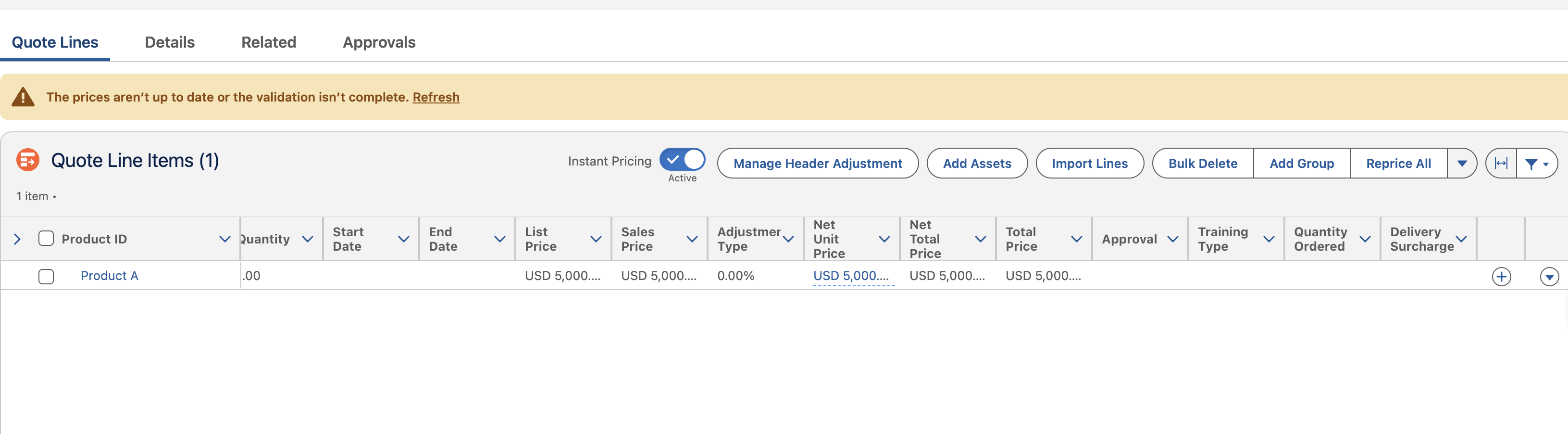
Agentforce Revenue Cloud: Reprice All Button and Refresh Link Behaviour
Veröffentlichungsdatum: Jul 13, 2026
Beschreibung
Users may observe different behavior when repricing a transaction (Quote/Order) by using:
- The Reprice All button
- The Refresh link displayed with a warning message in the Quote Line Items section
When Reprice All is selected, pricing is recalculated, but configuration rules are not executed.
When the Refresh link is selected, both pricing and product configuration are executed. As a result, pricing is recalculated and applicable product configuration rules are re-evaluated.
Lösung
When the Reprice All button is selected, the placeSalesTransaction API is invoked with configuration set to skip and pricing set to force.
"configurationPref": {
  "configurationMethod": "skip",
  "configurationOptions": {
    "validateProductCatalog": false,
    "validateAmendRenewCancel": false,
    "executeConfigurationRules": false,
    "addDefaultConfiguration": false
  }
},
"pricingPref": "force"
The payload indicates that:
- Pricing is forcibly recalculated.
- Product configuration is skipped.
- Configuration rules are not executed.
- Default configuration is not applied.
- Product catalog and amend, renew, or cancel validations are not performed.
The Reprice All button is a standard Salesforce button designed specifically to trigger pricing recalculation. Its behavior cannot be customized to execute product configuration rules.
This behaviour is working as designed.
Use the Refresh Link in the Quote Line Items section when both of the following actions are required:
- Recalculate pricing
- Re-evaluate applicable product configuration rules
Zusätzliche Ressourcen
Nummer des Knowledge-Artikels
005388807
Konnten Sie Ihr Problem mithilfe dieses Artikels lösen?
Geben Sie uns Feedback, damit wir uns verbessern können.
