조직 선택
Unable to Reinstall Tableau App for Slack from Agentexchange: Browser Redirects to tableau.com/solutions/technologies
게시 일자: Jul 22, 2026
상세 설명
Symptom:
- When workspace administrator selects "Add to Slack" on AgentExchange , the browser redirects to tableau.com/solutions/technologies instead of showing the Slack App installation screen.
- This issue may occur after removing and attempting to reinstall the Tableau App for Slack.
Environment:
-Tableau Cloud
-Slack (any workspace)
솔루션
Tableau App for Slack must be installed via Tableau Cloud, not Slack's admin console.
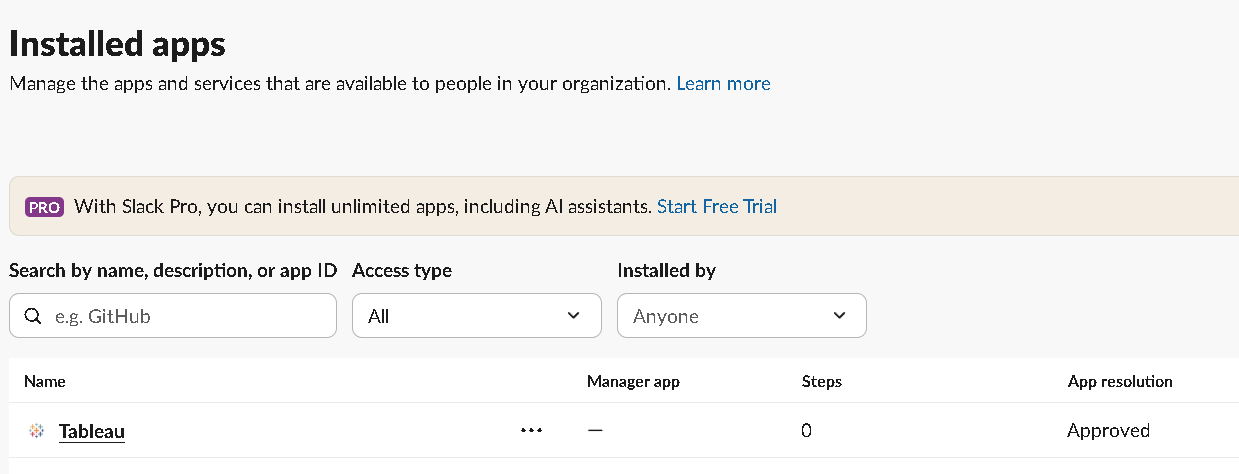
Before install Tableau Apps for Slack, Confirm Tableau is not listed in the workspace Installed apps, then disconnect and reconnect Slack from Tableau Cloud.
1. Sign in to Tableau Cloud as a site administrator.
2. Go to Settings > Integrations.
3. Verify connected workspace under "Slack Connectivity" > "Tableau for Slack".
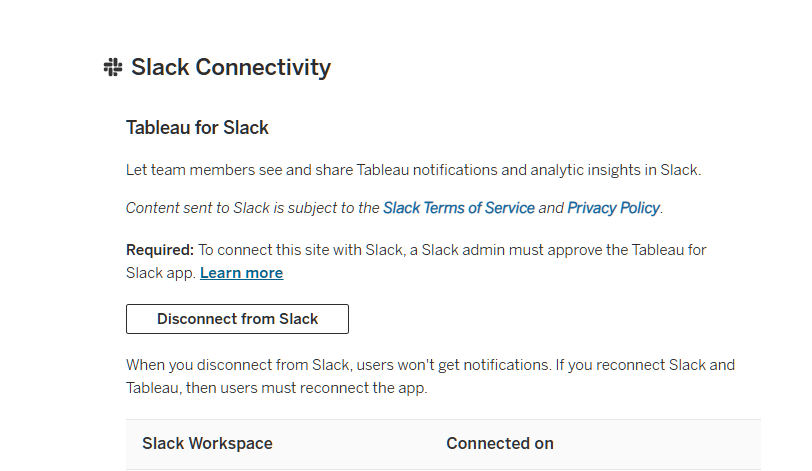
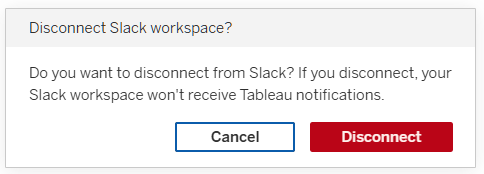
4. Click "Disconnect from Slack" and confirm "Disconnect" on the popup.
5. After disconnecting, click "Connect to Slack".
6. Select your Slack workspace and click "Allow".
7. Verify the Tableau App was added to the Slack workspace.
추가 자원
Integrate Tableau with a Slack Workspace
https://help.tableau.com/current/online/en-us/slack_admin.htm
Use the Tableau App for Slack
https://help.tableau.com/current/pro/desktop/en-us/slack_tableau.htm
Tableau App for Slack
https://slack.com/marketplace/A026RA4ND1R-tableau
Knowledge 기사 번호
005389630
이 기사를 통해 문제를 해결했습니까?
개선을 위한 의견을 보내주세요.
