조직 선택
Images do not render when Browser Rendering is Enabled
게시 일자: Jul 28, 2026
상세 설명
A workbook that contains images does not display those images on Tableau Server. The problem occurs in the Tableau Server rendering experience, even though the image URL can load successfully when opened directly in an external browser.
However if we append Tableau Server URL with ":render=false" ; The images are displayed as expected.
솔루션
1. Open the Workbook that has images in Edit mode
2: Navigate to Marks and change it to Polygon
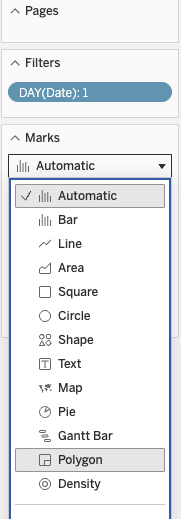
3: Check if the images are rendering.
Why this helps: When we use "Polygon" as mark type, Tableau server is forced to render this sheet by itself instead of browser rendering.
Knowledge 기사 번호
005390148
이 기사를 통해 문제를 해결했습니까?
개선을 위한 의견을 보내주세요.
