組織を選択
Table Calculations May Return a Different Result When Copying a Crosstab
公開日: Sep 8, 2026
説明
This is expected behavior. A Combined Field keeps its underlying dimensions separate rather than merging them into one value. When another field is added to Detail or Color, Tableau creates hidden partitions for those dimensions, so the table calculation recalculates across those partitions when copied via Crosstab — producing values that don't match the view (e.g. INDEX() numbers out of order) returning an incorrect value.
解決策
Option 1
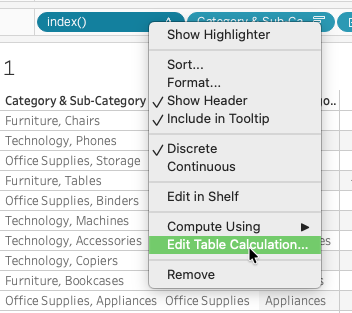
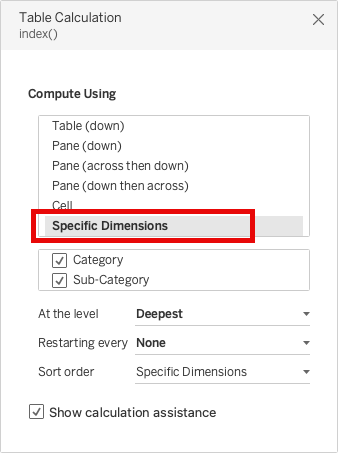
Right-click the table calculation field → Edit Table Calculation... → select the Specific Dimensions (leave the selected dimensions unchanged).
This keeps results consistent when using Copy > Crosstab.
Option 2
Replace the Combined Field with a manually concatenated calculated field (e.g. [Category] + [Sub-Category]). Since this produces one flat value instead of separate dimensions, no extra partitioning occurs and results stay correct.
ナレッジ記事番号
005459300
この記事で問題は解決されましたか?
ご意見をお待ちしております。
