Vælg en organisation
Using Windows Performance Recorder (WPR) and Windows Performance Analyzer (WPA) to Determine if Antivirus Minifilter Drivers Are Impacting Tableau Server Performance on Windows
Udgivelsesdato: Oct 1, 2026
Beskrivelse
Issue
This article applies to Tableau Server performance cases on Windows where CPU usage is unexpectedly high or response times are slow, and antivirus software is suspected of adding overhead to file I/O.
During normal operation, Tableau Server processes perform frequent read/write operations against the file system. For example, reading a workbook (.twb) temp file from the Repository (Postgres) and writing it to disk when a view loads, or reading and writing extracts during a view load or extract refresh. Antivirus software often intercepts these file operations (via "minifilter" drivers) to scan for viruses, and excessive real-time scanning of busy operational files that are not prone to virus introduction (such as log files) can be heavily resource-consuming.
While Tableau publishes antivirus exclusion guidance, it can be difficult to confirm whether those exclusions are actually being observed, or how effective they really are. This article describes how to use WPR and WPA (part of the Windows Performance Toolkit) as an independent way to check whether antivirus minifilter drivers are adding delay to Tableau Server's file operations.
Cause
Antivirus products use file system filter drivers ("minifilters") to intercept file read/write calls so they can be scanned in real time. When these minifilters scan busy, low-risk operational files (temp files, extracts, logs) too aggressively, they add measurable delay to the underlying file operation, which can appear as high CPU usage or slow response in Tableau Server.
Environment
- Tableau Server processes exhibiting high CPU or slow response (e.g., VizqlServer)
- Windows Server OS (any version supported by Tableau Server)
- Confirm the installed Windows Server version against Microsoft's release info before installing the Windows Assessment and Deployment Kit (ADK), since an incompatible ADK version may fail to open)
- Third-party antivirus software installed on the Tableau Server host machine
Løsning
For Tableau Server environments hosted on Windows Server OS exhibiting high CPU or slow response (e.g. VizqlServer) where a third-party antivirus software is installed, use the Windows Performance Toolkit (WPR and WPA/Xperf) to capture a short trace during the performance issue, then inspect it for minifilter delay.
Part 1 — How to capture the trace
- Identify the Windows Server version on the affected machine and cross-reference it against Microsoft's Windows Server release info. Installing the wrong Windows ADK version for the OS may prevent the trace from opening later.
- Download the matching version of the Windows ADK
- Note: You only need to install the Windows Performance Toolkit component from the ADK.
- Open the Start menu, type
WPRUI, and open the Windows Performance Recorder application. - In WPR, set:
- Performance Scenario: General
- Detail Level: Verbose
- Logging Mode: Memory
- Under First Level Triage, select the checkbox for First Level Triage.
- Under Resource Analysis, select the checkbox for CPU Usage.
- Under Scenario Analysis, select the checkbox for Minifilter I/O Activity.
- Click Start in WPR when the issue occurs.
- Keep the capture short (around 10 seconds). On a busy system, 20 seconds is already too long.
- If possible, open the trace on the computer to confirm it was captured correctly.
Part 2 — How to read the trace
- Double-click the trace file to open it in WPA.
- If you see a "time inversion detection" error, try opening the trace from the command prompt instead — this may not always work. This error is usually caused by the trace being too long (10 seconds is generally sufficient).
- Default install location:
C:\Program Files (x86)\Windows
Kits\10\Windows Performance Toolkit - Command:
wpa.exe <file location> /tti
- Default install location:
Screenshot showing the expand arrow next to the Storage category in WPA, which reveals sub-items including Mini-Filter Delays when clicked.
-
Double-click Mini-Filter Delays. The default view immediately gives useful information.
-
For example, if
WdFilter.sys(Windows Defender) shows a higher duration thanfileinfo.sys(a standard Windows disk driver), antivirus is likely adding delay. Iffileinfo.syshas the highest duration instead, antivirus can most likely be ruled out.
-
-
Change the Duration column from microseconds to seconds for a more human-readable comparison:
-
Right-click the Duration column in the table view
-
Choose Custom Format and change the time representation to seconds.
-
This step helps avoid misreading the impact (e.g., 1.1 seconds for AV versus 1.0 seconds for
fileinfo.sysover a 10-second trace is negligible)Screenshot of the table view after changing the Duration column format to seconds, showing driver names alongside their duration values in a human-readable format for easier comparison.
-
-
- Drill down into what
WdFilter.sysis doing:- Click the ▷ arrow next to
WdFilter.sys - In the column headings, right-click → More Columns → Process Name
Screenshot of the right-click context menu on the column headings, showing the path More Columns → Process Name used to add the Process Name column to the WdFilter.sys view.
- Click the ▷ arrow next to
- The process being intercepted is now visible.
Screenshot showing the expanded WdFilter.sys entry with the Process Name column now displayed, revealing which process is being intercepted by the antivirus minifilter driver.
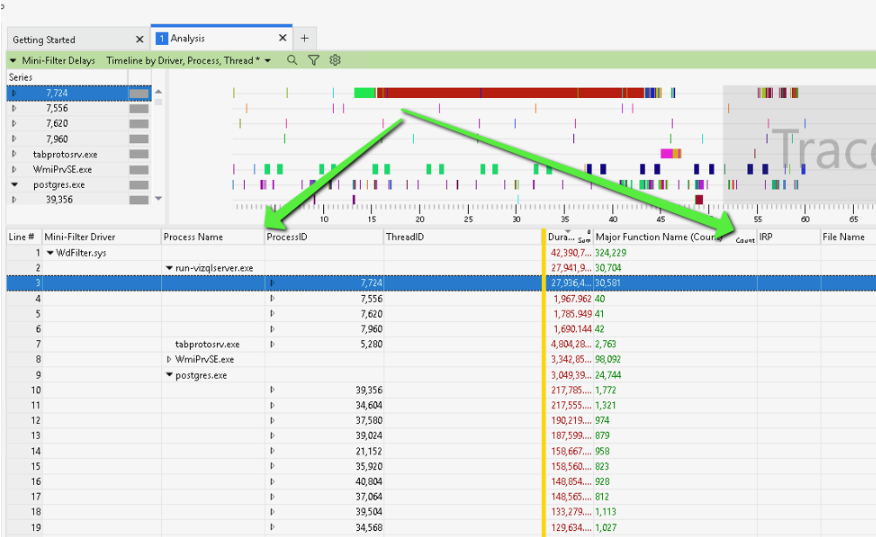
- Click and drag the Major Function Name (Count) column and place it between the Process Name and ProcessID columns to see what
WdFilter.sysis doing more clearly.Screenshot showing the Major Function Name (Count) column dragged and dropped between the Process Name and ProcessID columns in the WPA table view.
- In the view, click the corresponding ▷ arrow to expand WRITE → expand a Process ID → expand a Thread ID
- In this example,
Vizqlserver.exeis performing the write operation, which passes through theWdFilter.sysminifilter, adding delay to Vizqlserver's write.Screenshot of the expanded WRITE node showing Process ID and Thread ID drill-down, with Vizqlserver.exe visible as the process performing the write operation intercepted by WdFilter.sys.
- In this example,
Interpreting Results
The goal of this exercise is solely to determine precisely where resources are being consumed. This concrete evidence allows for IT teams to make an informed decision (e.g., adjusting exclusions) to improve their Tableau Server experience.
Yderligere ressourcer
See the following additional resources:
Vidensartikelnummer
005459334
Løste denne artikel dit problem?
Giv os besked, så vi kan forbedre os!
