Select An Org
Error 'Response returned an error code' when accepting terms of service in Tableau Cloud Manager
Publish Date: Sep 25, 2026
Description
When logging into Tableau Cloud Manager for the first time, a confirmation screen for the Main Services Agreement, Product Terms Directory and the Terms of Service is displayed. Clicking the agree button triggers the error "Response returned an error code" due to user-specific security settings.
Can’t Load Page
Something went wrong while loading the page. Refresh and try again.
Error: Response returned an error code
Resolution
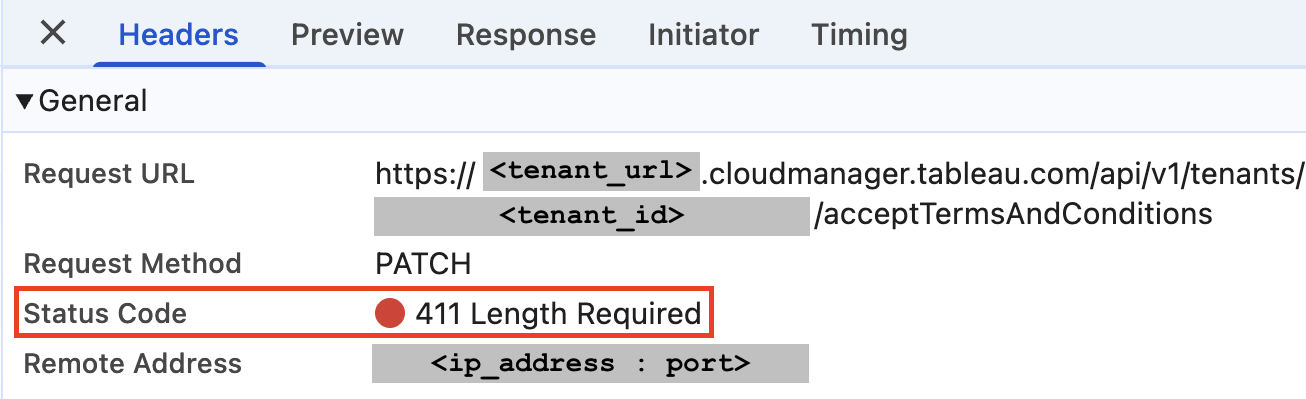
When clicking the agree button, an HTTP PATCH request with a content length of 0 is sent from the browser to Tableau Cloud Manager. It is possible that the user organization's security settings or policies are blocking this request because it is considered unusual.
To resolve this issue, identify the blocked network request using browser Developer Tools and request that your IT department update network security settings.
- Open browser Developer Tools and click the Network tab.
- Log in to Tableau Cloud Manager and reproduce the issue.
- In Developer Tools, locate the HTTP PATCH request sent to following url with a content of zero length.
-
https://<tenant_url>/api/v1/tenants/<tenant_id>/acceptTermsAndConditions
-
- Verify that the response returns HTTP 411: Length Required, indicating the zero-length request is blocked by your network security environment.
- Provide the request URL and PATCH details to your organization's IT department to adjust network security equipment or proxy settings so zero-length requests to this endpoint are permitted.
Knowledge Article Number
005459976
Did this article solve your issue?
Let us know so we can improve!
