Välj en organisation
How CRM Analytics and Tableau Next Work Better Together
Publiceringsdatum: Nov 5, 2026
Uppgift
What is CRM Analytics
CRM Analytics is Salesforce's native analytics solution (formerly Einstein Analytics and Tableau CRM) built to deliver contextual, actionable insights and predictions directly inside the Salesforce CRM experience. Rather than pulling users into a separate tool, it surfaces analytics right where teams already work, making it a strong fit for organisations that want analytics deeply woven into day-to-day Salesforce workflows. Learn more about CRM Analytics
What is Tableau Next
Tableau Next is Salesforce's agentic analytics platform, bringing together the strengths of CRM Analytics and Tableau with built-in AI. It runs on Data Cloud as a unified data layer and Tableau Semantics as its business context layer, giving organizations one consistent foundation for data and meaning across the platform.
Tableau Agent for Tableau Next is a collection of pre-built agentic capabilities that enable:
- Conversational Analytics (formerly Concierge) - Ask natural language questions about your data
- Semantic Modeling (formerly Data Pro) - Accelerate semantic modeling and data preparation
- Proactive Insights (formerly Inspector) - Receive automatic checks and alerts when your metrics meet specific conditions
See this trailhead module for more details
Together, these capabilities let users interact with their data conversationally and get AI-driven insights without needing to build reports from scratch. Learn more about Tableau Next
Steg
How the Two Products Work Together
Activate the full value of your data with CRM Analytics and Tableau Next
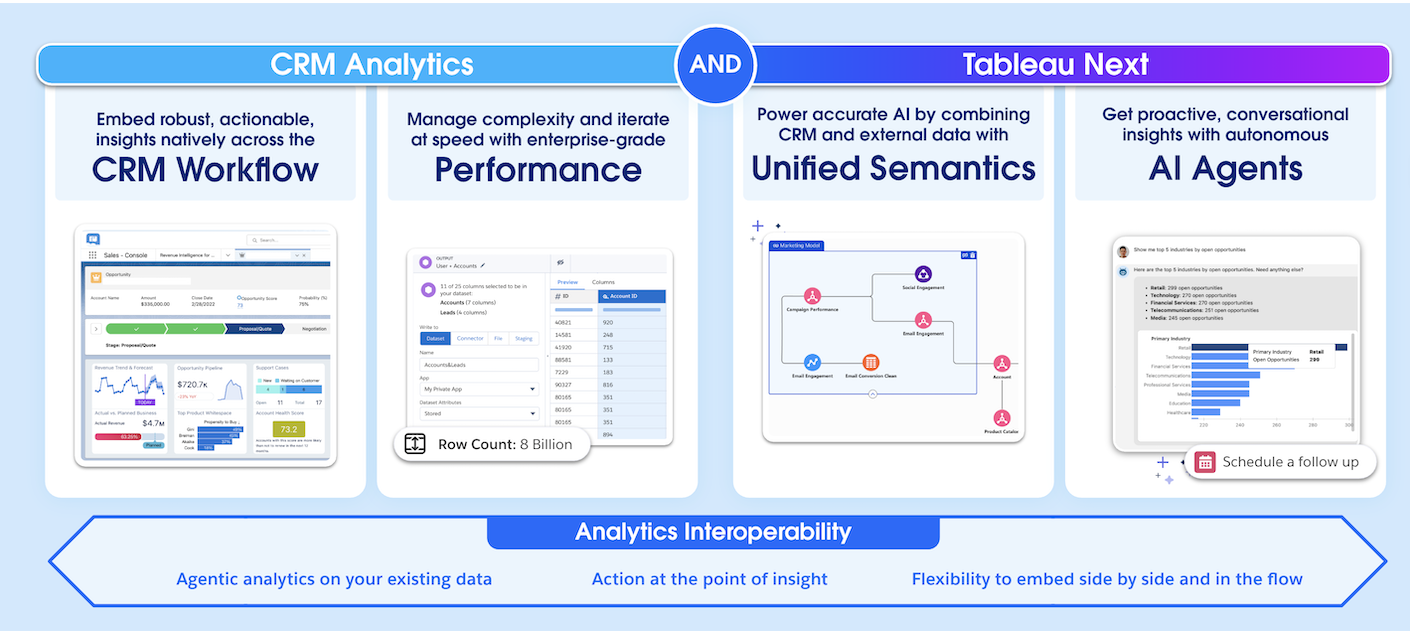
CRM Analytics and Tableau Next are complementary, not competing: adopting Tableau Next does not require rebuilding or retiring your CRM Analytics content. Your existing CRMA datasets and dashboards can be used directly as a trusted data source for Tableau Next's conversational analytics. Together, the two products are:
- Built on Salesforce — delivering out-of-the-box insights for every user on every team, with no separate analytics stack to maintain.
- Built for Salesforce — embedding actionable insight directly in the flow of work, not in a separate reporting tool.
- Built with full interoperability — today's CRM Analytics investment carries forward into an agent-driven future. Some Salesforce apps, such as Marketing Intelligence, already run on Tableau Next while continuing to use CRM Analytics data underneath, a pattern that is expected to extend across more Salesforce products over time.
Real-Life Example
A partner management team uses a CRM Analytics dashboard to monitor partner performance metrics inside Salesforce. When a partner's numbers start trending down, instead of opening a new report, the account manager asks the Tableau Next Concierge agent directly: "Why is this partner trending down?" Tableau Next analyzes the same underlying data and returns a natural-language explanation along with a supporting visualization — turning a static dashboard number into an actionable, AI-driven answer without leaving the flow of work.
Why This Matters for CRM Analytics Customers
- Extend rather than replace. Tableau Next adds a conversational, agentic layer on top of the operational monitoring CRM Analytics already gives you, including proactive, autonomous AI agents that can surface insight before you ask for it.
- One connected data foundation. Because both products draw on the same governed Salesforce data, and CRM Analytics datasets can write to Data 360, insight stays consistent whether you're looking at a dashboard or asking a question in natural language.
- Built for where Salesforce analytics is headed. As Salesforce continues to invest in agentic AI across the platform, the interoperability between CRM Analytics and Tableau Next means customers already on CRM Analytics are well-positioned to adopt new agentic and conversational capabilities as they roll out, without a disruptive migration.
- Proven results. Customers already combining Tableau Next with their Salesforce data have reported increase in customer satisfaction, faster reporting, and analytics adoption growing.
Ytterligare resurser
Frequently Asked Questions
1. Does Tableau Next replace CRM Analytics?
No. Tableau Next is not a replacement for CRM Analytics. CRM Analytics continues to provide embedded, governed, operational dashboards, while Tableau Next adds conversational and exploratory analytics on top. Customers use both together rather than migrating away from one.
2. Do I need to migrate my CRM Analytics data to use Tableau Next?
No migration is required. CRM Analytics datasets can be used as a trusted source of data for Tableau Next's conversational analytics, so existing CRM Analytics work continues to provide value.
3. Who typically uses CRM Analytics versus Tableau Next?
CRM Analytics is generally used by frontline and operational teams who need monitoring, dashboards, and key performance indicators (KPIs) in the flow of their daily work. Tableau Next is generally used by analysts, executives, and power users who need ad-hoc, guided, or conversational investigation of the "why" behind a metric.
4. Will My Existing CRM Analytics Investment Still Be Supported?
Yes. Salesforce maintains active product roadmaps for CRM Analytics, Tableau Cloud, and Tableau Server, and existing CRM Analytics data and assets can be used directly within Tableau Next rather than being rebuilt.
5. What Data Does Tableau Next Use?
Tableau Next uses Data Cloud (Data 360) as its unified data layer, which allows it to combine Salesforce CRM data with external data sources under a shared business semantic layer called Tableau Semantics.
Learn More
If you'd like personalized, in-depth guidance on bringing CRM Analytics and Tableau Next together for your account, check out the Expert Coaching article and request a one-on-one session with a subject matter expert: Request an Expert Coaching Individual Session.
Knowledge-artikelnummer
005460247
Löste denna artikel ditt problem?
Berätta för oss vad vi kan förbättra!
