Valitse organisaatio
Classic Dispatch Console: "Still There? You've Been Inactive" Message Explained
Julkaisupäivä: Oct 5, 2026
Kuvaus
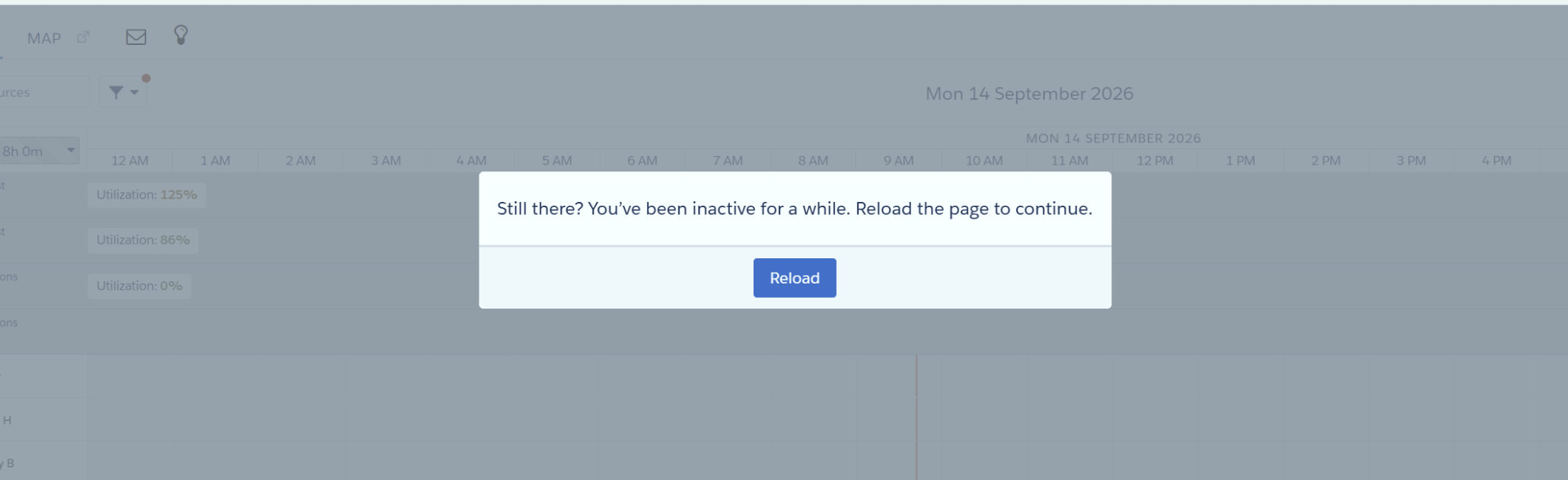
Field Service Dispatcher users working in the Classic Dispatch Console may see an overlay stating: "Still there? You've been inactive for a while. Reload the page to continue." It can appear well before the org's Salesforce session timeout (Session Settings) is reached, which confuses admins who expect the two timers to match. This applies to the Classic Dispatch Console; the newer Scheduling Console does not display the overlay. Users typically notice it after leaving the tab idle and returning to find the overlay over the Gantt view.
Ratkaisu
Root Cause
The Classic Dispatch Console has its own built-in inactivity monitor, separate from the org's Session Settings. It displays the "Still there?" overlay after 2 hours of no detected activity in the console tab. It was introduced as a performance consideration (keeping the console responsive and its data current after a long idle period). The timer is managed internally by Salesforce with no admin or Setup-level control, so it cannot be changed by the customer.
Resolution Steps
This is expected, by-design behavior. There is no fix or configuration change to apply. To manage or avoid the overlay:
- Keep the Dispatch Console tab active — any activity resets the 2-hour timer; moving the mouse is enough.
- If the overlay appears, click Reload (or press F5) to resume. This is a page refresh; it does not create a new Salesforce login session and the underlying session is unaffected.
- If the tab has been idle for a very long period (for example, left open overnight), the Salesforce session itself may separately reach its own timeout per Session Settings. In that case clicking Reload redirects to the login page because the underlying session — not just the console timer — has expired.
- If dispatchers need the console to stay continuously active without interruption, consider evaluating the newer Scheduling Console, which does not have this overlay.
Verification
- Leave the Classic Dispatch Console tab idle ~2 hours and confirm the overlay appears.
- Interact with the console before the 2-hour mark and confirm the overlay does not appear (activity resets the timer).
- After the overlay appears, click Reload and confirm you remain logged in (no redirect to login), confirming the underlying session was not affected.
Lisäresurssit
Work in the Field Service Classic Dispatch Console Gantt : https://help.salesforce.com/s/articleView?id=service.pfs_gantt.htm&type=5
Customize the Field Service Classic Dispatch Console : https://help.salesforce.com/s/articleView?id=service.pfs_customize_dc.htm&type=5
Knowledge-artikkelin numero
005460475
Ratkaisiko tämä artikkeli ongelmasi?
Anna palautetta, jotta voimme kehittyä!
