Sélectionner une organisation
Service Appointment Rescheduling Shows Fewer Available Dates
Date de publication: Sep 30, 2026
Description
Some users reported that when attempting to reschedule or book a appointments in Field Service, fewer date options were available than expected. Previously, users were able to see candidate dates across the full window between a Service Appointment’s Earliest Start Permitted and Due Date, but this no longer appeared to be the case.
Résolution
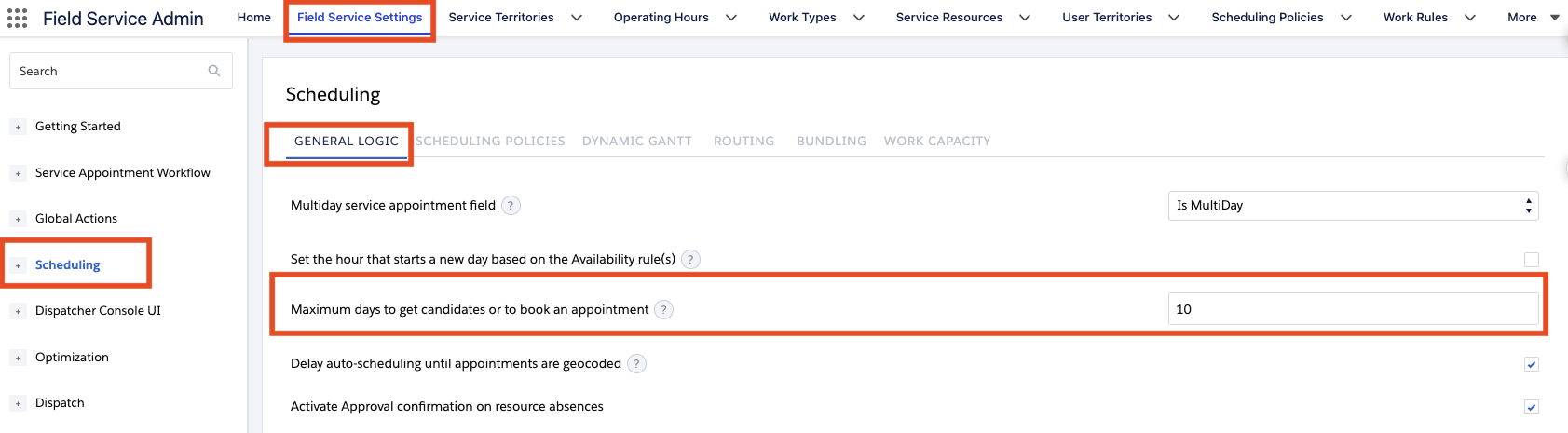
The number of days the scheduling engine searches for candidate or booking dates is controlled by Maximum days to get candidates or to book an appointment under Field Service Settings.
If this value is set lower than the Service Appointment's available window, fewer candidate dates may be displayed during rescheduling, even when the Earliest Start Permitted–Due Date range is wider.
Resolution
- Go to Field Service Settings → Scheduling → General Logic.
- Locate Maximum days to get candidates or to book an appointment.
- Set the value to 31, the maximum supported value.
- Re-test the rescheduling/booking flow and verify that the expected candidate dates are displayed.
Ressources supplémentaires
Reference article: https://help.salesforce.com/s/articleView?id=service.fs_einstein_agentforce_scheduling_considerations.htm&type=5
Numéro d’article de la base de connaissances
005460504
Cet article a-t-il résolu votre problème ?
Dites-nous ce que nous pouvons améliorer !
