Organisation auswählen
Difference Between Total and Sum in Reference Lines
Veröffentlichungsdatum: Oct 20, 2026
Beschreibung
Explains the difference between Total and Sum aggregation options for reference lines in Tableau Desktop.
Lösung
When configuring reference line aggregation options in Tableau Desktop, the distinction between Total and Sum is as follows:
- Total (TOTAL) : The value calculated directly from all underlying data rows within the specified scope (Table, Pane, or Cell).
- Sum (SUM) : The sum of the aggregated values (marks) displayed in the view within the specified scope.
Example:
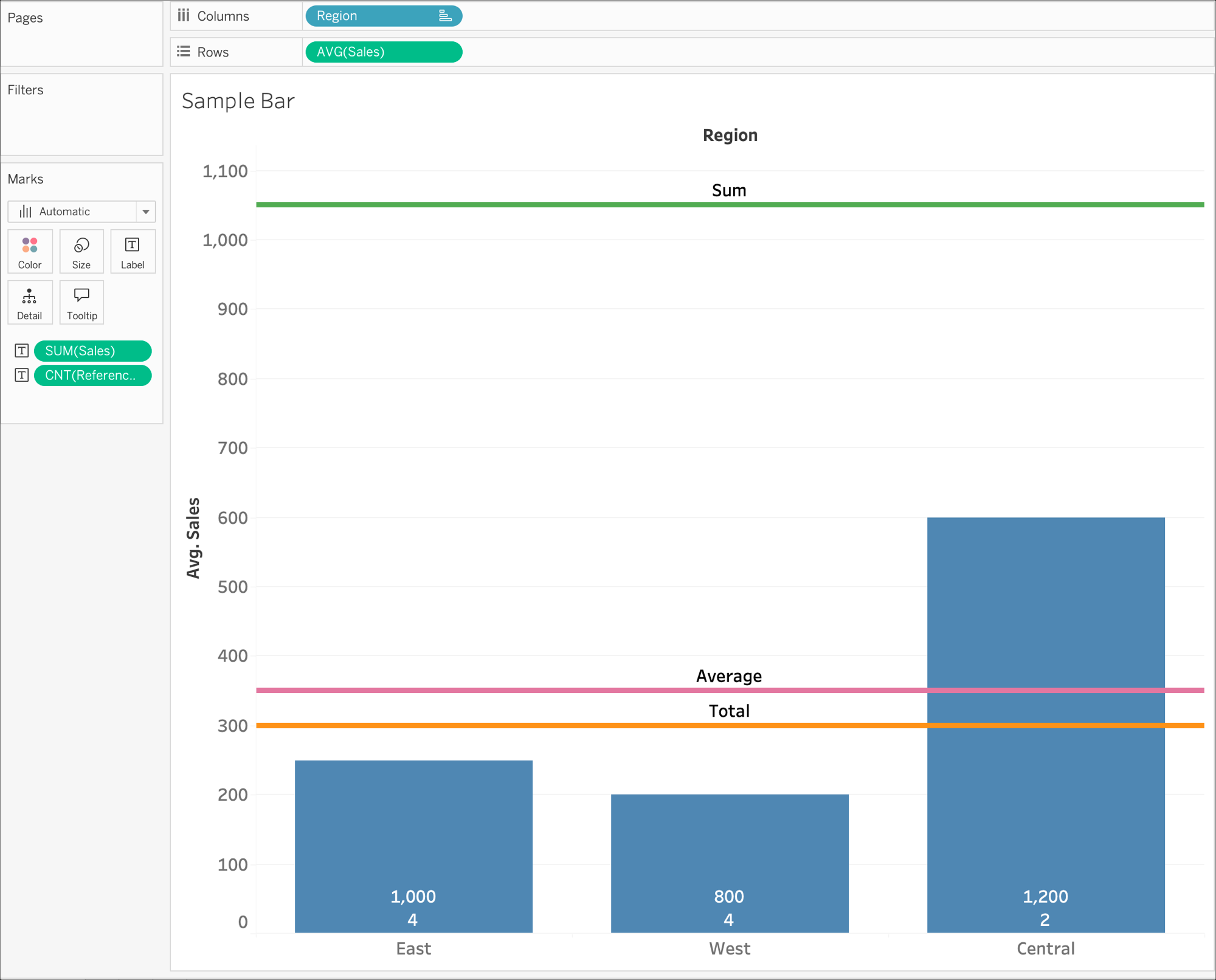
Consider a bar chart displaying average Sales for each Region:
- East: Average Sales = 250 (Data row count: 4)
- West: Average Sales = 200 (Data row count: 4)
- Central: Average Sales = 600 (Data row count: 2)
When adding a reference line for [Average Sales], the calculations produce the following results based on the chosen option:
- Sum (SUM): Sum of average values across regions
250 + 200 + 600 = 1050 - Total (TOTAL): Average calculated across all 10 underlying data rows
((250 × 4) + (200 × 4) + (600 × 2)) ÷ (4 + 4 + 2) = 300
(Reference)
- Average (AVG) : Sum of average values divided by the number of regions
(250 + 200 + 600) ÷ 3 = 350
Zusätzliche Ressourcen
Nummer des Knowledge-Artikels
005462388
Konnten Sie Ihr Problem mithilfe dieses Artikels lösen?
Geben Sie uns Feedback, damit wir uns verbessern können.
