Выбрать организацию
Adjust Points Action Fails When Multiple Transaction Journals Are Selected in the Transaction Journal List View
Дата публикации: Oct 31, 2026
Описание
When performing the Adjust Point Standard Action directly from the Transaction Journal List View Page, the Process is failing with the below message:
- On User Interface (UI): Enter Up to 16 Digit
- In Network log: The loyalty program member is already associated with the loyalty program currency. Specify another loyalty program currency and try again
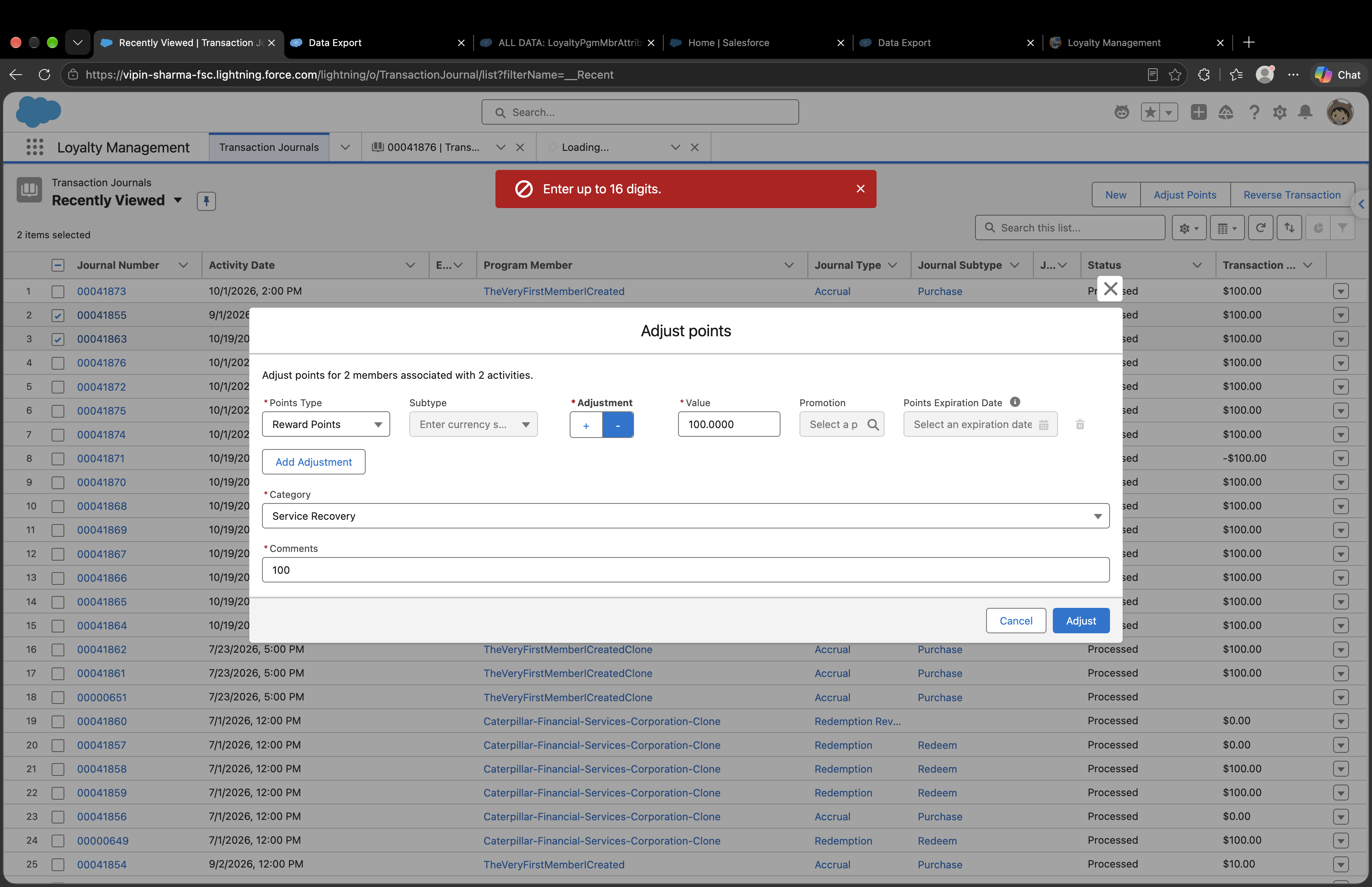
Steps to reproduce:
- Login to the Loyalty Management enabled Org.
- Navigate to the Transaction Journal List View.
- Click on the Adjust Point standard action available on the UI.
- Fill the necessary details like Points Type, Adjustment, Value, Category, Comments etc.
- Click on the Adjust button.
- Observe the Error on the UI as well as in the network log.
Решение
Currently, the Adjust Points action available from the Transaction Journal list view supports processing only one Transaction Journal at a time. Selecting multiple Transaction Journals and performing point adjustments in a single operation is not supported at this time. However, bulk point adjustments can be performed using the Adjust Points action through the REST API or Flow, provided the supported input parameters are used.
For clarity, the adjustPointsAction supports the following two types of inputs:
- LoyaltyProgramMemberId: Supports bulk adjustments, with up to 100 inputs per request. Each input must correspond to a unique combination of Loyalty Program Member and Loyalty Program Currency.
- JournalId: Supports adjustments for only one Transaction Journal per request. This option adjusts the points for the member associated with the specified journal and links the adjustment to that journal through the Related Journal field.
Additionally, the action validates the entire request before processing it. When multiple JournalId inputs are provided for the same currency in a single request, the inputs do not meet the supported criteria. As a result, the request is rejected with the following error message: “The loyalty program member is already associated with the loyalty program currency.” Consequently, no adjustments are processed for that request.
Recommended Approach
To perform bulk point adjustments, we recommend using the Adjust Points action through the REST API or a Flow that processes the selected records, with the following considerations:
- Use
LoyaltyProgramMemberIdinstead ofJournalId, along with the required inputs:LoyaltyProgramCurrencyId,Points,AdjustmentType, andReasonForChange. A maximum of 100 inputs can be submitted per request. - Each request can contain only one input for a given combination of Loyalty Program Member and Loyalty Program Currency. If multiple adjustments are required for the same member in the same currency, you can either consolidate the points into a single input or submit them in separate requests.
Дополнительные ресурсы
Adjust Point Action Rest API documentation:
Номер статьи базы знаний
005465818
Эта статья решила вашу проблему?
Оставьте свой отзыв, чтобы мы могли стать лучше!
