위치:
Apex 컨트롤러 클래스 및 메서드로 작업 동작 정의
테이블 위젯에 표시된 계정 목록을 생성하는 Apex 컨트롤러 클래스 및 메서드를 정의하고, 각 계정에 대한 기회를 만들고, 과업에 대해 각각 진행 상태를 반환할 수 있습니다.
- 설정에서 빠른 찾기 상자에 Apex 클래스를 입력합니다.
- Apex 클래스를 선택합니다.
-
새로 만들기를 클릭합니다.
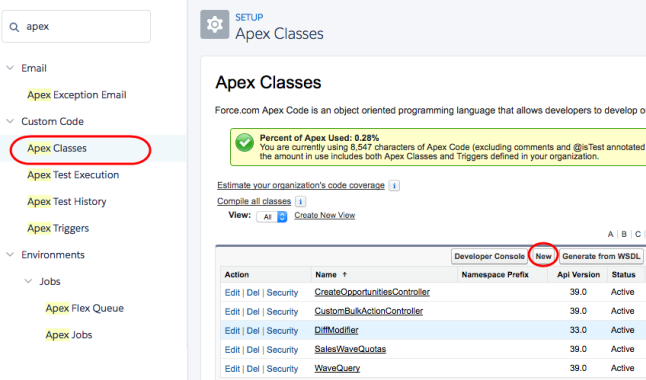
-
다음 코드를 추가합니다.
public class CreateOpportunitiesController { public string query{get; set;} /* To determine the records to perform the bulk action on, extract the SAQL query */ public PageReference init() { query = ApexPages.currentPage().getParameters().get('query'); return null; } /* Takes the account records from the SAQL query, creates an opportunity for each account, and then returns a map between account ID and new opportunity name. Note: Account.Name and AccountId referenced below refer to the dataset field names. Update them to match your dataset fields. */ @RemoteAction public static Map<String, String> create(List <Map<String, String>> accountRecords) { Map<String, String> result = new Map<String, String>(); List<Opportunity> opps = new List<Opportunity>(); for (Map<String, String> accountRecord : accountRecords) { String name = accountRecord.get('Account.Name') + ' - Sprint Review - 12/2'; String accountId = accountRecord.get('AccountId'); result.put(accountId, name); Opportunity opp = new Opportunity( /* You can set different fields from the Opportunity object than those listed below, like Amount. */ Name = name, Type ='New Customer', AccountId = Id.valueOf(accountId), CloseDate=Date.valueOf('2016-12-31'), StageName='Prospecting'); opps.add(opp); } insert opps; return result; } } - 저장을 클릭합니다.
이 기사를 통해 문제를 해결했습니까?
개선을 위한 의견을 보내주세요.
