您位於此處:
文字到數字轉換:轉換資料欄類型
當您將資料載入至資料集時,如果數字 (度量) 欄包含非預期的字串或字元,則 CRM Analytics 會將其標記為文字 (維度)。若要對資料欄執行計算,例如計算平均值,請使用「文字到數字」轉換,將「文字」資料欄類型變更為「數字」。您只能對數字資料欄執行計算。
此文章是否解決您的問題?
請讓我們知道,以便我們改進!
| 需要的使用者權限 | |
|---|---|
| 若要管理和建立配方: | 「編輯 CRM Analytics 資料流程」或「編輯資料集配方」權限 |
在資料欄類型轉換期間,「文字到數字」轉換會將小數值捨入至最接近的整數。例如,300.2939 會變成 300。
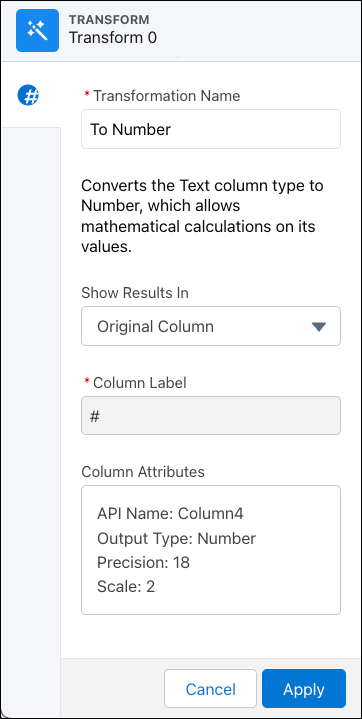
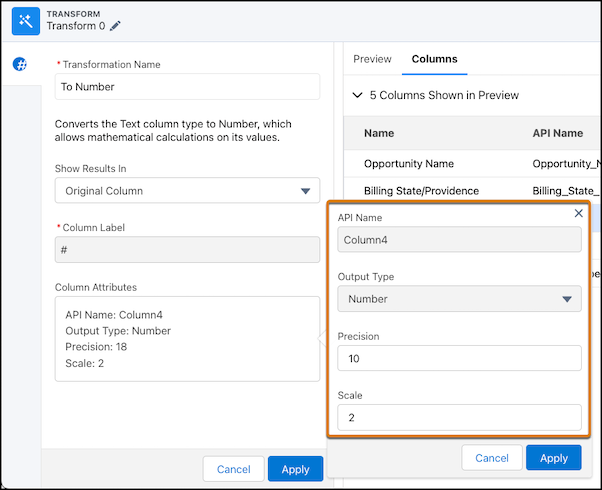
您可以根據輸出資料欄的資料類型來設定以下屬性。
| 屬性 | 描述 |
|---|---|
| API 名稱 | 資料欄的 API 名稱。資料欄 API 名稱每個最多可以為 255 個字元。API 名稱在配方中也必須是唯一的。 |
| 精確率 | 數字 (度量) 資料欄中的位數上限。包括小數點左側與右側的所有數字 (但不包含小數點字元)。輸入介於 1 至 18 (含) 之間的整數。如果數值超過指定的位數,則會視是否啟用空值度量處理而定,將值設定為 0 或空值。例如,如果位數設定為 5,且空值度量處理已啟用,則會以空值取代數值 123456.78。 |
| 刻度 | 數值欄中小數點右邊的小數位數。輸入介於 0 至 17 (含) 之間的整數。小數位數必須少於位數。例如,如果數值為 123456.789,且您將小數位數設定為 2,則數字會顯示為 123456.78。 |
| 長度 | 文字 (維度) 資料欄中的字元數上限。輸入介於 1 至 32000 (含) 之間的整數。預設長度為 255 個字元。 |
| 日期格式 | 日期欄的日期格式。 |
如需更多原則,請參閱此說明主題中「欄位名稱限制」一節。
 )。
執行配方將資料欄類型轉換成數字。

We use three kinds of cookies on our websites: required, functional, and advertising. You can choose whether functional and advertising cookies apply. Click on the different cookie categories to find out more about each category and to change the default settings.
Privacy Statement
Required cookies are necessary for basic website functionality. Some examples include: session cookies needed to transmit the website, authentication cookies, and security cookies.
Functional cookies enhance functions, performance, and services on the website. Some examples include: cookies used to analyze site traffic, cookies used for market research, and cookies used to display advertising that is not directed to a particular individual.
Advertising cookies track activity across websites in order to understand a viewer’s interests, and direct them specific marketing. Some examples include: cookies used for remarketing, or interest-based advertising.