To gain insight into your deals, use bucketing to group
by deal size instead of looking at individual deals. This lets you
concentrate on the large deals that affect your quota the most.
Required Editions
Available in: Salesforce Classic and
Lightning Experience
Available in: Enterprise, Performance, Unlimited, and
Developer Editions
Available in: Enhanced Folder Sharing and Legacy Folder Sharing
User Permissions Needed
To create, edit, and delete reports:
Legacy Folder Sharing
Create and Customize Reports
AND
Report Builder
Enhanced Folder Sharing
Create and Customize Reports
AND
Report Builder
Create or edit a standard opportunity report.
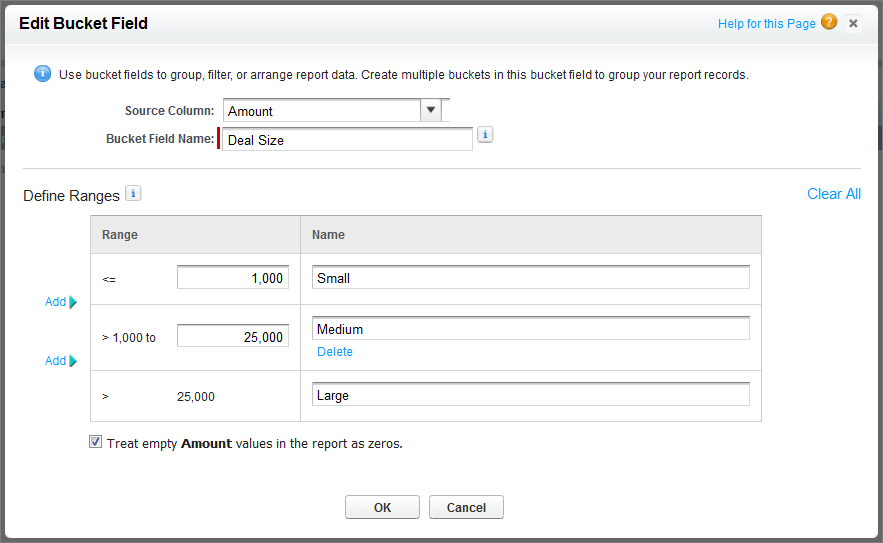
In the Fields pane of the report builder, double-click Add Bucket Field or drag it into the report.
For Source Column, select Amount.
For Bucket Field Name, enter Deal Size.
Under Define Ranges, enter 1000 in
the first row. This represents the maximum for a small deal. Name
this range Small.
Click Add and enter 25000 in the second row. This represents the maximum for a medium-size
deal. Name this range Medium.
By default, the last range is any amount over the previous
range. You don’t need to enter a number for this range. Name
this range Large.
Click OK.
With numeric bucket
fields, each range is greater than the lower number, up to and including
the higher number. Once you’ve set up this bucket field, amounts
will be bucketed as follows:
We use three kinds of cookies on our websites: required, functional, and advertising. You can choose whether functional and advertising cookies apply. Click on the different cookie categories to find out more about each category and to change the default settings.
Privacy Statement
Required Cookies
Always Active
Required cookies are necessary for basic website functionality. Some examples include: session cookies needed to transmit the website, authentication cookies, and security cookies.
Functional Cookies
Functional cookies enhance functions, performance, and services on the website. Some examples include: cookies used to analyze site traffic, cookies used for market research, and cookies used to display advertising that is not directed to a particular individual.
Advertising Cookies
Advertising cookies track activity across websites in order to understand a viewer’s interests, and direct them specific marketing. Some examples include: cookies used for remarketing, or interest-based advertising.