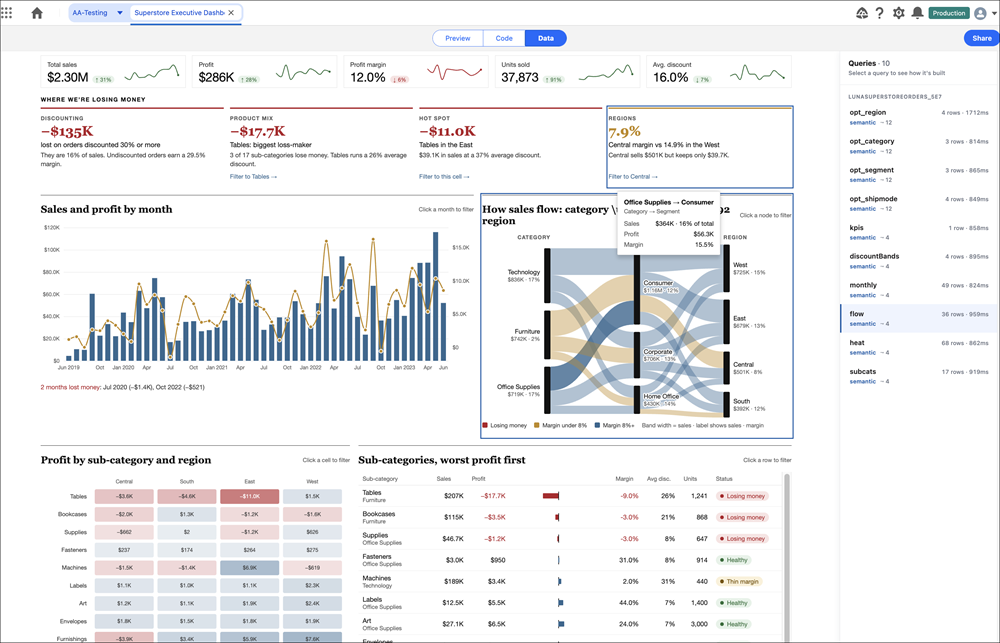
Build a Tableau Next Data App by describing your requirements to an AI client, such as
Claude Desktop or Cursor. Preview and refine the app through conversation, and then publish it to
a Tableau Next workspace.
To build and publish Tableau Next Data Apps: (Beta):
Tableau Unmetered Admin or Tableau Next Admin permission set
Complete these steps in your AI client:
Select a medium-tier model for efficiency, such as Claude Sonnet 5.5 (medium effort) or ChatGPT 5.6 Sol.
Ask the AI client to connect to the Salesforce org where you have Tableau Next analyst permissions and that contains the data you want to analyze.
Describe the app you want to build, including the data to use, the business questions to answer, and the charts and interactions to include. Explicitly ask the AI client to build a Tableau Next Data App.
For example:
“Using the Sales Superstore semantic data model, build a Data App that shows key sales performance indicators by US region. Show the key takeaways for executives in an editorial style.”
To provide a design reference, upload a PNG or PDF and ask the AI client to use it when building the app.
Review the app preview and ask the AI client to make changes until the app meets your requirements.
When you’re ready, ask the AI client to publish the app and specify the Tableau Next workspace where you want to publish it.
Note Previewing an app doesn’t publish it. Ask the AI client to publish the app when you’re ready to share it.
Open the selected workspace in Tableau Next to view the published app.
Did this article solve your issue?
Let us know so we can improve!
Loading
Salesforce Help | Article
Cookie Consent Manager
Cookie Consent Manager
General Information
Required Cookies
Functional Cookies
Advertising Cookies
General Information
We use three kinds of cookies on our websites: required, functional, and advertising. You can choose whether functional and advertising cookies apply. Click on the different cookie categories to find out more about each category and to change the default settings.
Privacy Statement
Required Cookies
Always Active
Required cookies are necessary for basic website functionality. Some examples include: session cookies needed to transmit the website, authentication cookies, and security cookies.
Functional Cookies
Functional cookies enhance functions, performance, and services on the website. Some examples include: cookies used to analyze site traffic, cookies used for market research, and cookies used to display advertising that is not directed to a particular individual.
Advertising Cookies
Advertising cookies track activity across websites in order to understand a viewer’s interests, and direct them specific marketing. Some examples include: cookies used for remarketing, or interest-based advertising.