
You are here:
Move Components in Page Designer More Easily
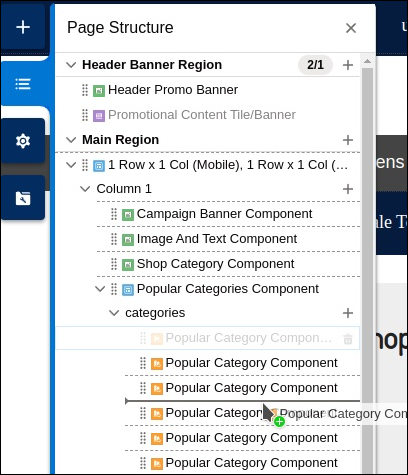
Dragging components in Page Designer is now more intuitive. Know exactly where you can place a component. And after you drop a component and refresh the page, the component remains in focus and highlighted until another selection is made in the canvas.
How: Improvements to the drag functionality improve the Page Designer workflow.
- Minimal changes in page structure during the drag function. When You initiate the drag process, you don’t lose the orientation to your starting location and desired drop location.
- Clearly identifiable drop zones identify where you can drop a component. After you drop a component and refresh the page, the component remains in focus and highlighted.
- After you drop a component and refresh the page, the component remains in focus and highlighted.
Эта статья решила вашу проблему?
Оставьте свой отзыв, чтобы мы могли стать лучше!
