
You are here:
Pricing Hooks
In software development, hooking is a concept that allows you to modify the original behavior of the application without changing your code. By intercepting the commands, you can change the action that would have been performed originally. This is very useful when adding new functionality to applications, exposing additional fields in pricing calculations, or altering how products are priced, to name a few of its applications.
Using a hook, you can modify the pricing behavior in the cart without changing the underlying programming code. Salesforce Industries CPQ enables you to write custom pre-invoke and post-invoke hooks for each interface to implement custom logic. Pre-invoke hooks execute before the actual interface executes, whereas post-invoke hooks execute after the actual interface executes.
Salesforce Industries CPQ functionality is managed by a global interface named CpqAppHandler. It includes a wide range of methods to perform CPQ processes in Industries Cart. These methods are also available as REST API, known as the Industries Cart-based APIs. So, when you need to change the default behavior or processing of a CPQ operation, you create a custom implementation in CpqAppHandler’s hook interface, which is appropriately named CpqAppHandlerHook.
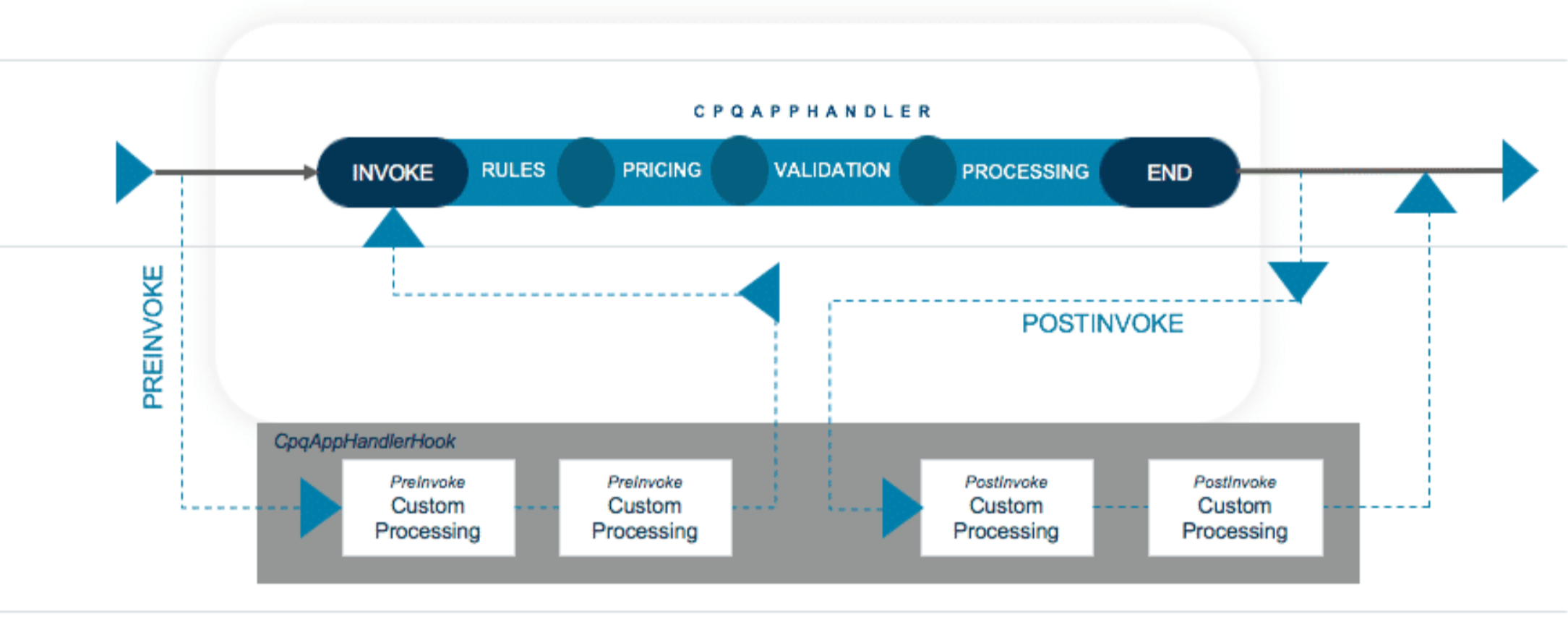
You can use the CpqAppHandlerHook to manage the inputs and outputs of CPQ methods. You can:
-
Add, change, or delete input parameters.
-
Add, change, or delete output responses.
-
Debug issues by verifying the input and output are correct.
-
In some cases, provide a workaround when waiting for a patch for an issue.
In addition, you can add business logic to do the following:
-
Conditional processing.
-
Preload information to use further down the execution chain.
-
Process custom fields.
-
Implement custom functionality.
-
Perform callouts.
Invoke the CpqAppHandlerHook
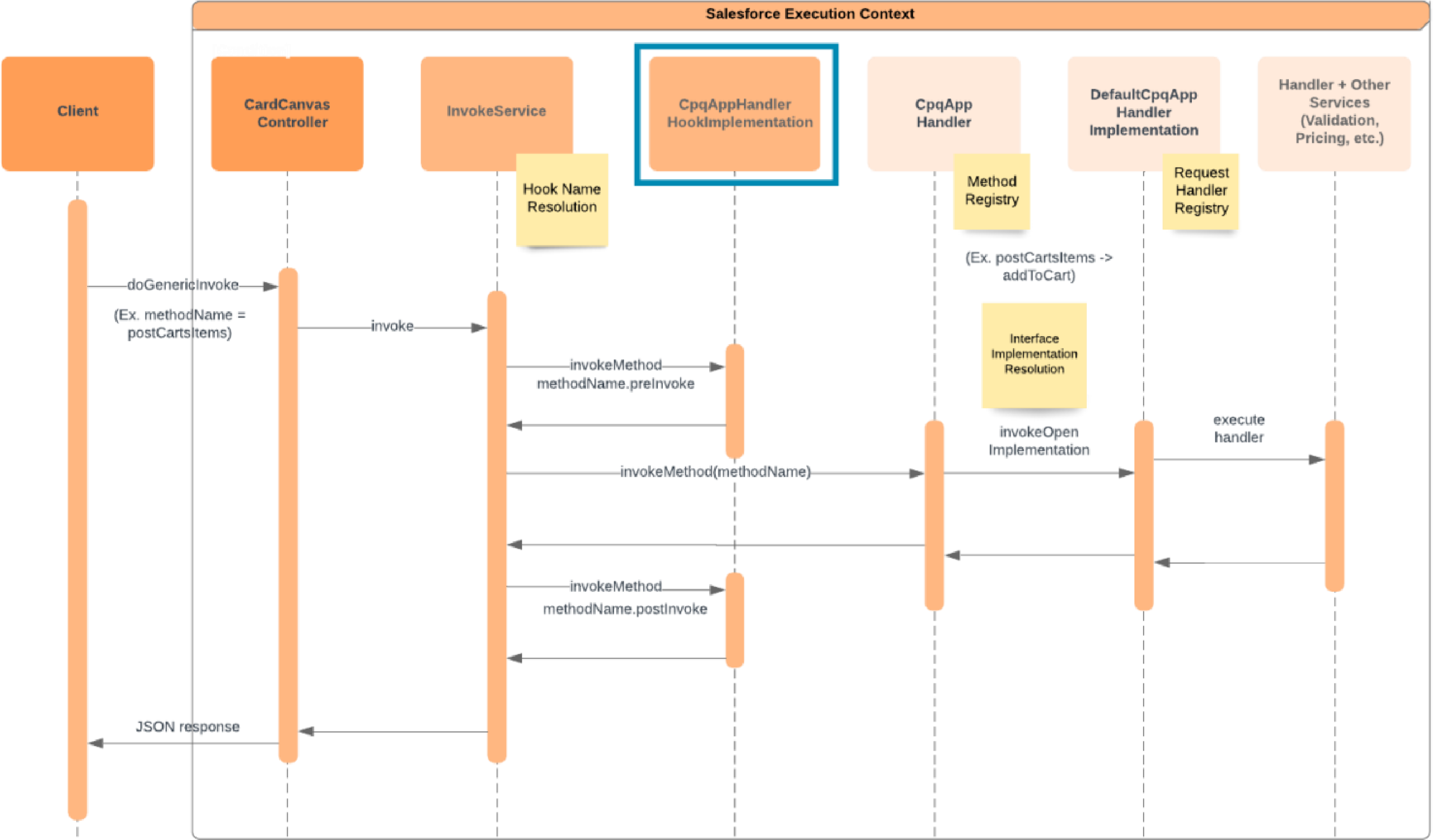
The CpqAppHandlerHook is automatically invoked when the InvokeService is
called. The InvokeService simply appends a hook string, such as “Hook”, to the
interface name and determines if there is an active interface with that name. If
there is, the InvokeService initiates the active implementation in the hook
interface. Then, it adds a .preInvoke suffix to the method name and
invokes the PreInvoke method in the hook
implementation. A corresponding .postInvoke method is
invoked on the hook implementation after the hooked class method has completed
its processing.
The following image provides an example of the sequence when using a CpqAppHandlerHook.
Injecting custom code is powerful when executed correctly, but be aware of the ramifications if executed poorly. Salesforce recommends the following when implementing a hook:
-
Ensure that a feature doesn’t already exist that addresses your need for a hook.
-
Ensure the custom code in the hook does not cause the execution to exceed any Apex governor limits.
-
Put a try-catch around the hook code to catch any exceptions thrown by the custom code.
-
When unit testing the hook code, it may be possible to mock the inputs expected by the hook code to minimize test setup and get better code coverage. Use Test.isRunningTest() to extract the mock input from the inputMap or from a static map.
Using a Hook
Let’s look at some examples based on the following business requirement:

Example 1
Disallow users from ordering the same product more than once on the same order, and check to see if the product exists as an active asset on the account.
Solution using a hook:
-
Implement a CpqAppHandlerHook to check before postCartsItems logic runs to see if the product exists in other active line items or active assets.
-
In the preinvoke hook, if the product exists in active line items or assets, null the items and create a new node that is checked in the post-hook.
-
In the postinvoke hook, if the new node exists, then display an error.
-
When the user tries to add a duplicate product, they will get an error in the cart.
Example2
Consider how pricing works in Industries Cart. You add an iPhone X to the cart. It displays a one-time charge of $1000. However, the customer wants to know the total price of the iPhone X, which includes the sales tax cost. How do you display the cost of the iPhone X plus applicable taxes in the one-time charge column in Industries Cart?
You would do this by implementing a pricing hook to alter how the pricing is calculated. Instead of calculating Quantity*Price and displaying the price in the One Time Charge column, you would create a pricing hook to calculate the One Time Charge as Quantity*Price*Sales Tax Rate. If you don’t want to include the sales tax in the one-time charge column, but instead display it as a separate column, you can modify the cart to display a custom field for the applicable sales tax.
