
You are here:
Product References in EPC
Use the Find References button in Vlocity Product Console to find references to a given product in active promotions, product bundles, assets, quote line items, order line items, and opportunity line items. This button assists you with determining the effect of changing product selling period and end of life dates.

To use the Find References button, go to the General Properties facet for the product, and the button is located next to the Save button. The Partial List of Active References dialog box displays.
The default number of rows returned for each reference object is 20, but this limit can be increased by setting the FindReferencesRowCountLimit custom setting in CPQ Configuration Settings Reference. The maximum number of rows returned is 1000.
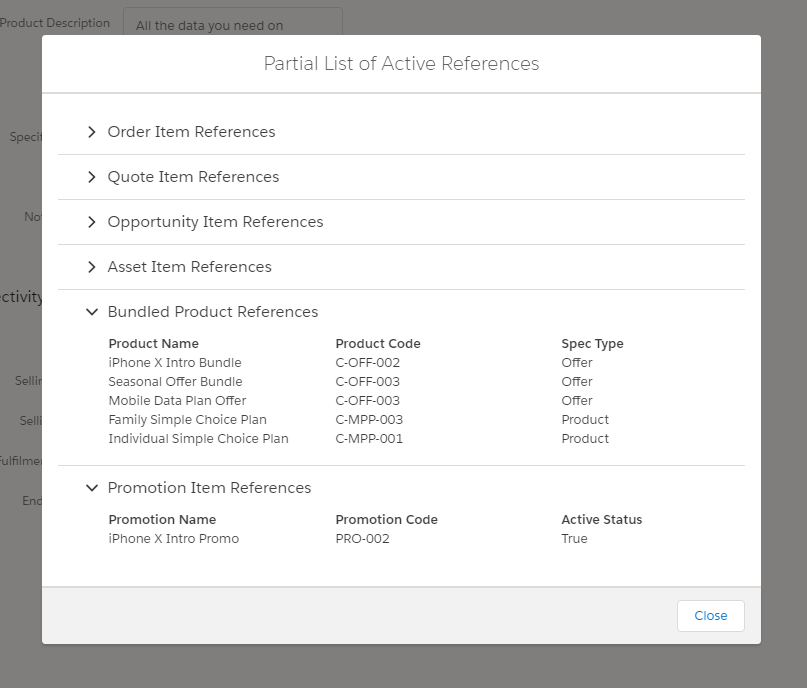
To find order, quote, and opportunity line item references, each line item's fulfillment status (vlocity_cmt__FulfilmentStatus__c) must be set to Draft, In Progress, PONR, or Pending. In order to find asset references, the asset's provisioning status (vlocity_cmt__ProvisioningStatus__c) must be set to Active, Changed, or Deleted. These values are normally set by order management processes. If the statuses have null or other values, the references will not display.
