You are here:
Configure an Integration Retry Policy
You can create a policy to control how orchestration items retry failed callouts to fulfillment systems. This step shows how to configure a policy that you've already enabled in the custom record type settings.
Before You Begin
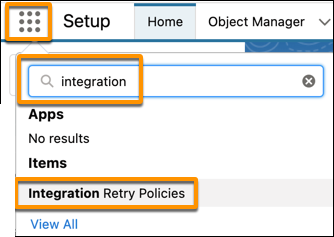
- From the App Launcher, click Integration Retry Policies.
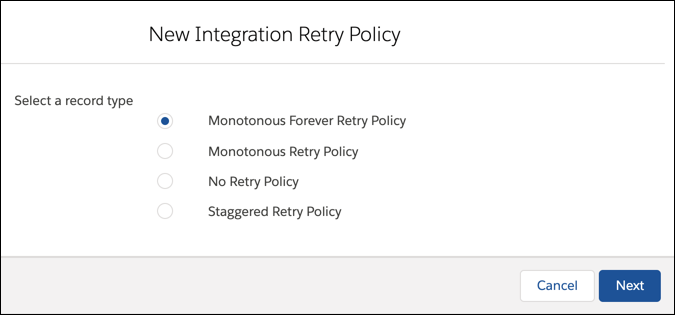
- Click New. The New Integration Retry Policy window opens.
- Select a type for this Integration Retry Policy:
Monotonous Forever Retry Policy: A failed Orchestration item is retried automatically forever, or until it succeeds or is stopped. In the next step, you configure the interval in seconds between retries.
Monotonous Retry Policy: A failed Orchestration item is retried automatically the number of times that you set. In the next step, you configure how many times to retry the item, and the interval in seconds between tries.
No Retry Policy: A failed Orchestration item is not retried automatically.
Staggered Retry Policy: A failed orchestration item is retried at the different intervals that you set. In the next step, you'll enter comma-separated values to specify the intervals (in seconds) for retrying the item. For example, if you wanted the item to retry three times: after 10 seconds, then an hour, and then a day, you would type this string: 10,3600,86400
 Note
NoteThe Staggered Retry policy is honored by all Order Management products as of release Spring '22. Before that release, it doesn't have an affect for OM Standard orgs.
- Click Next. Give the policy a name, and configure it according to the kind of policy that you chose. Note
Order Management Standard: These policies are implemented by the Integration Retry job, which runs no more frequently than once a minute. For example, if you set a retry interval of 30 seconds, the item won't actually retry until the next time that the Integration Retry job runs and schedules the retry (sometime in the next minute).