
You are here:
Manage Jeopardy (Service Level Agreements)
Industries Order Management can inform you when an order is at risk of missing its assigned service level agreement (SLA). The jeopardy status appears on Order Items, Orchestration Items, Orders, Fulfillment Requests and Fulfillment Request Lines.
You can set up a Salesforce queue to contain cases that are in jeopardy. See: Set Up Jeopardy Status Notifications

For jeopard management to work, you must start the Schedule Jeopardy Management job. See Start the Schedule Jeopardy Management Job
A jeopardy condition is a situation where there is a high chance of missing a deadline for an order or a certain milestone. For example, an order could be delayed due to construction work preventing customer line installation, no equipment in stock, or external partner performance.
The order is considered to be in jeopardy if the planned completion date may miss a deadline specified for an order, given the current state of Orchestration Plan execution and the timing of tasks to execute.
Similarly, you can define a jeopardy condition for an Orchestration Item, such as manual task, for an appointment with a customer. Depending on jeopardy severity, an order can have the following status:
RED: Based on the progress of orchestration plan execution, a service provider is likely to miss the due date, such as a delivery date requested by a customer. Some corrective actions, such as escalation or re-prioritization, are required to prevent missing the due date.
YELLOW: Based on the progress of orchestration plan execution, there is a manageable risk that the service provider will miss the due date, such as a delivery date requested by a customer. Some preventive actions, such as escalation or re-prioritization, are required to prevent missing the due date.
GREEN: Order fulfillment is on track and is expected to be completed on time. No actions are required, and the order is processed according to standard operations flow.
Vlocity Jeopardy Manager estimates the due date throughout the fulfillment process and sets jeopardy status on tasks and orders.
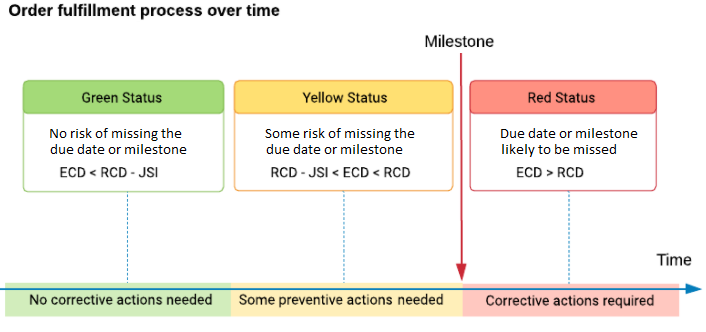
Order Management automatically calculates the Earliest Completion Date and Expected Completion Date of a plan (Earliest Completion Date + Jeopardy Interval). This is useful in cases where Order Management needs to respond to a CRM with the amount of time required for a field task, such as a truck roll.
- Jeopardy Dates
Jeopardy dates and time intervals for Orders are: - Set the Requested Completion Date for an Order or Orchestration Item
The requested completion date is the date that you expect an order or orchestration item to complete. OM uses this date to determine the jeopardy of missing a target date. - Set Up Jeopardy Status Notifications
You can set up Industries Order Management to populate a queue with cases that are in jeopardy of missing a due date. That way, you can check that queue, rather than having to look at individual orders to see whether they're in jeopardy. - Configuring a Calendar for Manual Tasks in Order Management
You can set up a calendar with standard operating hours for each work day or special holiday. When you create a manual task, you can then specify the number of work days the task is expected to take. - Configuring Plan Scheduling
In Order Management Standard jeopardy management, you can access the configuration for plan scheduling in Custom Settings > XOM Setup. - Start the Schedule Jeopardy Management Job
Before Order Management checks whether items or orders are in jeopardy, you must go to the XOM Admin Panel, and click the Start button next to SCHEDULE JEOPARDY MANAGEMENT JOB.
