
You are here:
Orchestration Item Dependencies
Orchestration dependency definitions specify the dependencies among orchestration items, either within a single plan or between orchestration items from different orchestration plans.
For example, you can have four orchestration item definitions included in an orchestration plan that you can sequence into a specific order.

When you define an orchestration item, click Orchestration Dependency Definitions to open the Orchestration Dependency Definition page:
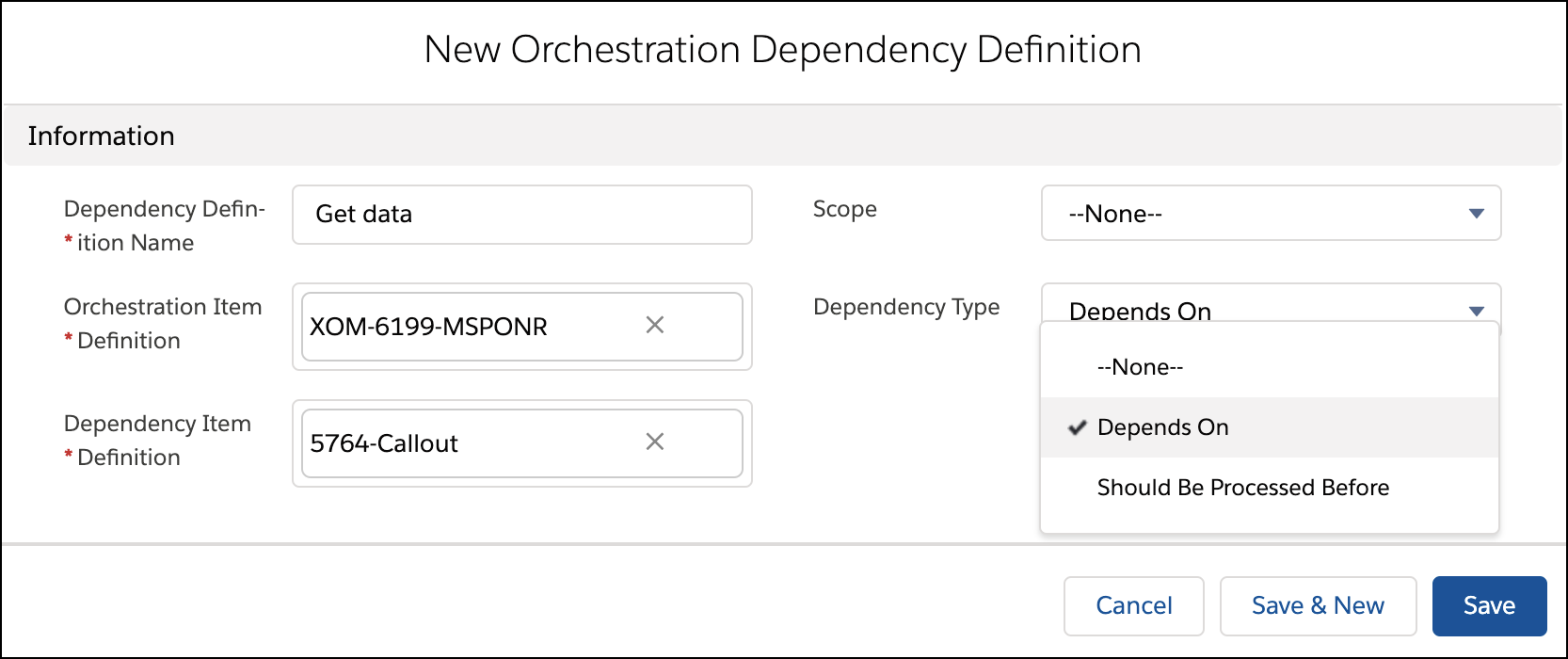
On this page, you define the dependencies of the orchestration item that you're defining. You can say that a different orchestration item must happen before the one you're defining, or that the one you're defining must happen before the other item.

The Orchestration Dependency Definition page has the following fields:
Dependency Definition Name: Give a name to the dependency definition.
Orchestration Item Definition: This field shows the orchestration item that you're defining. This item is the one that is referred to in the Dependency Type field.
Dependency Item Definition: This field shows the OTHER orchestration item. That is, not the one that you're currently defining, but the one that you want to say should be processed before (or after) the one you're defining.
Dependency Type: This field specifies the dependency between the orchestration item that you're defining (shown in the Orchestration Item Definition field) and the other orchestration item (shown in the Dependency Item Definition field).
Depends On: The item in the Orchestration Item Definition field depends on, and is processed after, the item in the Dependency Item Definition field.
Should Be Processed Before: The item in the Orchestration Item Definition field is processed before the item in the Dependency Item Definition field.
Scope: Set the scope to decide whether to create a separate orchestration item for a given combination of order items and fulfillment request lines and orchestration item definitions, and how to resolve dependencies between orchestration items at runtime. For more information, see Orchestration ScopeOrchestration Scope.
Dependency Loops
A loop is when two or more orchestration items are defined to depend on each other. Such a situation can cause problems during runtime, so Order Management blocks them by default.
The default setup: When you save an orchestration item, Order Management checks the items that it depends on, along with all the items that all those items depend on, and so on. If Order Management finds an item that depends back on the one that you want to save, then you won't be allowed to save.
You can change the default setup: See Control How Orchestration Item Dependency Loops Are Treated
- Control How Orchestration Item Dependency Loops Are Treated
A loop is when two or more orchestration items are defined to depend on each other. You can change whether loops are allowed by editing the OrchestrationDepDefCycleCheckMode custom setting. - Create Dependency Definitions
When you define an orchestration item, click Orchestration Dependency Definitions to open the Orchestration Dependency Definition page. - Orchestration Dependencies Across Orders
You can set up orchestration orchestration dependencies across orders using the Related Order scope in an orchestration dependency definition. - Create Orchestration Dependencies Across Orders
You can configure orchestration tasks to depend on tasks in related orders. - The New Orchestration Dependency Definition Screen
When creating an orchestration dependency, fill out the fields on the New Orchestration Dependency Definition screen. - Add the Related Order option to Orchestration Dependency Definition Scope
To take advantage of related orders, you must add the Related Order scope option to fields and relationships.
