
You are here:
Queue Assignment Rules
As a Fulfillment Designer, you can configure rules to automatically assign tasks to a specific team or user in a designated work group. This enables certain orchestration items to have priority over others, based on orchestration queue assignment rules.
For example, you can prioritize the activation of gold-level or high priority customers so they are put in a faster-running queue. Rules describe the conditions, which when met, result in specific queues being chosen.
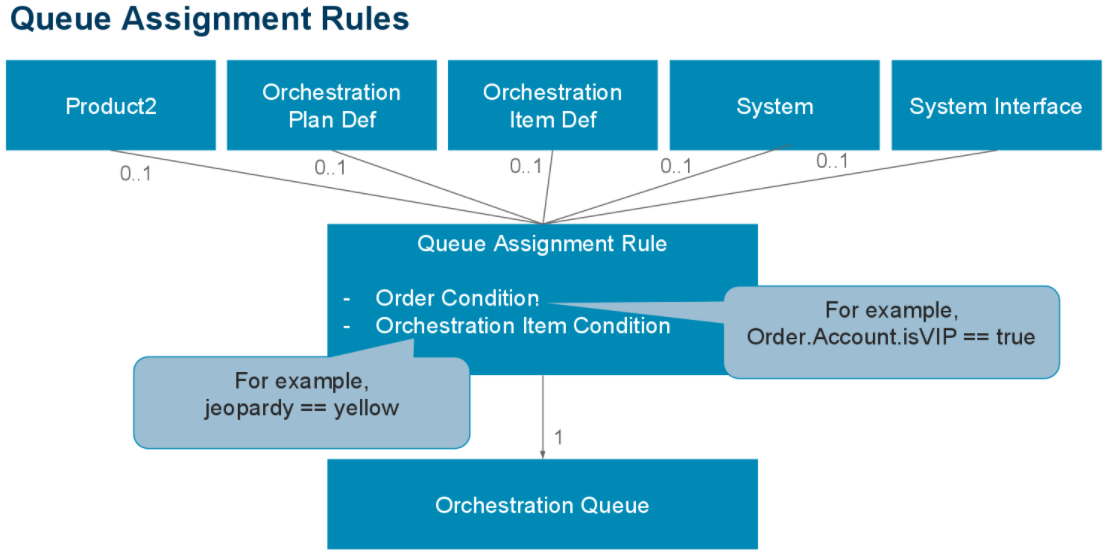
More specific conditions have priority over less specific conditions. The default queue is described as a rule with all conditions being empty, with only queue name specified.
To support round-robin and least-loaded task assignment algorithms, Order Management defines memberships for queues, where user accounts can relate to a manual queue. Many user accounts can belong to the same manual queue. At the same time, one user account can belong to multiple manual queues.
Attributes-based assignments allow you to set up assignment rules that define how to route a manual task. A user can create one or many assignment rules on a Manual Queue record. Each assignment rule may have a condition similar to any other condition on an orchestration scenario, Orchestration item definition, or decomposition relationship, so that you determine whether you need to process a given assignment rules for each individual case. Each assignment rules can point to a Destination queue or a Destination user.
- Configure Manual Queue Assignment Rules
Configure a manual queue with rules that automatically assign tasks to a specific team or user in a designated work group. This enables certain orchestration items to have priority over others, based on orchestration queue assignment rules.
