Set the currency conversion preference for a definition in the Data Processing Engine
builder. Turn conversion on to consolidate amounts into a single currency, or turn it off to
keep the original currencies. For the Data 360 runtime, select the target
currency.
Before you configure currency conversion, confirm that:
Multi-currency is enabled for your org.
Your definition uses the CRM Analytics or Data 360 runtime.
Your data sources include currency values.
The writeback user's currency matches the integration user's currency for definitions
with CRM Analytics runtime.
You set the currency conversion preference when you build a definition. The definition
honors your preference each time it runs. To use currency conversion in an existing
definition, edit the definition and set your preference.
In the Data Processing Engine builder, open the definition that you want to
configure.
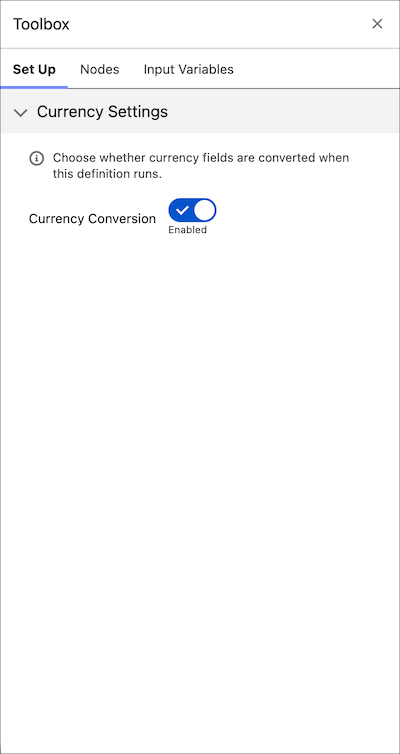
In the left panel , find the Currency Settings section.
Set the Currency Conversion toggle.
On
Converts currency fields to a single target currency during the run.
Off
Keeps currency fields in their original currency.
Optional: For a Data 360 definition with the toggle on, in
Currency, search for and select the target currency ISO code,
such as USD, EUR, or GBP.
For the CRM Analytics runtime, no dropdown appears because amounts convert to the
integration user's currency. By default, the first available currency value is
selected.
Add your data sources and select the currency fields you want to process.
Add the transformation and writeback nodes. Optionally, if Currency Conversion is Off,
map the currency ISO code field in the writeback nodes where currency fields are
mapped.
Save the definition.
For CRM Analytics runtime definitions, run a full sync after transformation on the
local datasets created during the initial sync. The full sync updates those datasets with the
latest converted currency values.
Эта статья решила вашу проблему?
Оставьте свой отзыв, чтобы мы могли стать лучше!
Загрузка
Salesforce Help | Article
Cookie Consent Manager
Cookie Consent Manager
General Information
Required Cookies
Functional Cookies
Advertising Cookies
General Information
We use three kinds of cookies on our websites: required, functional, and advertising. You can choose whether functional and advertising cookies apply. Click on the different cookie categories to find out more about each category and to change the default settings.
Privacy Statement
Required Cookies
Always Active
Required cookies are necessary for basic website functionality. Some examples include: session cookies needed to transmit the website, authentication cookies, and security cookies.
Functional Cookies
Functional cookies enhance functions, performance, and services on the website. Some examples include: cookies used to analyze site traffic, cookies used for market research, and cookies used to display advertising that is not directed to a particular individual.
Advertising Cookies
Advertising cookies track activity across websites in order to understand a viewer’s interests, and direct them specific marketing. Some examples include: cookies used for remarketing, or interest-based advertising.