Select a node and view the details of other nodes that currently reference elements of
it, such as node sources and mapped fields. These nodes that reference the selected node are
known as reference nodes. If you make changes to a node, it’s helpful to know its reference
nodes to anticipate any changes that need to be made to them, too.
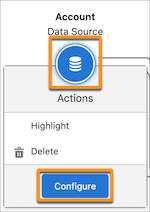
In a definition, on the node canvas, click the node that you want to see the reference
nodes of, then select Configure.
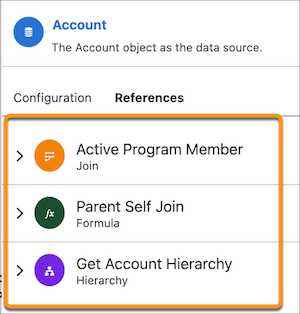
Click the References tab.
All nodes that use the selected node as a source are shown in the References tab.
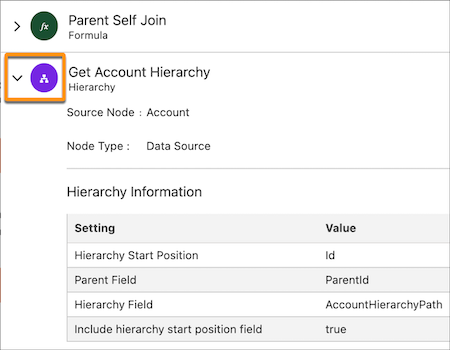
To expand a reference node’s details, click the node icon or arrow.
The reference node details open.
The details show information about how the node is referencing the selected node (for
example, what fields the reference node is using from the selected node).
Why Does a Node Indicate That Removed Fields Are Referenced in a Node after the References Are Removed? When you remove fields from a node, ensure that the removed fields aren't referenced by any other node in the definition. The node in which you've already deleted references to the removed fields is used as a source by another node in which the removed fields are still referenced. To resolve this issue, go to the node in which you've deleted references to the removed fields. Next, find the nodes that use the current node as source and reference the removed field. Go to the nodes that still reference the removed fields, and then delete the references.
Эта статья решила вашу проблему?
Оставьте свой отзыв, чтобы мы могли стать лучше!
Загрузка
Salesforce Help | Article
Cookie Consent Manager
Cookie Consent Manager
General Information
Required Cookies
Functional Cookies
Advertising Cookies
General Information
We use three kinds of cookies on our websites: required, functional, and advertising. You can choose whether functional and advertising cookies apply. Click on the different cookie categories to find out more about each category and to change the default settings.
Privacy Statement
Required Cookies
Always Active
Required cookies are necessary for basic website functionality. Some examples include: session cookies needed to transmit the website, authentication cookies, and security cookies.
Functional Cookies
Functional cookies enhance functions, performance, and services on the website. Some examples include: cookies used to analyze site traffic, cookies used for market research, and cookies used to display advertising that is not directed to a particular individual.
Advertising Cookies
Advertising cookies track activity across websites in order to understand a viewer’s interests, and direct them specific marketing. Some examples include: cookies used for remarketing, or interest-based advertising.