
You are here:
Integrate with SAP IS-U (Master Data Synchronization)
Integrate your legacy systems with the Energy & Utilities Contact Center Console. Master Data Sync implements a scheduled upload of Premises, Service Point and Assets (Inventory Items) updates from SAP to Salesforce.
Before You Begin
SAP ISU, even when integrated with Salesforce, is still expected to be the master for some data including premises, service points and inventory items, which means that records will be added to SAP ISU for these objects on a regular basis and will need to be updated in Salesforce periodically. For example, new premises can be added for new houses that were built and these premises must exist in Salesforce as well for some processes to correctly function, for example a move in process.
Master Data Sync supports use cases that deal directly or indirectly with premises, service points or inventory items, including Move In, Transfer Service, and many other uses.
- Master Data Sync assumes that an initial data migration has been done. Master Data Sync only handles updates, it is not intended to migrate data.
- Master Data Sync does not provide a 2-way sync. It uploads new records into Salesforce.
To add Master Data Sync SAP IS-U integration to your Salesforce org:
- Visit the Salesforce Industries Process Library.
-
Download and install the following process from the Energy and Utilities Cloud Integration API Suite:
-
SAP Data Sync
See Downloading and Installing Processes for more information on how to install the business process.
-
- Import the metadata ZIP file to your org using IDX Workbench.
- To connect to the billing system, create a Named Credential named SAPConnector and point the Named Credential to the billing system in case a direct connection is used or to an integration layer if used.
Apex Trigger
The trigger provides a convenient method to automatically start the data update in Vlocity once records are loaded into the interface object by firing up the Data Mapper that loads the data. If the trigger is not created, the user can activate the DR manually, via API or any other way that a DR can be triggered.
This Apex trigger is optional.
To create the trigger, follow these steps:
-
Go to Setup.
-
Click Object Manager.
-
Click Interface SAP ISU Premises Master Data
-
Create a new trigger and copy this code into the trigger:
trigger InterfaceSAPISUPremisesMasterData on Interface_SAPISU_PremisesMasterData__c (after insert) {
    if(Trigger.isAfter){
        if(Trigger.isInsert){
            vlocity_cmt.DRGlobal.triggerHandler(Trigger.New);
        }
    }
}
Steps for Bulk Data Upload
Once the org is set up and the logged in user has access to create/edit the data in the Interface Object Interface SAP ISU Premises Master Data, the data needs to be pushed to this object by mapping the required fields. There are multiple methods through which the data can be moved into Salesforce such as with the Data Loader.

Following are the fields of the Interface Object which should be used to map with the Master Data. This object needs to be manually created in the org, it is not included.
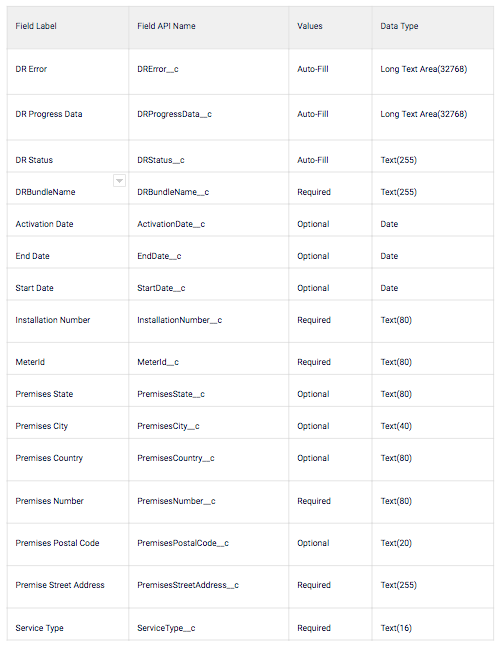
After the data is pushed with mapped fields to the Interface object the ApexTrigger will get triggered and the Apex jobs will run. These jobs are batch apex jobs which can be tracked under 'Apex Jobs' in Salesforce org. This will initiate the Data Mapper 'VPL-SAPISUPremiseMasterData-ENGY-104-1' to load the data into the following Domain objects.
- Premises
- Service Point
- Inventory Item
Once the Apex Job is successful, the data will be loaded into the main objects with the required fields filled.
Package Components
The process package includes these components:
Data Mapper Documents Apex Trigger Custom Object
- Interface SAP ISU Premises Master Data
- InterfacePremiseTechnicalMasterData
- Master Data Sync - VPL Documentation - Mapping Reference
- VPL-SAPISUPremiseMasterData-ENGY-104-1
