You are here:
Configure Your Grant Site for the Applicant and Grantee Support Agent
Register your Salesforce site domain, create the Grantmaking Experience Cloud site, and configure profile access and self-registration for grantseekers.
Required Editions
| Available in: Lightning Experience |
| Available in: Nonprofit Cloud for Grantmaking and Public Sector Solutions. View edition availability. |
| User Permissions Needed | |
|---|---|
| To create and configure an Experience Cloud site: | Create and Set Up Experiences system permission AND View Setup and Configuration system permission |
| To access and customize the Grantmaking Experience Cloud site template: | Grantmaking Manager permission set |
Before configuring the site, activate the Applicant and Grantee Support Agent. See Activate the Applicant and Grantee Support Agent.
-
Register your Salesforce site domain.
- From Setup, enter Sites in the Quick Find box, then select Sites under Sites and Domains.
- Click Register My Salesforce Site Domain and follow the prompts.
-
On the same Sites page, turn on Allow using standard external profiles
for self-registration, user creation, and login.
This setting is required for grantseekers to create their own accounts on your site.
-
Create the Grantmaking Experience Cloud site.
See Set Up a Grantmaking Experience Cloud Site for complete instructions.
-
Add the required profiles to the site's member list.
- From Setup, enter All Sites in the Quick Find box, then select All Sites under Digital Experiences.
- Click Workspaces next to your Grantmaking site.
- Click the Administration tile, then select Members.
-
Add the following profiles, or your own custom profiles, to the selected members
list.
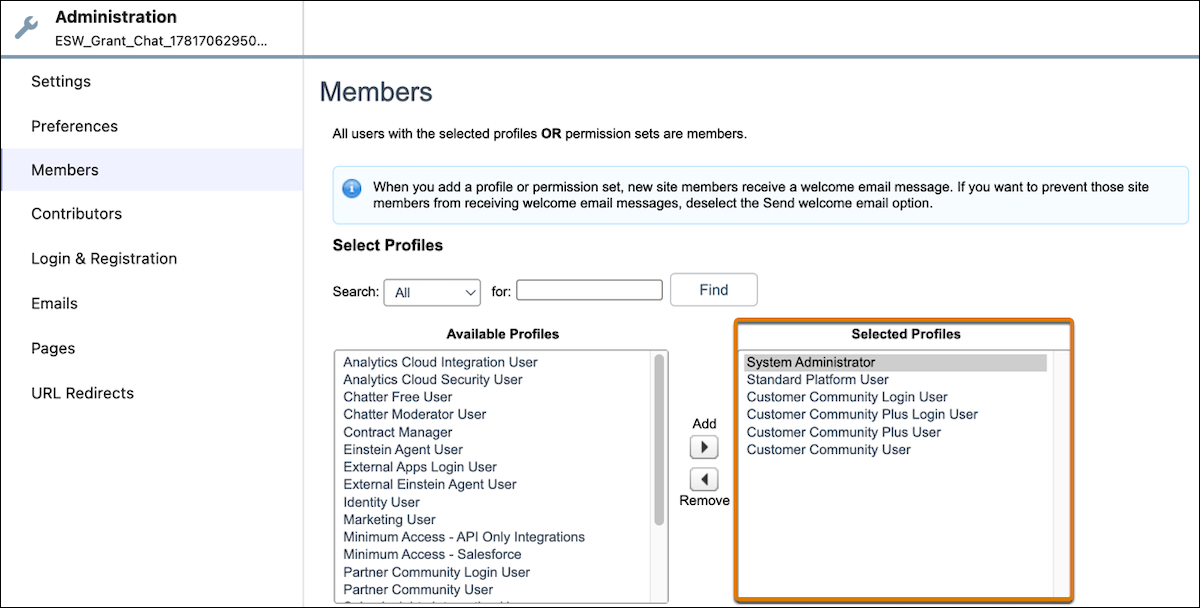
- System Administrator
- Standard Platform User
- Customer Community Login User
- Customer Community Plus Login User
- Customer Community Plus User
- Customer Community User
- Click Save.
-
Turn on self-registration for grant seekers.
- From Setup, enter All Sites in the Quick Find box, then select All Sites under Digital Experiences.
- Click Workspaces next to your Grantmaking site.
- Click the Administration tile, then select Login & Registration.
-
Under Registration Page Configuration, set the following values.
- Allow customers and partners to self-register: Enabled
- Profile: Select the profile you’d like to assign to users.
- Account: Leave empty.
- Click Save.
Did this article solve your issue?
Let us know so we can improve!
