Jos haluat peruuttaa käytäntöjä Käytännöt-käyttöliittymästä, avaa ensin Käytännöt-luettelosivu ja napsauta käytäntöä, jonka haluat peruuttaa.
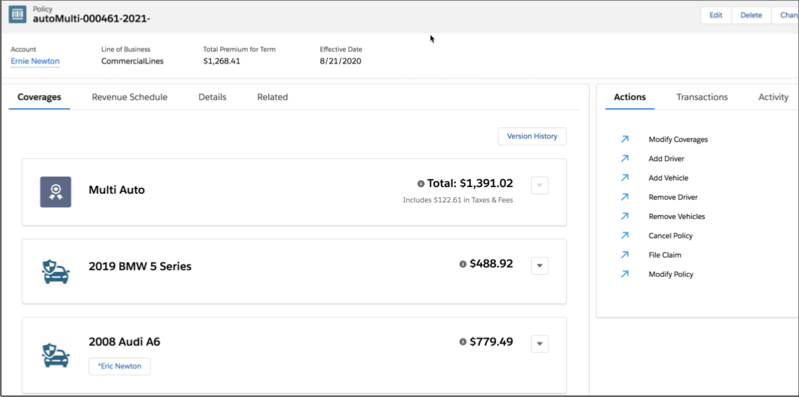
Napsauta Peruuta käytäntö.
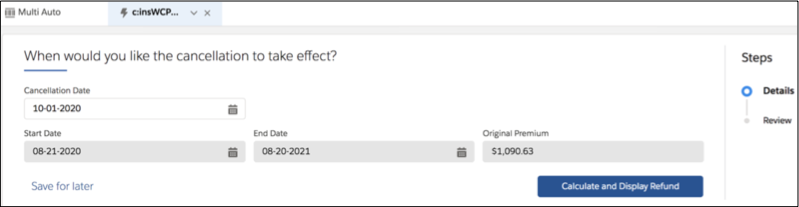
Syötä päivämäärä, jolloin haluat peruuttaa vakuutuksen, ja napsauta Laske ja näytä korvaus.
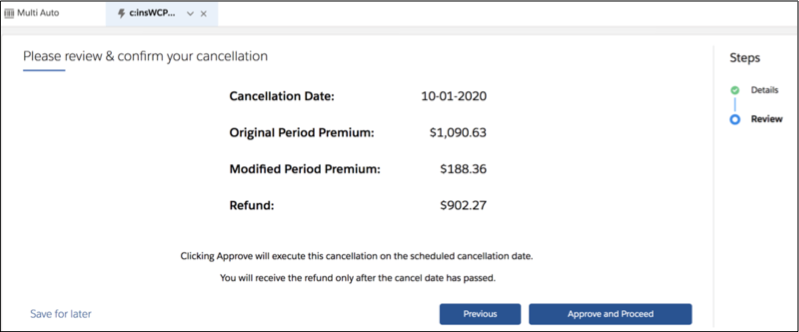
Kun napsautat Hyväksy ja jatka, voit siirtyä takaisin käytäntöjen sivulle, jolla on nyt määrittämäsi uusi päättymispäivä.
Ratkaisiko tämä artikkeli ongelmasi?
Anna palautetta, jotta voimme kehittyä!

Ladataan
Salesforce Help | Article
Cookie Consent Manager
General Information
Required Cookies
Functional Cookies
Advertising Cookies
General Information
We use three kinds of cookies on our websites: required, functional, and advertising. You can choose whether functional and advertising cookies apply. Click on the different cookie categories to find out more about each category and to change the default settings.
Privacy Statement
Required Cookies
Always Active
Required cookies are necessary for basic website functionality. Some examples include: session cookies needed to transmit the website, authentication cookies, and security cookies.
Functional Cookies
Functional cookies enhance functions, performance, and services on the website. Some examples include: cookies used to analyze site traffic, cookies used for market research, and cookies used to display advertising that is not directed to a particular individual.
Advertising Cookies
Advertising cookies track activity across websites in order to understand a viewer’s interests, and direct them specific marketing. Some examples include: cookies used for remarketing, or interest-based advertising.