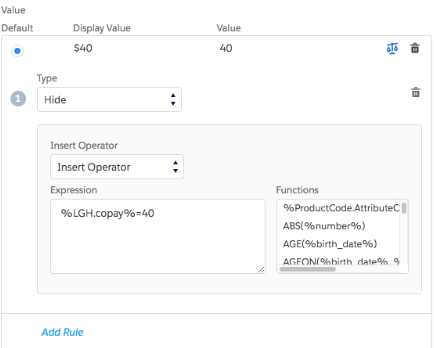
특성 값 규칙은 통화 및 텍스트 드롭다운과 같은 여러 개의 추가 값이 있는 특성에만 적용됩니다. 특성 값 규칙은 단일 특성의 특정 값에 적용됩니다.
다음과 같은 유형의 특성 값 규칙을 만들 수 있습니다.
숨기기
규칙이 true로 평가될 경우 사용자에게서 이 특성 값을 숨깁니다.
규칙 아이콘 색상은 특성에 규칙이 적용되었는지 여부를 나타냅니다. 특성 값 옆에 있는 규칙 아이콘이 검은색인 경우 정의된 규칙이 없습니다. 규칙 아이콘이 파란색인 경우 특성 값에 하나 이상의 규칙이 할당됩니다.
특성 값에서 규칙 아이콘을 클릭합니다.
규칙 추가 링크를 클릭합니다.
유형 필드에서 숨기기를 선택합니다.
식 필드에 규칙을 입력합니다.
예를 들어 Copay 특성(이 제품의 다른 특성)의 값이 40인 경우 $40의 특성 값을 숨기려고 합니다.
% 문자를 사용하여 변수를 만듭니다. 이 예제의 수식은 다음과 같습니다.
%productCode.attributeCode%="40"를 참조하세요.
대규모 그룹 건강 제품의 제품 코드가 LGH및 Copay의 특성 코드가 copay인 경우 식의 코드가 다음과 같이 표시됩니다.
규칙이 true로 평가되면 사용자에게 $40 특성 값이 숨겨집니다.
이 기사를 통해 문제를 해결했습니까?
개선을 위한 의견을 보내주세요.
로드 중
Salesforce Help | Article
Cookie Consent Manager
Cookie Consent Manager
General Information
Required Cookies
Functional Cookies
Advertising Cookies
General Information
We use three kinds of cookies on our websites: required, functional, and advertising. You can choose whether functional and advertising cookies apply. Click on the different cookie categories to find out more about each category and to change the default settings.
Privacy Statement
Required Cookies
Always Active
Required cookies are necessary for basic website functionality. Some examples include: session cookies needed to transmit the website, authentication cookies, and security cookies.
Functional Cookies
Functional cookies enhance functions, performance, and services on the website. Some examples include: cookies used to analyze site traffic, cookies used for market research, and cookies used to display advertising that is not directed to a particular individual.
Advertising Cookies
Advertising cookies track activity across websites in order to understand a viewer’s interests, and direct them specific marketing. Some examples include: cookies used for remarketing, or interest-based advertising.