Loading
Business Rules Engine
Índice de materias
Seleccionar filtros

          No hay resultados
          No hay resultados
          Estas son algunas sugerencias de búsqueda

          Compruebe la ortografía de sus palabras clave.
          Utilice términos de búsqueda más generales.
          Seleccione menos filtros para ampliar su búsqueda.

          Buscar en toda la Ayuda de Salesforce
          List Variables in Expression Sets and Subexpressions

          List Variables in Expression Sets and Subexpressions

          With the integration of Context Service with Business Rules Engine, you can use attribute tags from context definitions as list variables in expression sets and subexpressions.  An expression set or subexpression is context-aware if it is related to a context definition. When you create an expression set, select a context definition that’s available in your Salesforce org to associate the definition with the expression set. When you open a version of the expression set in Expression Set Builder, you see the context’s tags as list variables in the Resources list in the builder.

          Required Editions

          Available in: Lightning Experience
          Available in: Enterprise, Unlimited, and Developer Editions for clouds that have Business Rules Engine enabled

          Context definitions are comprehensive, custom data structures that have nodes and attributes. Nodes are hierarchical objects, and attributes are fields in such objects. Nodes and attributes can be mapped to sObjects and their fields. Each node and attribute can have a tag, which abstracts the underlying data structure and enables expression sets to directly point to the attribute and use its data at run time.

          When an expression set that uses list variables runs, the results of the expression set are written back to the context definition that the list variables belong to.

          Considerations for Using List Variables in Expression Sets

          • A context definition’s tags can't be used as list variables in an expression set if the context definition is inactive. Only active context definitions appear in the Context Definition field at the time of creating an expression set.
          • Only the nodes and attributes that have tags appear as list variables in Expression Set Builder.
          • Attribute tags under the nodes can be used as list variables in expression set version steps.
          • Node tags can’t be used as list variables in step elements other than business elements.
          • List variables can’t be used in an expression set version that uses object field aliases.

          Considerations for Using Context-aware Subexpressions

          • Context-aware expression sets can include both context-aware and plain subexpressions.
          • Context-aware subexpressions must use the same context as their parent expression set.
          • Subexpressions in a list group within a context-aware expression set must be context-aware.
          • In a list group, filtered values are passed to subexpressions, with filters applying to context tags at the same or lower hierarchical level than the list filter.
          • If the subexpression has multiple levels of nesting, only the filter from the immediate parent expression set applies.
          Example
          Example A Salesforce org has an active context definition that’s named Video.Image showing context nodes, attributes, and tags.

          Here, Reel (1) and Metadata (2) are nodes in the context definition. The tag for the Reel node is Video_Reel, and all attributes in this node have their corresponding tags (3).

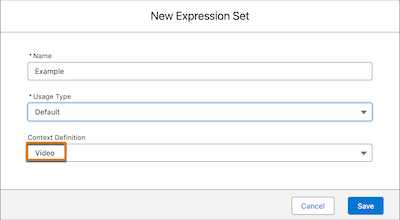
          You created an expression set named Example that uses the Video context definition.

          New expression set creation window that shows the selected context definition.

          You open a version of the Example expression set in Expression Set Builder. The context definition’s tags are listed under Resource Manager and are available to be used as list variables in the expression set version.

          Resource Manager showing context definition tags
           
          Cargando
          Salesforce Help | Article