You are here:
Integrate with MuleSoft Direct for Media Cloud
MuleSoft Direct for Media Cloud offers integration applications and connections for the Advertising Technology ecosystem. For example, you can use MuleSoft Direct for Media Cloud to integrate your external ad server with Advertising Sales Management.
MuleSoft Direct for Media Cloud is an integration framework for Media Cloud, its applications, and Salesforce's suite of media industry solutions. MuleSoft Direct for Media Cloud includes:
- The MuleSoft Direct integration platform
- Advertising ecosystem API definitions, integrations, and connectors
- Example integrations and comprehensive documentation to help you develop your own integrations
The MuleSoft Anypoint Exchange marketplace supports APIs, API groups, API spec fragments, custom assets, examples, GraphQL APIs, and integration assets such as connectors, policies, RPA assets, rulesets, and templates. Use Exchange to discover, share, and incorporate assets and resources into your applications. Exchange helps you create API developer portals, and view and test APIs, simulate sending data to APIs by using the mocking service, create assets, and use API Notebooks to describe and test API functions.
The following diagram gives an overview of how Advertising Sales Management communicates with an external ad server through MuleSoft APIs.
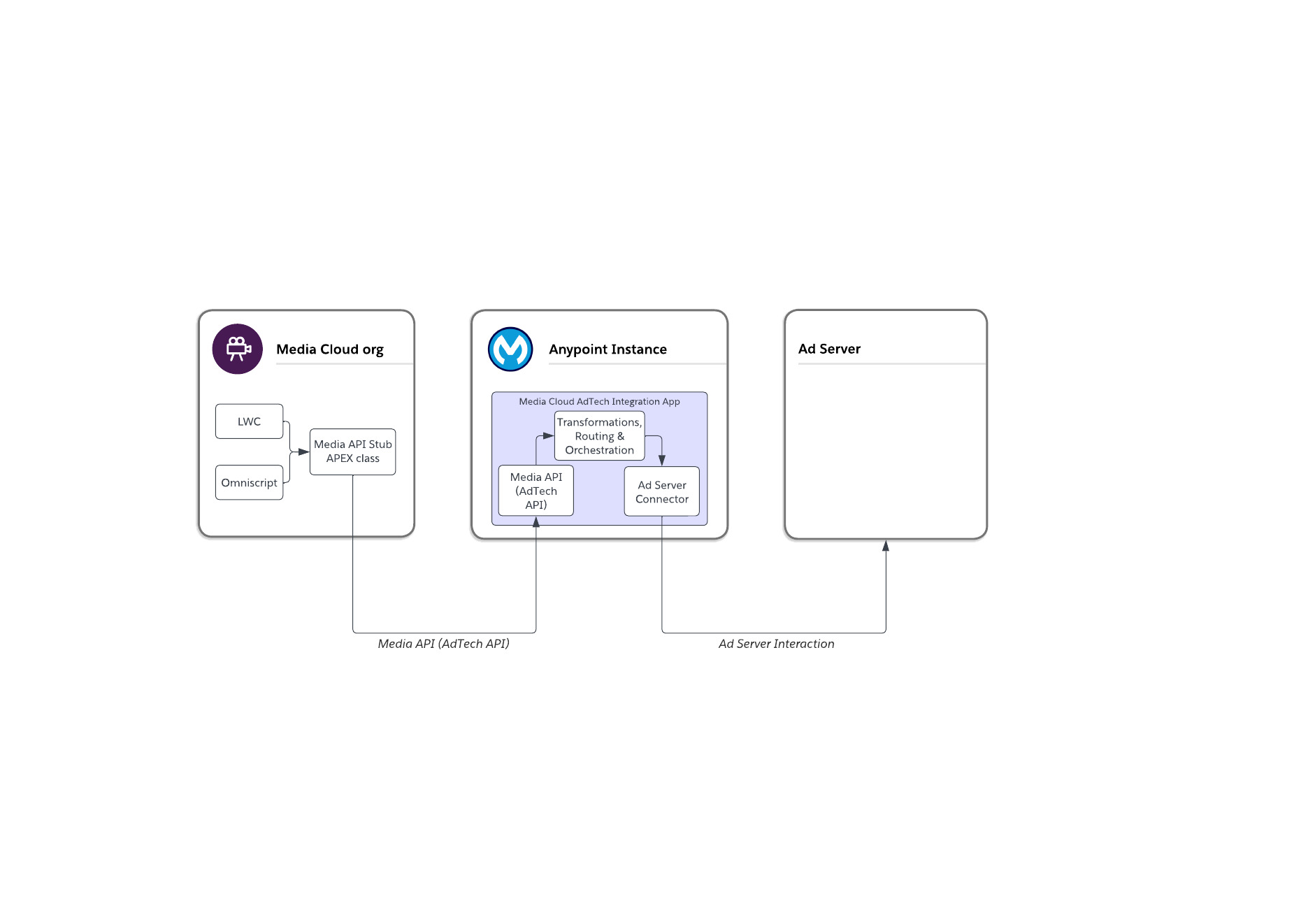
When you submit an order from your Advertising Sales Management org, you trigger the Media API ( AdTech API), which sends the information to your MuleSoft Anypoint Instance. The request is then transformed, and the Ad Server API Call is triggered, which passes the information from the Ad Server Connector in your Anypoint instance to the external ad server.
See Also
To integrate MuleSoft Direct with Media Cloud, follow these instructions:
- Set Up an Orchestration Plan for Ad Server Integration by Using MuleSoft
When the orders are placed in Advertising Sales Management, you need a reliable system to create and update these orders on the Ad Server. Use an Orchestration Plan, which is a structured workflow that automates the creation and update of orders on the Ad Server. - Enable Custom Settings for MuleSoft
Custom settings are similar to custom objects. Application developers can create custom sets of data and associate custom data with an organization, profile, or specific user. All custom settings data is exposed in the application cache. This enables efficient access without the cost of repeated queries to the database. - Enable the MuleSoft Application
After you have created the MuleSoft Custom Setting, enable the MuleSoft Application in your Advertising Sales Management org. - Integrate Your External Ad Server with Advertising Sales Management
Complete the following tasks to set up your external ad server with MuleSoft Direct for Media Cloud and Advertising Sales Management. Out of the box, MuleSoft Direct for Media Cloud supports integration with external ad servers such as Google Ad Manager, xG Linear, FreeWheel, and Triton Digital.
