You are here:
How Colors Work in the Advertising Inventory Calendar Cells
Each cell in the advertising inventory calendar uses color to show how much you've booked a slot's inventory. Media planners can see at a glance whether inventory is available to sell, filling up, or fully committed without opening the cell.
| Available in: Lightning Experience |
| Available in: Enterprise, Performance, and Unlimited editions with Media Cloud- Growth or Media Cloud- Advanced |
The progress fill shows the booked proportion, and as bookings increase, the fill covers more of the cell. The colors apply for the calendar views of all media types. Admins configure the colors and their percentage ranges in the Ad Availability View Configuration record. They can adjust them to match your company's conventions.
The calendar calculates the booking percentage as booked capacity divided by total capacity for the slot. Each band maps to a status and a configurable color.
| Booking Level | Status | Default Color |
|---|---|---|
| Up to 30% | Open | Green (#2E844A) |
| 31–70% | Partially Booked | Gray (#757575) |
| 71–100% | Fully Booked | Red (#BA0517) |
| Over 100% | Overbooked | Teal (#34EBD2) |
When an ad space has no capacity set up, the cell shows Slots Not Available.
These examples show how a cell's fill changes as bookings increase:
- 0% booked (clearly available): No progress bar fill.
- 30% booked (available, but filling): Progress bar in green filled to 30%.
- 50% booked (available, but filling): Progress bar in gray filled to 50%.
- 85% booked (booked): Progress bar in red filled to 85%.
- 100% or more booked (overbooked): Full progress bar in teal.
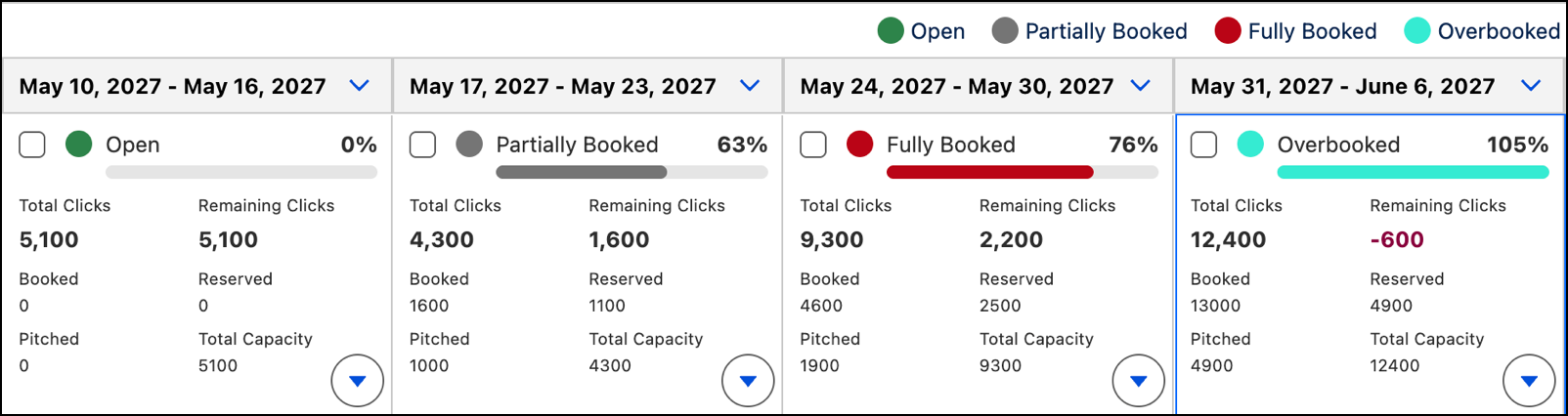
Each cell in the inventory calendar grid displays a colored dot next to its label that matches the cell's progress bar. Because this dot remains visible even when the progress bar is empty, you can quickly determine a cell's status at a glance based entirely on its color.
For information on configuring colors, see Advertising Inventory Calendar Setup with Ad Availability View Configuration.
