You are here:
Ad Server Integration with Dynamic Revenue Orchestrator
System integrators can use the capabilities of Dynamic Revenue Orchestrator (DRO) to create a process that automatically create and amend order and order line items in the publisher's external ad server instance. System integrators can create a button on the Order page layout that enables sales reps to send order information and enables operations specialists to send amended line item information to the external ad server instance.
Required Editions
| Available in: Lightning Experience |
| Available in: Enterprise, Performance, and Unlimited editions with Media Cloud - Advanced |
Dynamic Revenue Orchestration Setup
Before system integrators can use Dynamic Revenue Orchestrator to configure processes, system integrators must work with the admin to setup Dynamic Revenue Orchestrator in Salesforce. See:
Integration Definitions for Ad Sales Business Tasks
System integrators must first decide which tasks that they you want to automate using Dynamic Revenue Orchestrator. Based on the list of tasks to automate, the system integrator must work with the admin to create standard integration definitions for each task. The integration definitions connect each task with the parent integration definition that makes callouts to the publisher's external ad server. The child integration definitions for each task must use the AdServerActionBasedIntegrationProvider standard provider.
To learn about the parent integration definition, see Integration Definition for Advertising Sales Management. Here's the required configuration of the child integration definitions based on the task that they represent:
| Task | Configuration |
|---|---|
| Create order |
|
| Create line items |
|
| Approve order |
|
| Pause order |
|
| Update line item |
|
| Resume order |
|
| Delete order |
|
| Archive order |
|
Workspace for Ad Sales Business Processes
System integrators can create a fulfillment workspace for all the tasks related to sending advertisement campaign order data to external ad server instances. The workspace can consist of step groups. Step groups represent sequential workflows such as creating orders, preforming order actions, and updating line items in case of order amendment. See Create a Workspace Fulfillment.
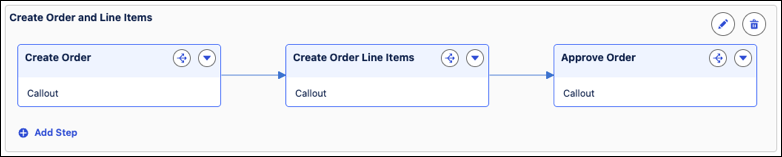
Step Group to Create Orders in External Ad Servers
In the step group for sending order and ad placement configuration data to external ad servers, create these dependent steps.
- To create orders
- To create line items in orders
- To approve orders
For the step group, system integrators can configure a product fulfillment scenario. The fulfillment scenario decides which orders are eligible for the step group. For the step group that creates, you can select Add as the action. See:

Step Group for Amended Orders in External Ad Servers
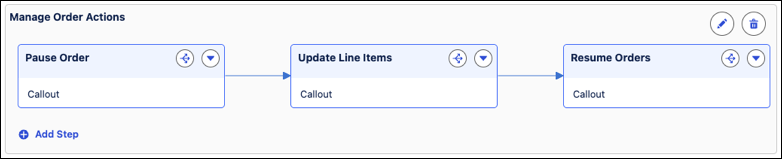
In the step group to manage tasks related to order amendments, create these dependent steps.
- To pause orders
- To update line items in orders
- To resume orders
To ensure that the step group is only executed for amended orders, select Amend as the action for the step group's fulfillment scenario.
Step Groups for Order Management in External Ad Servers
The workspace for the ad sales business processes can consist of another step group that consists of independent steps that support tasks related to managing orders in the external ad server such as deleting and archiving orders.
Quick Action to Submit Orders to Dynamic Revenue Orchestrator
Admins can create a flow with the Submit Order action to automate the process of submitting activated orders to the workspace for advertisement campaign orders and associate the flow with a quick action on the Order page layout. See Submit Order Action in Revenue Cloud Developer Guide.
Information Sent to Ad Servers by Dynamic Revenue Orchestrator
See Outbound Integration Definition Resources in Advertising Sales Management to learn about the structure in which advertising campaign order data is sent to external systems.
