You are here:
Deploy Advertising Sales Management Winter '25
If you're a new customer deploying Advertising Sales Management Winter '25, complete these steps.
 This is an Advertising Sales Management on Managed Package feature. For Advertising Sales
Management on Salesforce Platform, see Advertising
Sales Management on Salesforce Platform.
- Prepare to Deploy Advertising Sales Management Winter '25
Complete these prerequisite steps to set up your target org before you deploy Advertising Sales Management Winter '25. - Download Advertising Sales Management Static Resource Files for Winter '25
Download and reorganize the static resource files into folders before you use IDX Workbench to deploy the Advertising Sales Management components to your target org. - Deploy Advertising Sales Management Winter '25 Components
After you download the Advertising Sales Management static resource components, use IDX Workbench to deploy them to your target org.
Prepare to Deploy Advertising Sales Management Winter '25
Complete these prerequisite steps to set up your target org before you deploy Advertising Sales Management Winter '25.
This is an Advertising Sales Management on Managed Package feature. For Advertising Sales
Management on Salesforce Platform, see Advertising
Sales Management on Salesforce Platform.
| REQUIRED EDITIONS |
|---|
| Available in: Lightning Experience |
| Available in: all editions |
| REQUIRED USER PERMISSIONS | |
|---|---|
| To access Media Cloud advanced features: | MediaCloudPlus Runtime |
| To create, read, update, and delete Flexcards: | Omnistudio Admin |
Before you deploy Advertising Sales Management Winter '25, perform these steps.
-
If you haven't signed up for automatic upgrades, then manually upgrade your target org to the latest Communications, Media, and Energy managed package.
You can view the latest release version in the Industries Communications, Media, and Energy Release Summary.
-
Install the Alpha version of IDX Workbench.
 Note Salesforce recommends that you use MacOS with the Alpha version of IDX Workbench.
- Make sure that your user profile has all the required permission sets and permission set licenses to complete the Advertising Sales Management deployment.
- Download the Advertising Sales Management Winter '25 YAML file. The YAML file contains the list of Advertising Sales Management core components for this release.
- Manually update the Remote Site Settings for Flexcards.
- (Optional) Set up advanced visualizations for account relationships. See Actionable Relationship Center (ARC) in Media Cloud.
Download Advertising Sales Management Static Resource Files for Winter '25
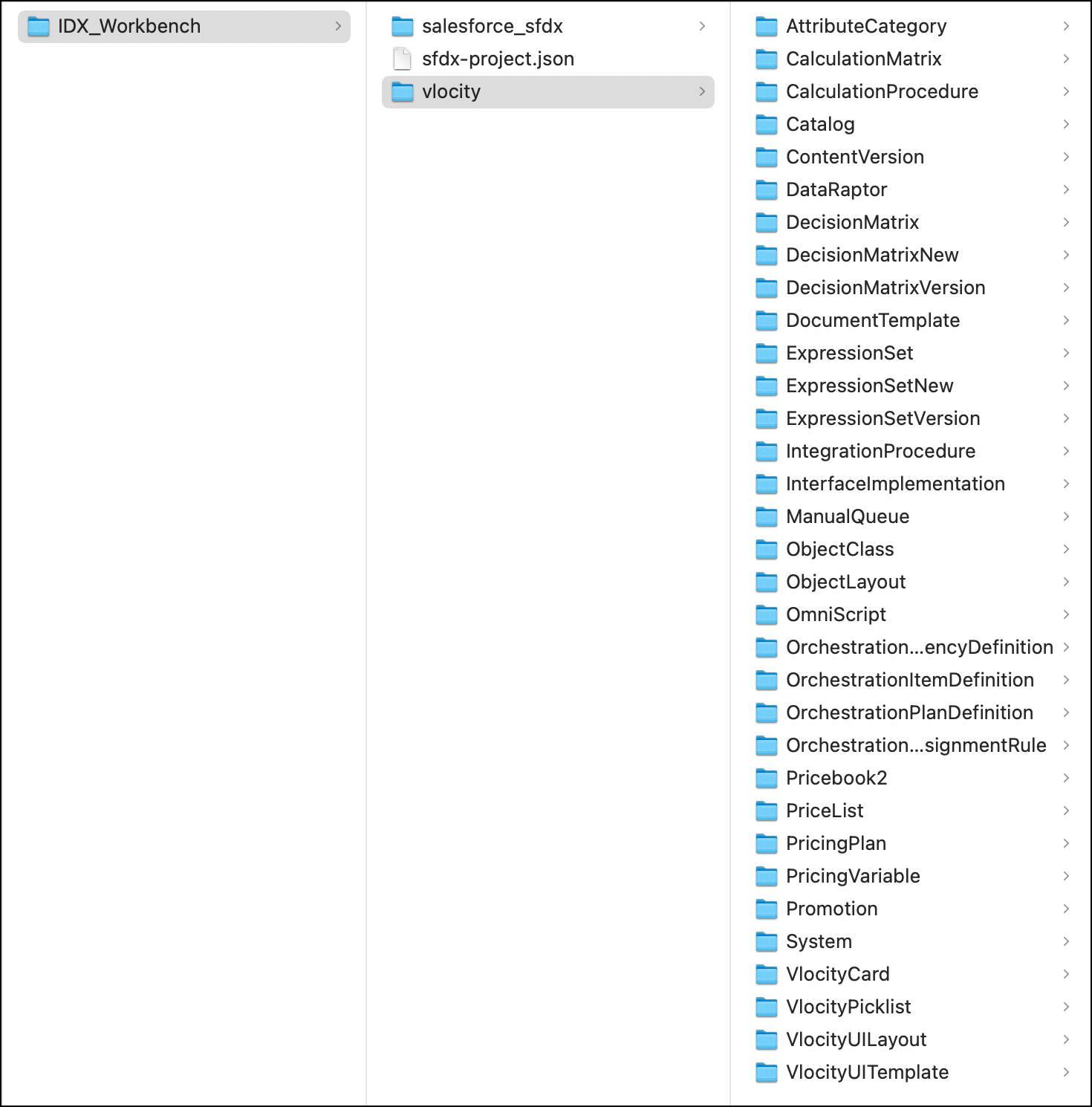
Download and reorganize the static resource files into folders before you use IDX Workbench to deploy the Advertising Sales Management components to your target org.
Deploy Advertising Sales Management Winter '25 Components
After you download the Advertising Sales Management static resource components, use IDX Workbench to deploy them to your target org.
This is an Advertising Sales Management on Managed Package feature. For Advertising Sales
Management on Salesforce Platform, see Advertising
Sales Management on Salesforce Platform.
- In the IDX Workbench application, add the IDX_Workbench folder from your local system as a new repository.
- Select the newly created repository as the source.
- Set up the target org as the org that you want to upgrade to the latest version.
- After you select the repository in IDX Workbench, go to the repository path.
- To view hidden files, press Command + Shift + . on your Mac.
- Move the YAML file that you downloaded earlier into the hidden .vlocity folder in the repository.
- Go back to IDX Workbench and click Cancel.
- Click Edit and in Configure Workspacen , select the repository.
- In Project, select the YAML file that shows up in the list, and click Save.
-
Select All changed items, and then from the Actions menu, click Migrate with Dependencies.
Deploy all the components in this order:
- Integration Procedures and DataRaptor
- RecordTypes, Fields, CompactLayouts, ListViews, StandardValueSets, CustomLabels, and Custom Metadata.
-
VlocityPicklist and ObjectClass
Note Before you deploy ObjectClass components, run the Install Default Vlocity Objects and Layout EPC job.
- AttributeCategory and ObjectLayout
-
Vlocity Cards
Before you activate the Flexcards, update the Flexcard Object's default Lightning record page to access the Flexcard Designer. Activate all the deployed Flexcards. If you see an activation error, and if the error message indicates any missing dependent Flexcards, first activate the dependent Flexcard before activating the current one.Check whether all the Flexcards listed in the YAML file are active. If any of the Flexcards isn't active, then activate only those cards.Note If Omnistudio is enabled in your Salesforce org, use Omnistudio Build Tool to deploy Flexcards.
-
Omniscripts
After the migration is complete, deactivate the vplAdsMediaPlanDetails Omniscript. In the Outline, Add Placement, and View Summary steps, for vplAdsDisplayTotalCalculatedValue and vplAdsMediaPlanOsNavigation Lightning Web Components, select the option with the namespace vlocity_cmt__. Reactivate the Omniscript.
- PricingPlan, Pricebook2, and PricingVariable
- System and catalog
- VlocityUITemplate, VlocityUILayout
-
Email, reports, and reportTypes
Note Before you deploy reports, enable Translation Language Settings from Setup in your org.
- WebLinks and QuickActions
-
FlexiPages and layouts
Before you deploy FlexiPages, for the Status field in the contract object, create a picklist with the values Awaiting Approval, Negotiating, and Rejected Internally. See Add Contract Status Picklist Values for CME.Note Before you deploy FlexiPages, ensure that you create the KPI Summary Lightning page.
When you deploy FlexiPages, if you see an error message related to Flexcards, reactivate the Flexcard specified in the error message, and try again.
- Tabs, Triggers, Static Resources
- OrchestrationPlanDefinition
-
OrchestrationItemDefinition
Note Before you begin to deploy OrchestrationItemDefinition, manually create the Data Mapper bundle in your org.
If you face an error when you deploy OrchestratinItemDefinition components, then open GAMArchiveLineItemService_DataPack.json from the OrchestrationItemDefinition, and set the value of %vlocity_namespace%__RetryPolicy__c to null for those particular components.
-
OrchestrationDependencyDefinition
Deploy these OrchestrationDependencyDefinition components in this order (without dependencies).Note Deploy all the remaining OrchestrationDependencyDefinition components together.
GAMPauseOrder - GAMUpdateOrderLineItemService
GAMPauseOrder - GAMAddNewLineItemService
GAMOrderService - GAMOrderLineItemService
GAMOrderLineItemService - GAMLineItemCreativeAssociationService
GAMLineItemCreativeAssociationService - GAMApproveOrderService
GAMApproveOrderService - GAMActivateOrderLineItemService
GAMAddNewLineItemService - GAMAddLineItemCreativeAssociationService
GAMAddLineItemCreativeAssociationService- GAMActivateNewLineItemService
GAMActivateorderlineitemservice - GamEnd
GAMActivatenewlineitemservice - GamResumeorder
GAMStart - GAMPauseorder
GAMStart - GAMOrderService
-
OrchestrationQueueAssignmentRule and ManualQueue
Note Before you deploy the OrchestrationQueueAssignmentRule components, configure the Order Management (OM) and OM Plus Interfaces.
- Document Template
-
Flow and Workflows
Before you deploy workflows, update the Workflow datapacks with valid usernames in the assignedTo and recipient tags. These users must exist in your Salesforce org. The Contract Workflow datapack contains two alert flows, which contain three recipient users. Enter a unique username for each recipient.Before you deploy workflows, for the Tark field in the quote workflow, add the picklist value Not Started.
-
Aproval Process
When you deploy Approval Processes, replace the name of the user in PartyRelationship__c.Party_Relationship_Mapping_Approval_Flow.approvalProcess-meta and Account.PartnerAccountApprovalFlow.approvalProcess-meta with a valid user that exists in your Salesforce org.Note If you deployed documentation templates and your flows and approval processes do not work as expected, then open the deployed templates and activate them.
-
Interface Implementations
Note To disable the rounding off feature in your Standard Cart API enabled orgs, activate the CpqPricingVariableCalcHook interface implementation.
- Deploy all expression sets and decision matrices.
- Edit Flexcard parameters, to ensure that the parameters are in the correct sequence.
- If necessary, set up Actionable Relationship Center in Media Cloud.
- For optimized performance, enable explicit pricing.
- If necessary, enable the optimized fetch products feature.
-
Set the appropriate field level security for all the fields related to these objects.
- Ad Buy Server Account
- Ad Creative Size Type
- Ad Demo Code
- Ad Opportunity
- Ad Order Item
- Ad Order Item Creative Size Type
- Ad Order Item Creative Size Type
- Ad Order Line Ad Target
- Ad Order Item Units Split
- Ad Product Target Category
- Ad Quote Ad Quote Line
- Ad Quote Line Ad Target
- Ad Quote Line Creative Size Type
- Ad Quote Line Hiatus
- Ad Quote Line Units Split
- Ad Server
- Ad Server Account
- Ad Server User
- Ad Space Creative Size Type
- Ad Space Group Member
- Ad Space Specification
- Ad Spec Media Print Issue
- Ad Target Category
- Ad Target Category Segment
- Media Channel
- Media Content Title
- Media Print Issue
- Assign Lightning pages in your target org.
- Assign page layouts in your target org.
- Update profile settings.
- Set up pagination.
- When a quote is converted to an order, the data from the quote, quote line item, and ad quote line item must be copied to the order, order line item, and ad order line item, respectively. To ensure the mapping between these fields, see Maintain Advertising Sales Management Object and Field Mapping.
- Disable Lightning Web Security.
- Create RollbackIPChanges and RollbackDRChanges, with values set to true, from Omni Interaction Configuration under Setup.
- If necessary, enable support for associated media bundles.
- If necessary, create sample product and price data in your Advertising Sales Management org.
