You are here:
Advertising Sales Management Error Message Handling Framework
The Advertising Sales Management error message handling framework for line items shows messages, such as Success, Failure, or Warning, as the response for all Integration Procedures called from the Lightning web components. These messages appear as toast messages.
 This is an Advertising Sales Management on Managed Package feature. For Advertising Sales
Management on Salesforce Platform, see Advertising
Sales Management on Salesforce Platform.
| REQUIRED EDITIONS |
|---|
| Available in: Lightning Experience |
| Available in: all editions |
| REQUIRED USER PERMISSIONS | |
|---|---|
| To access Media Cloud advanced features: | MediaCloudPlus Runtime |
Use the error message handling framework to customize the messages and to define whether your message is a Success, Failure, or Warning message.

Validation Checks and Custom Error Messages for Line Items
You can add validation checks to show custom error messages for line items.
This is an Advertising Sales Management on Managed Package feature. For Advertising Sales
Management on Salesforce Platform, see Advertising
Sales Management on Salesforce Platform.
To extend the pagination response for line items, create a new class or use the existing implementation class. After you add the class, call the class from all the Integration Procedures that include a call to the pagination service. This screenshot shows an Integration Procedure setup to include DaypartData for the extension service.
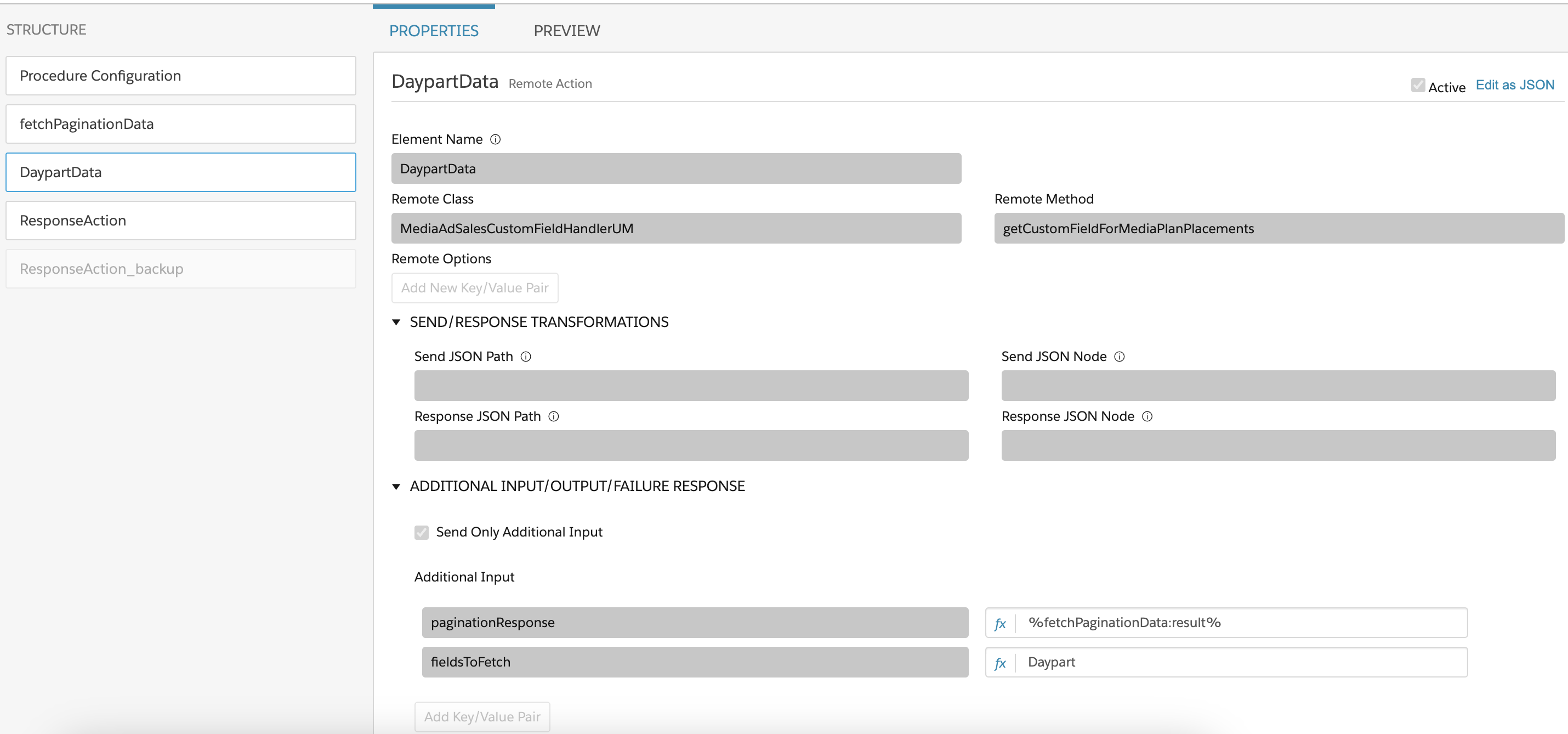
The Integration Procedures vary based on the operation to be carried out. For example, in the Radio media type, modify these integration procedures.
-
Add: sfiAdsRadioAddPlacement
-
Update: sfiAdsUpdateRadioLineItems
-
Clone: sfiAdsRadioClonePlacement
-
Configure flow: sfiAdsGetMediaPlanPlacements
To make sure that the grid consistently shows data for these custom fields, you must apply these changes consistently across all Integration Procedures where the pagination service is invoked.
Because validation logic is integrated with the GET call in the specified class, you don't need to clear the error message until you want to persist the error message to a field.
Persist an Error Message on a Line Item
In the Advertising Sales Management grid, you can retain and persist an error message linked to a specific line item. You can show this error message in the pagination service based on the item’s state, rather than inspecting all line items individually every time.
This is an Advertising Sales Management on Managed Package feature. For Advertising Sales
Management on Salesforce Platform, see Advertising
Sales Management on Salesforce Platform.
When you retain and persist an error message on the grid, it also checks if the entire cart has any error messages, beyond the messages that are visible on the current page.
- From Setup, click Object Manager.
- Click Ad Quote Line from the list.
- Click Field & Relationships.
- Create a custom field (Messages) with a Text Area (Long) data type.
- From Settings, click Developer Console.
- Create a custom Apex class that contains validation checks.
- Add this custom class to the integration procedure associated with operations that need checks such as Add, Update, Clone, or Configure flow.
-
When you receive the message for population, apply this message to the newly added custom field on the Ad Quote Line.
Note If you don't see an error message after the validation checks, update this field to null.
- In the pagination response, populate the adQlidToErrorMap map and incorporate it into the attributeMessages node.
The custom error messages persist and appear next to the corresponding line items in the grid.
