You are here:
Deploy Expression Sets and Decision Matrices for Advertising Sales Management Upgrade
Manually download and deploy expression sets and decision matrices to your target org.
 This is an Advertising Sales Management on Managed Package feature. For Advertising Sales
Management on Salesforce Platform, see Advertising
Sales Management on Salesforce Platform.
| REQUIRED EDITIONS |
|---|
| Available in: Lightning Experience |
| Available in: All Editions |
| REQUIRED USER PERMISSIONS | |
|---|---|
| To access Media Cloud advanced features | MediaCloudPlus Runtime |
Before you begin:
-
Download the Expression Set and Decision Matrix ZIP file. The link to the file is given in the table below.
-
Download and expand the Decision Matrix CSV ZIP folder, to get the Decision Matrix CSV file. The link to the file is given in the table below. The CSV file has data rows for the sample data available in the org. You can update the rows according to the requirements in your target org.
This table contains the links to the Expression Sets and Decision Matrices ZIP folder and the Decision Matrix CSV ZIP folder for each release. Click the appropriate link to download the files for your version of Advertising Sales Management.
| Advertising Sales Management Release | Download Link |
|---|---|
| Advertising Sales Management Winter '25 | Advertising Sales Management Winter '25 Expression Sets and Decision Matrices ZIP folder Advertising Sales Management Winter '25 Decision Matrix CSV ZIP folder If you're upgrading Advertising Sales Management from Summer '24 to Winter '25, delete all older expression sets and decision matrices from this file, and retain only the decision matrices and expression sets that are specific to this release. These decision matrices and expression sets are new in this release:
These decision matrices and expression sets have been updated in this release:
Redeploying updated expression sets and decision matrices could override any customizations you've made to these components in your org. To preserve your customizations, Salesforce recommends that you don't redeploy these components. Instead, manually add the new columns. |
| Advertising Sales Management Summer '24 | Advertising Sales Management Summer '24 Expression Sets and Decision Matrices ZIP folder Advertising Sales Management Summer '24 Decision Matrix CSV ZIP folder Delete all expression sets and decision matrices from this file except AdSalesNodeNameToEntity and AdSalesNodeNameToEntityMap. |
| Advertising Sales Management Spring '24 | Advertising Sales Management Spring '24 Expression Sets and Decision Matrices ZIP folder Advertising Sales Management Spring '24 Decision Matrix CSV ZIP folder |
Complete these steps to deploy expression sets and decision matrices in your target org.
- Use Salesforce Workbench Application to deploy the Expression Sets and Decisions Matrices ZIP folder. Ensure that you've selected the Ignore Warning, Rollback On Error, and Single Package parameters. Select None for Testing, and click Deploy.
- in your Advertising Sales Management org, go to the Decision Matrix to be updated, and open the latest Decision Matrix version under Related.
- Click Upload CSV File, and select the Decision Matrix CSV file you'd downloaded.
-
Set the highest rank, and activate the Decision Matrix version.
 Note Similarly, set the highest rank for the expression set, and activate it.
-
In MediaPlan_Grid_Configuration_New_Quote expression set you've deployed, map the lookup table variables to a local resource list or list variables.
- From the App Launcher, find and select Expression Sets.
- Select the expression set, and open the latest version.
-
For each lookup table within the expression set, click Map Variable.
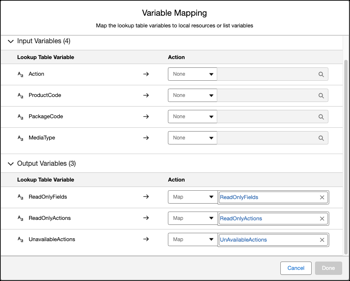
- Define the variable mapping, and save your changes.
