Konfigurera autentiseringsuppgifter för objekthierarkimappning
Autentiseringsuppgift används för att specificera URL för ett anrops slutpunkt och de autentiseringsparametrar det behöver i en definition. Uppdatera autentiseringsuppgifterna för den anslutna appen för mappning av objekthierarki.
Versioner som krävs
Tillgängliga i: Enterprise, Unlimited och Developer Editions.
Användarbehörigheter som krävs för att
Skapa, redigera eller ta bort inloggningsuppgifter:
Anpassa program
I Inställningar, i rutan Snabbsökning, skriv Säkerhet och välj sedan Autentiseringsuppgifter.
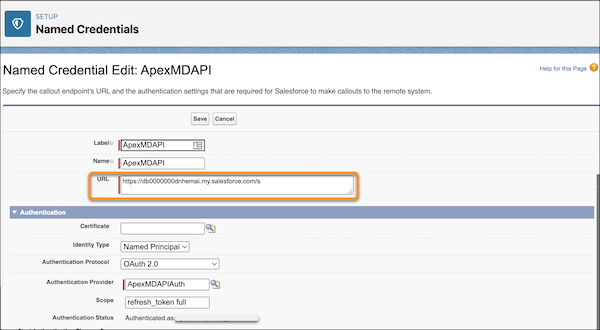
Klicka på Redigera i snabbåtgärdsmenyn bredvid ApexMDAPI.
Uppdatera URL:en så att den matchar Callback-URL:en för den anslutna appen ApexMDAPIApp.
Klicka på Spara.
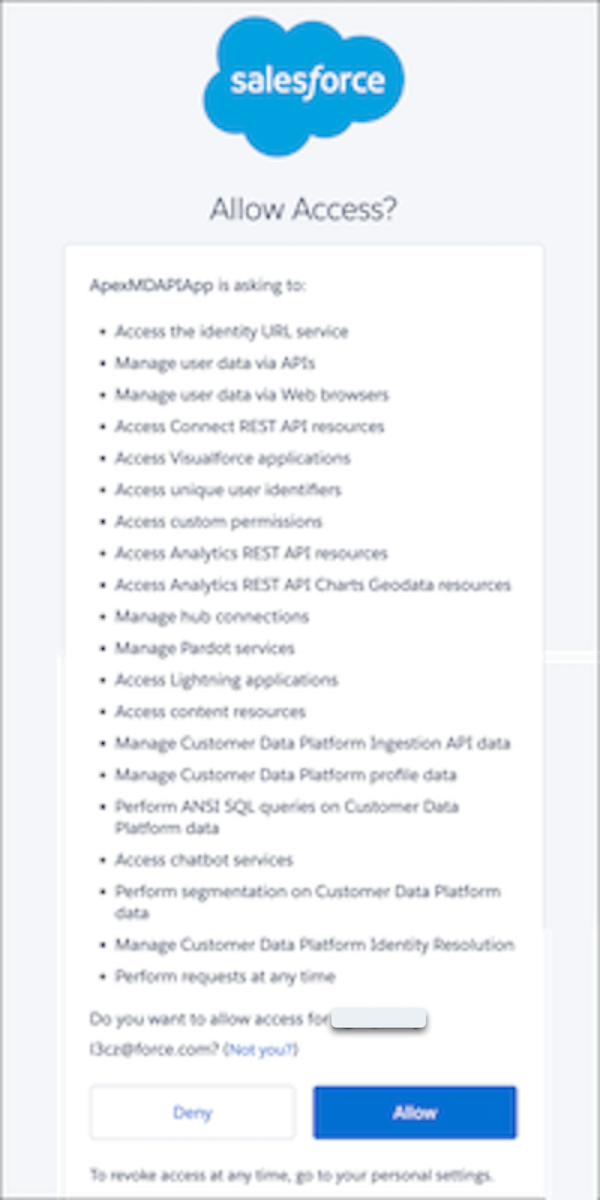
För att slutföra konfigurationen av autentiseringsuppgiften, ange ditt användarnamn och lösenord för Salesforce.
Klicka på Tillåt.
Den anslutna appen Objekthierarkimappning är nu redo att användas.
We use three kinds of cookies on our websites: required, functional, and advertising. You can choose whether functional and advertising cookies apply. Click on the different cookie categories to find out more about each category and to change the default settings.
Privacy Statement
Required Cookies
Always Active
Required cookies are necessary for basic website functionality. Some examples include: session cookies needed to transmit the website, authentication cookies, and security cookies.
Functional Cookies
Functional cookies enhance functions, performance, and services on the website. Some examples include: cookies used to analyze site traffic, cookies used for market research, and cookies used to display advertising that is not directed to a particular individual.
Advertising Cookies
Advertising cookies track activity across websites in order to understand a viewer’s interests, and direct them specific marketing. Some examples include: cookies used for remarketing, or interest-based advertising.