You are here:
Register Assets by Using Product Registration Prebuilt App
Sales and service representatives can register assets and assign the assets warranties by using the Product Registration prebuilt app. Use the prebuilt app in the Salesforce mobile app or in the Salesforce desktop site.
Required Editions
| Available in: Enterprise, Unlimited, and Developer Editions |
| User Permissions Needed | |
|---|---|
| To use the Product Registration prebuilt app |
|
- Open the Salesforce mobile app.
- Tap Menu, and then tap Product Registration.
-
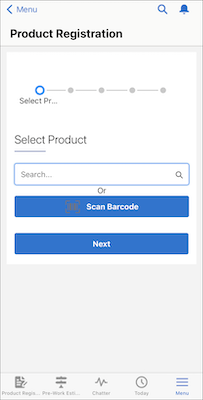
To select the product, do one of these.
- Search for the product by entering the product code or product name, and select the product.
- Tap Scan Barcode, scan the product barcode, and select the product.
-
Specify the serial number, date of purchase, and date of installation of the asset.
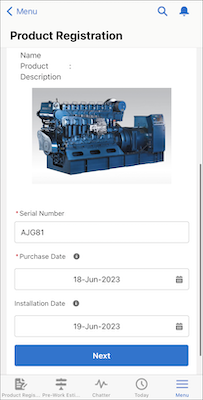
- Tap Next.
-
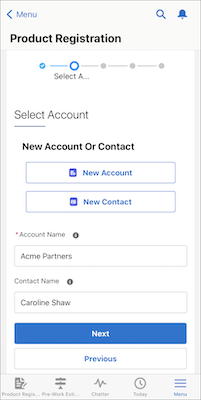
To associate the asset with an account, do one of these.
- To associate the asset with an existing account, enter the name of the account.
- To associate the asset with a new account, tap New Account.
-
To associate the asset with a contact, do one of these.
- To associate the asset with an existing contact, enter the name of the contact.
- To associate the asset with a new contact, tap New Contact.
 Note To be able to associate a contact with the asset, you must associate an account with the asset.
- Tap Next.
- Review the details of the registered asset, and tap Next.
-
Review the standard warranties assigned to the asset, if any.
You can search for a specific standard warranty from the list of standard warranties.
-
Depending on how you want to assign additional warranties, do one of these.
- To assign additional warranties now, select a warranty term from the Additional Warranties table, edit its start date and end date as appropriate, and click Next.
- To assign additional warranties later, tap Assign Warranties Later.
You can search for a specific additional warranty from the list of additional warranties.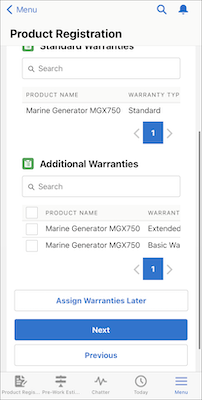
-
Review the assigned warranties.
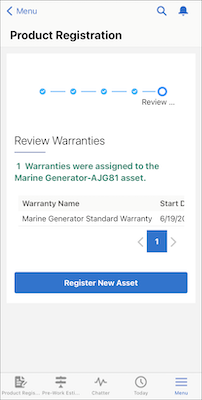
To register another asset, tap Register New Asset.
Did this article solve your issue?
Let us know so we can improve!
