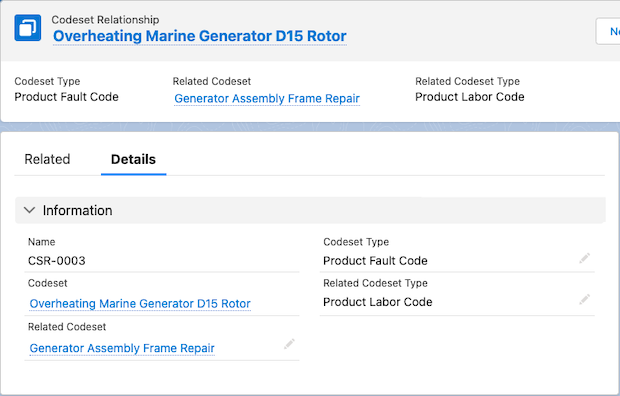
Definiera koduppsättningsrelationer för att associera en koduppsättning med en annan koduppsättning. Skapa till exempel koduppsättningsrelationer mellan produktfelkoder och produktarbetskoder för att mappa kombinationerna av produktfel med de olika arbetstjänster som kan åtgärda dem.
Versioner som krävs
Tillgängliga i: Enterprise, Unlimited och Developer Edition
Användarbehörigheter som krävs för att
Skapa och uppdatera produktfelkoder:
Behörighetsuppsättningen Hantering av garantins livscykel
Anteckning För att välja en koduppsättningstyp och en relaterad koduppsättningstyp för en koduppsättningsrelation, se till att din administratör har lagt till kombinationsrutevärden för fältet Koduppsättningstyp i objektet Koduppsättning.
Hitta och välj Koduppsättningsrelationer från Appstartaren.
Klicka på Ny.
För Koduppsättning, specificera en koduppsättning.
Ange till exempel en felkod för produkten.
För Typ av koduppsättning, välj typen av koduppsättning.
För Relaterad koduppsättning, specificera koduppsättningen som ska associeras med den andra koduppsättningen.
Ange till exempel en produktarbetskod.
För Relaterad koduppsättningstyp, specificera typen av koduppsättning som ska associeras med den andra koduppsättningen.
Spara dina ändringar.
Exempel
Garantiansvarig på Thomas Railways Equipment, Inc., en tillverkare, definierar två koduppsättningsrelationer.
Koduppsättningsrelation 1
Koduppsättning: Överhettat borrhuvud
Koduppsättningstyp: Produktfelkod
Relaterad koduppsättning: Byte av borrhuvud
Relaterad koduppsättningstyp: Produktarbetskod
Koduppsättningsrelation 2
Koduppsättning: Vridmomentkontroll som inte fungerar
Koduppsättningstyp: Produktfelkod
Relaterad koduppsättning: Reparation av vridmomentkontroll
Relaterad koduppsättningstyp: Produktarbetskod
Löste denna artikel ditt problem?
Berätta för oss vad vi kan förbättra!
Laddar
Salesforce Help | Article
Cookie Consent Manager
Cookie Consent Manager
General Information
Required Cookies
Functional Cookies
Advertising Cookies
General Information
We use three kinds of cookies on our websites: required, functional, and advertising. You can choose whether functional and advertising cookies apply. Click on the different cookie categories to find out more about each category and to change the default settings.
Privacy Statement
Required Cookies
Always Active
Required cookies are necessary for basic website functionality. Some examples include: session cookies needed to transmit the website, authentication cookies, and security cookies.
Functional Cookies
Functional cookies enhance functions, performance, and services on the website. Some examples include: cookies used to analyze site traffic, cookies used for market research, and cookies used to display advertising that is not directed to a particular individual.
Advertising Cookies
Advertising cookies track activity across websites in order to understand a viewer’s interests, and direct them specific marketing. Some examples include: cookies used for remarketing, or interest-based advertising.