
You are here:
Images and Icons in Themes
Learn about the images and icons that are available for the UI components in the Consumer Goods Cloud Offline mobile app, and how to customize them.
Required Editions
| Available in: Lightning Experience in Professional, Unlimited, and Enterprise Editions that have Consumer Goods Cloud enabled |
Find the images and icons that are associated with a mobile theme as a ZIP file on the Details tab of the Sync Management app.
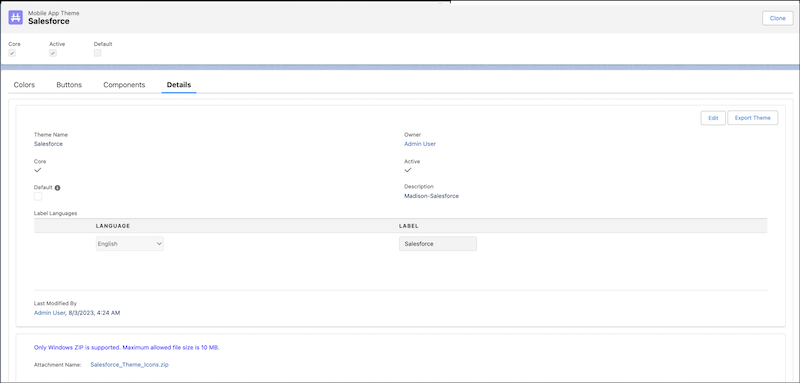

Update the images and icons for a theme by uploading an attachment with new files for the theme.

Keep these considerations in mind when working with theme images and icons.:
- The name of the image is the same as the default image name.
- Only PNG, GIF, and SVG files are supported.
- The attachment ZIP can’t exceed 10 MB.
- In an attachment, every new or updated image requires a unique name, including the file extension. For example, myPic.png and myPic.svg can’t be included in the same attachment.
- A default PNG or SVG image can be replaced in an attachment by an image with the same name but a different file extension. For example, you can replace the default image abc.pngwith the file abc.svgby uploading the SVG file in an attachment. You can't, however, replace a default PNG or SVG image with a GIF image of the same name.
- When you replace default images in a theme with new images, the new images maintain the aspect ratio of the default images.
- Image and icon file names can’t contain special characters.
The Sync engine downloads the ZIP file for each active theme to the Consumer Goods Offline mobile app, which validates the files. If the validation fails orthe theme isn’t available to users in the mobile app then the default theme is applied.. If the default theme validation also fails, then the mobile app uses standard theme settings.
Validation failures occur for any of these reasons:
- Theme attachment isn’t found on the device.
- Theme attachment size exceeds 10 MB.
- Theme attachment can’t be unzipped or extracted.
- Theme attachment doesn’t have the correct and predefined number of folders.
- Theme attachment ZIP file doesn’t contain any files.
- Theme attachment ZIP file contains images with extensions other than .png, .gif, and .svg.
- Images with the same names and different file extensions are found.
