Example: Consolidate Annual Emissions Inventory from Subsidiary Companies to Parent Company for Two-Level Organizational Hierarchy
This example walks you through how to set up accounts for a parent company and its subsidiaries to consolidate annual emissions inventory for a two-level extended organization. The inventory is calculated in two stages. First, each subsidiary performs its own carbon accounting and calculates its greenhouse gas (GHG) emissions inventory. Then, the parent company calculates its GHG emissions, sets the percentage allocations and recalculates its inventory to consolidate emissions across its hierarchy.
Required Editions
| Available in: Lightning Experience |
| Available in: Enterprise, Performance, Unlimited, and Developer Editions |
For example, parent company X has full ownership and financial control of operations A and B.
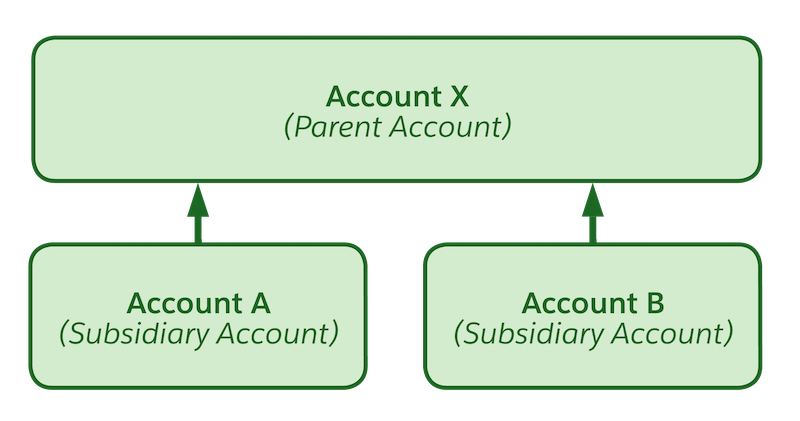
Before you begin, turn on Organizational Boundaries: Two-Level Organizational Hierarchy. See Enable Net Zero Cloud Features.

- Create accounts for the parent company and the subsidiaries.
- Create an internal organizational unit record for the parent company and indicate it is the parent in the hierarchy.
- Define the party-role relationships.
Record Id Role Related Role 1 Parent Subsidiary 2 Investor Investee - Define account-account relationships for the relationships between
companies in the hierarchy.
Account Related Account Party Relationship Type Is Active X A 1 Y X B 1 Y - Configure the emissions allocation rule from the child companies to the parent
company.
 Note The same allocation rule applies to all years.
Allocation from Account Allocation to Account Allocated from Scope Allocated from GHG Category Allocated to Scope Allocated to GHG Category Allocation Percentage A X All Emissions Scope 3 Investments 80% B X Scope 1 Scope 1 50% B X Scope 3 Purchased Goods and Services Scope 3 Investments 50% - For each subsidiary account, click Recalculate to
recalculate the annual emissions inventory.
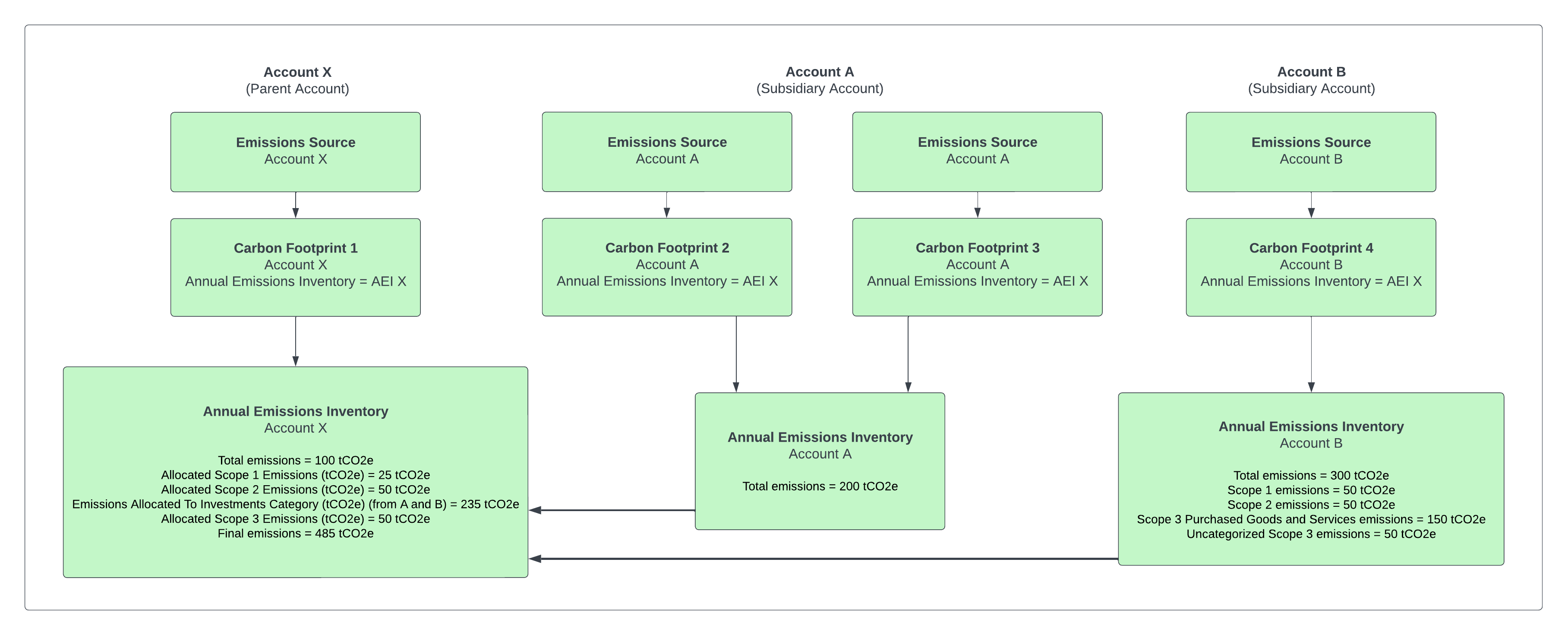
- The total emissions across all emissions sources of account A = 200 tCO2e
- The total emissions across all sources of account B = 300 tCO2e
- B’s Total Scope 1 Emissions = 50 tCO2e
- B’s Total Scope 2 Location Based Emissions = 50 tCO2e
- B’s Total Scope 3 emissions = 200 tCO2e
- B’s Scope 3 Purchased Goods and Services = 150 tCO2e
- B’s uncategorized Scope 3 emissions = 50 tCO2e
- For the parent account, click Recalculate to
recalculate the annual emissions inventory.
- The total emissions across all sources of account X = 100 tCO2e
- The allocated Scope 3 Investments emissions for account X allocated from account A = 160 tCO2e (80% of A’s emissions)
- The allocated Scope 1 emissions for account X allocated from account B = 50 tCO2e (100% of B’s Total Scope 1 emissions)
- The allocated Scope 3 Investments emissions for account X from account B = 75 tCO2e (50% of B’s Scope 3 Purchased Goods and Services emissions)
- Allocated Scope 1 Emissions (tCO2e) for account X = 25 tCO2e
- Allocated Scope 2 Emissions (tCO2e) for account X (by default, the location-based emissions are selected) = 50 tCO2e
- Emissions Allocated To Investments Category (tCO2e) for account X (from A and B) = 235 tCO2e
- Allocated Scope 3 Emissions (tCO2e) for account X = 50 tCO2e
- Final emissions for parent account X = Total emissions for account X +
Allocated emissions for parent account X =
100 tCO2e + 385 tCO2e = 485 tCO2e
Note To calculate allocated emissions (emissions from its subsidiaries), emissions aren’t aggregated directly from the subsidiary's annual emissions inventory. Instead, all subsidiary's carbon footprints associated with a subsidiary account (where the emissions source is linked to a subsidiary account) are aggregated to calculate the allocated emissions. Consequently, any emissions overridden in a subsidiary's annual emissions inventory won’t be included in the parent company's allocated emissions.
- For the parent account, to view the subsidiary’s allocated emissions split by
categories, open the Annual Emissions Inventory Extension related list.
- The allocated Scope 1 Emissions Data center = 25 tCO2e
- The allocated Scope 1 Emissions Commercial Building =25 tCO2e
Note Currently, emissions allocations added from a subsidiary account to a parent account are not supported.
