Calculate Scope 3 Carbon Footprints
Calculate scope 3 carbon footprints based on the energy consumption data and emissions for an asset source.
Required Editions
| Available in: Lightning Experience |
| Available in: Enterprise, Performance, Unlimited, and Developer Editions |
| Permission Set Needed | |
|---|---|
| To enter and modify data: | Net Zero Cloud Manager OR Net Zero Cloud Admin |
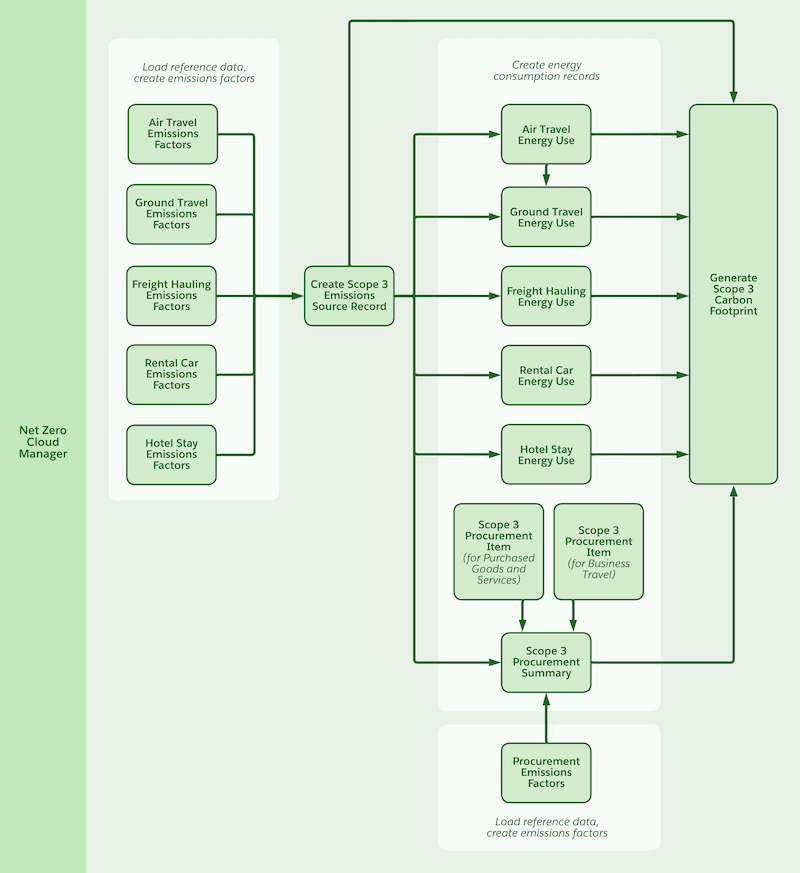
Here's an image that shows the high-level steps to perform scope 3 carbon accounting.
-
Load reference data or create emissions factor records.
For more information, see Load Reference Data or Create a Procurement Emissions Factor Set Record, Create an Air Travel Emissions Factor Record, Create a Ground Travel Emissions Factor Record, Create a Hotel Stay Emissions Factor Record, Create a Freight Hauling Emissions Factor Record, and Create a Rental Car Emissions Factor Record.
-
Create scope 3 emissions Source records for scope 3 activities, such as transportation,
purchase of raw materials, and business travel.
For more information, see Create a Scope 3 Emissions Source Record.
- Create energy use records that capture the energy consumption data for an asset source and emissions from the source for a specific date or date range.
-
Based on automation preferences the carbon footprint records are automatically
generated or you can create footprint records related to the emissions based on the energy
use records.
For more information, see Enable Net Zero Cloud Automation, Conditions for Automatic Creation of Carbon Footprints, and Create a Scope 3 Carbon Footprint Record.
The table lists the objects that the building blocks for scope 3 carbon accounting map out connections with.
| Emissions Source | Energy Use Type | Applicable Emissions Factors | Carbon Footprint Type |
|---|---|---|---|
| Scope 3 Emissions Source | Air Travel Energy Use | Air Travel Emissions Factors | Scope 3 Carbon Footprint |
| Ground Travel Energy Use | Ground Travel Emissions Factors | ||
| Freight Hauling Energy Use | Freight Hauling Emissions Factors | ||
| Rental Car Energy Use | Rental Car Emissions Factors | ||
| Hotel Stay Energy Use | Hotel Stay Emissions Factors | ||
Scope 3 Procurement Summary:
|
Procurement Emissions Factors |
Did this article solve your issue?
Let us know so we can improve!
