You are here:
Subscription Renewal Example
Trace an asset renewal to see how a new subscription term is established.
Required Editions
| Available in: Lightning Experience |
| Available in: Enterprise, Unlimited, and Developer Editions of Revenue Cloud where Transaction Management is enabled |
| User Permissions Needed | |
|---|---|
| To renew assets: | InitiateRenewal API permission set AND Sales Rep persona permissions |
A renewal extends an existing asset's lifecycle into a new term. Unlike an amendment, which changes quantity or configuration mid-term, a renewal starts a fresh contract period while maintaining continuity of service. This scenario traces the full renewal lifecycle from the expiring asset through order creation, decomposition, fulfillment, billing, and the renewed asset state.
Background
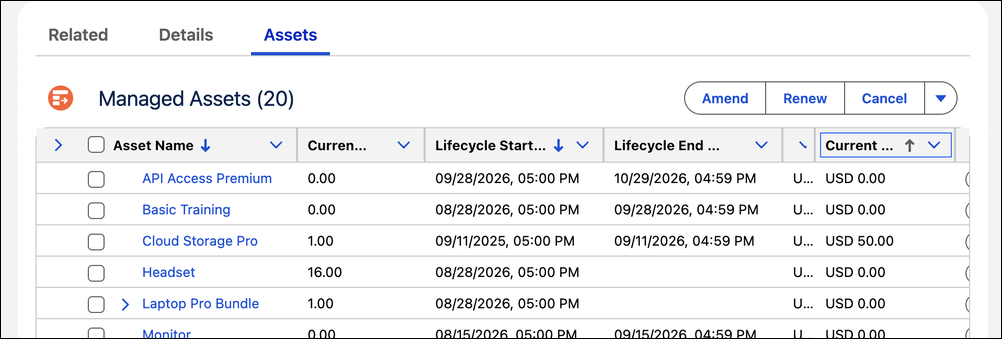
Cloud Kicks has an active Cloud Storage Pro subscription on their account.
- Product
- Cloud Storage Pro (CLOUD001)
- Quantity
- 1
- Monthly recurring price
- $50.00/month
- Asset status
- Active, lifecycle-managed
- Original term
- 12 months
- Term end date
- Approaching expiration (30 days out)
- Asset lifecycle
- Shows a single state period from the original order date
The subscription carries a renewal term and renewal unit inherited from the product configuration. These values determine what happens when the renewal is initiated.
Business Scenario
Cloud Kicks' Cloud Storage Pro subscription is approaching its 12-month term end. The account manager wants to renew the service for another year before it lapses. Rather than waiting for an automated renewal process, the account manager initiates the renewal manually from the asset record to review pricing and confirm terms. The renewal is for a subscription service, so nothing physical happens. It isn't a provisioning event.
Initiate the Renewal
The account manager goes to the Cloud Storage Pro asset on the Cloud Kicks account. The asset record shows the Amend, Renew, and Cancel action buttons.
The manager clicks Renew to open the renewal flow. Revenue Cloud creates a renewal quote that's prepopulated with the current asset configuration. Unlike an amendment quote, which shows the delta, a renewal quote shows the full asset configuration at its current state. The renewal reestablishes the entire service for a new term.
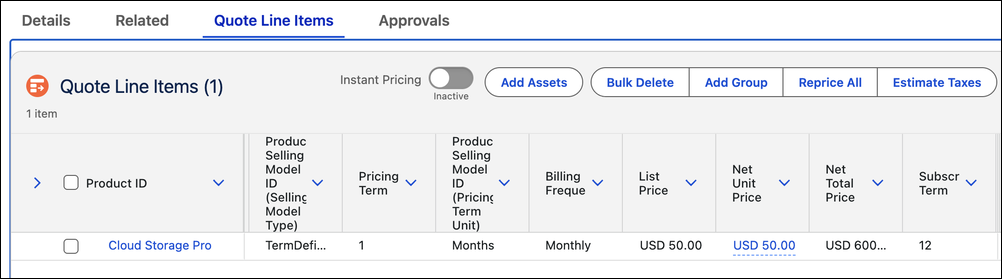
The renewal quote shows:
- Product
- Cloud Storage Pro
- Quantity
- 1
- Price
- $50.00/month (carried forward from the current term)
- New term
- 12 months (inherited from the product's renewal term and unit fields)
- New start date
- Day after the current term end date
The account manager can adjust the renewal term or pricing at this stage. For this scenario, Cloud Kicks renews at the same terms. To initiate this change from the asset record, see Renew Assets.
Create the Order
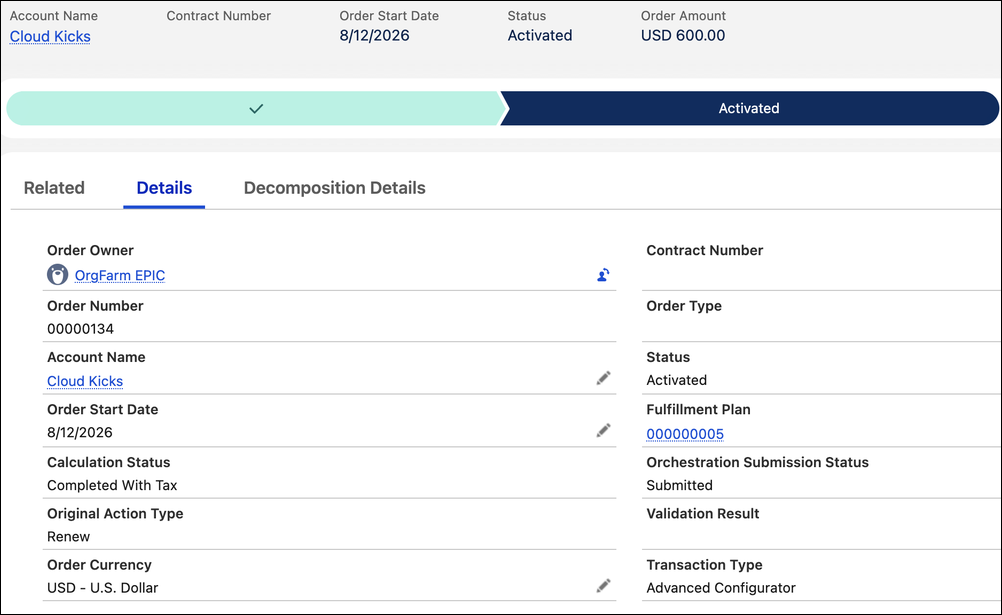
The account manager clicks Create Order from the renewal quote. The system generates a renewal order.
- Order type
- Renewal
- Order status
- Draft
- Line items
- 1 Cloud Storage Pro ($50.00/month × 12 months)
- Order start date
- Day after the current term end
- Order end date
- 12 months from the start date
The account manager activates the order.
Order Decomposition
After the renewal order is activated, Dynamic Revenue Orchestrator (DRO) processes it according to the decomposition rules configured for the product and the renew action. For Cloud Storage Pro, a subscription service, those rules generate no new fulfillment work. The service already exists, so nothing needs to be provisioned, shipped, or activated again. The renewal order still moves through orchestration, but decomposition produces no decomposed line items for the continuing subscription.
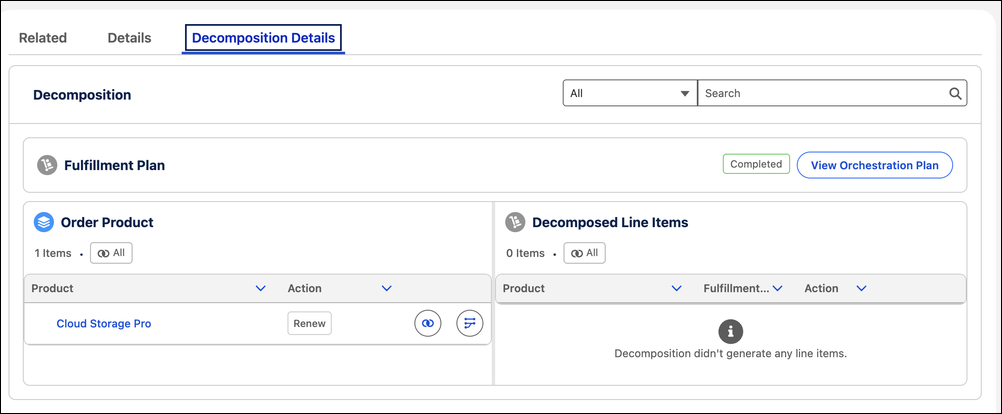

For this subscription renewal, no physical fulfillment occurs. The Cloud Storage Pro service continues uninterrupted. The renewal doesn't de-provision the old term or re-provision for the new term. This is the expected behavior for services where continuity is the goal. From the customer's perspective, the storage service simply keeps working.
Contrast that with a hardware renewal. If Cloud Kicks renewed a hardware maintenance contract that included annual device replacement, the decomposition rules for that product could trigger a shipping workflow for the replacement device. The decomposition configuration determines whether fulfillment is needed.
Billing Outcome
After the renewal order activates, Revenue Cloud creates a billing schedule for Cloud Storage Pro's renewed 12-month term.
- Old billing schedule
- Completes at the current term end date. The final invoice covers the last period of the original term.
- New billing schedule
- Starts on the renewal date (day after the old term end). The first invoice covers the first period of the new term.
The billing terms don't overlap. The last invoice of the old term covers up to the term end date. The first invoice of the new term covers from the renewal start date forward.

Final Asset State
After the renewal processes, the Cloud Storage Pro asset reflects the new term.
- Product
- Cloud Storage Pro
- Quantity
- 1 (unchanged)
- Asset status
- Active
- Lifecycle start
- Renewal start date (day after the old term end)
- Lifecycle end
- 12 months from the renewal start
- Current monthly recurring revenue
- $50.00
The Asset State Period (ASP) timeline now shows the original state period, from the original order date through the old term end, followed by the renewed state period, from the renewal start date through the new term end.
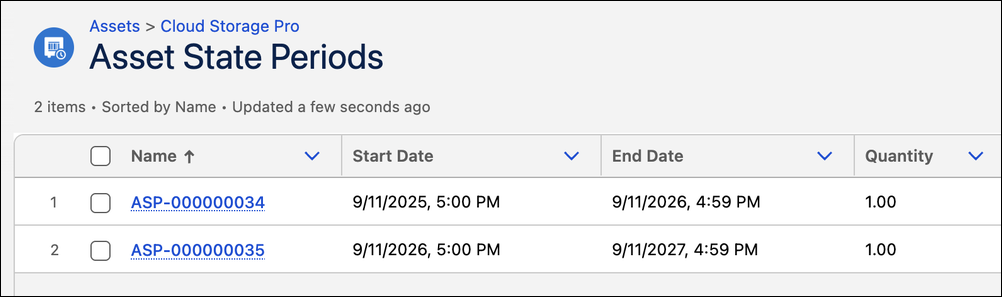
The ASP timeline provides a continuous history. You can trace back through multiple renewal cycles to see the full lifecycle of the subscription.
Troubleshooting
- The renewal order fails to activate
- Confirm that the renewal start date is after the current term end date. The system blocks renewals that would create overlapping terms.
- Billing shows a gap between terms
- Check the renewal effective date against the old term end date. A gap indicates that the old term already expired before the renewal order was created. Consider backdating the renewal to the day after the term ends to maintain continuity.
- DRO creates unexpected fulfillment tasks
- Review the decomposition rules assigned to renewal orders for this product. If the rules are configured for re-provisioning, they create fulfillment activities.
